
Zarina CRM Real Estate · 3 editions

Real estate CRM software, from listing to commission

Zarina CRM Real Estate comes in 3 editions built on the same base: residential agency, commercial property and land, and developers. Portfolio with map, automatic matching of requirements and listings, viewings signed on the phone, digital contracts, transactions, commissions and portal publishing. Installed on the agency’s own server, with a lifetime licence and unlimited agents.

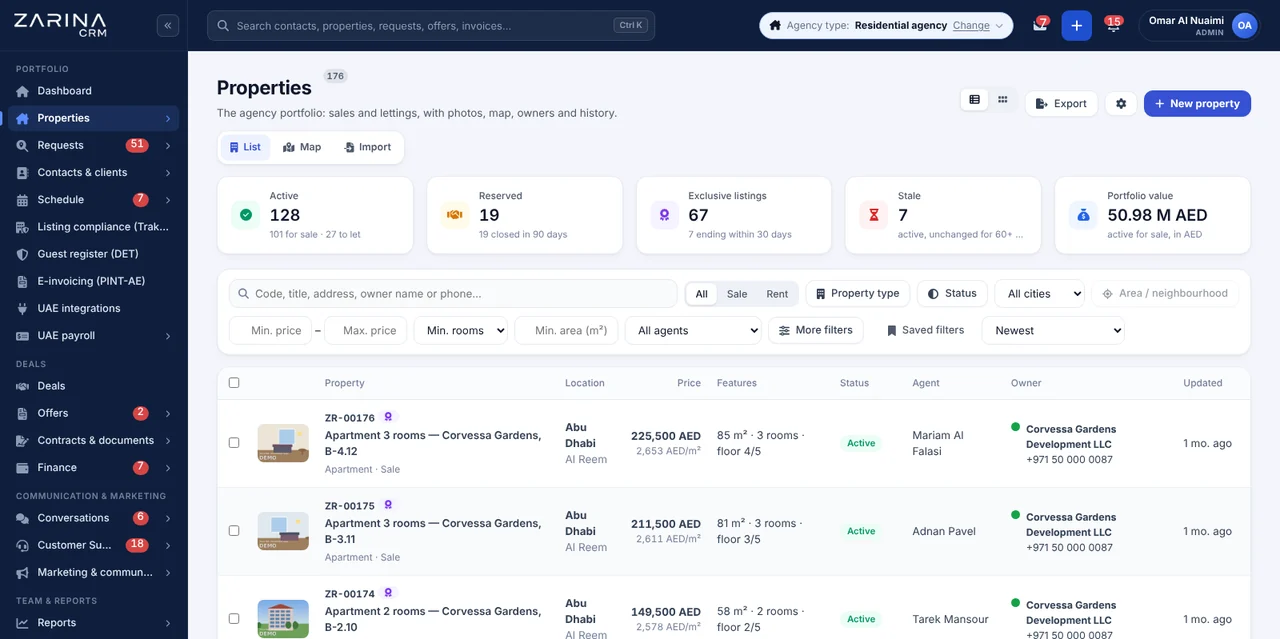
Screenshot from Zarina CRM Real Estate: the agency portfolio with properties for sale and rent, exclusive listings, prices and agents
3 editions on one coreLifetime licenceUnlimited agentsInstalled on the agency’s serverPortal publishing
Three editions, one core

Choose the right edition for your real estate agency

All 3 editions start from the same platform and can be combined if the company works in several segments. Property records, calculations, workflows and reports differ. All of them can be seen in the demo.

Residential agency

Apartments, villas, townhouses and plots for individual clients. Portfolio with a record per property type, requirements with automatic matching, signed viewings and exclusive mandates with deadlines.

  • Automatic requirement-listing matching, with a score
  • Scheduled viewings and a viewing form signed on the phone
  • Exclusive mandates with an alert before expiry
  • Portal publishing and automatic withdrawal

Commercial property and land

Retail units, offices, warehouses and land, for corporate clients and investors. Yield calculations, extended documentation and negotiations with several parties.

  • Yield, price per sq ft and land value share
  • Data Room with NDA signed online and an access log
  • Online auction with minimum increment and anti-sniping
  • PDF presentation in English, Arabic and Romanian

Property developers

Projects with multiple units, construction stages and sales straight from the project, with reservations and contracts issued from the phone.

  • Projects with units, stages and availability
  • Reservations and sale agreements with online signature
  • Proformas and VAT invoices, with payment plans
  • Buyer portal and per-project reports
The agency workflow

From listing to commission, in 6 steps

Every step stays in the same platform, with a complete history per property, per client and per agent.

1

Listing

The property enters the portfolio with the record that fits its type, photos with automatic watermark, a pin on the map and price per sq ft and yield calculations.

2

Requirement

The client’s criteria are recorded in full: budget, areas, bedrooms, size, floor, must-have and nice-to-have features. A lead becomes a requirement in a single click.

3

Fit

The platform calculates a match score and alerts the agent when a new property appears or a price drops. The shortlist goes out by email or WhatsApp, with open tracking.

4

Viewing

Booking with confirmation and reminder, a viewing form signed on the phone as proof of introduction, and an automatic feedback request after the visit.

5

Transaction

Offers and counter-offers, the sale agreement (MOU), the mortgage and transfer stage, with a document checklist. On completion, the property is automatically marked as sold or rented.

6

Commission

The commission is split between the listing agent, the selling agent, the manager and the cooperating agency, with a proforma, online payment and a per-agent report.

Modules and features

What you get in the Real Estate CRM package

Zarina CRM Real Estate is a complete CRM system for real estate agencies, developed in Romania, and the list below describes the features in the current version of the platform. We do not include features still in development.

Property portfolio

A different record for each of the 10 property types, with all the relevant fields.

  • Price per sq ft, yield and commission calculated automatically
  • Duplicate checks and property cloning
  • Full history and a price evolution chart
  • Owner status indicator and exclusive mandates with deadlines

Photos, watermark and confidentiality

Bulk upload, ordering and cover image, with protection of the agency’s material.

  • Watermark applied automatically to photos
  • Confidential photos that do not appear in the public listing
  • GPS data stripped from files
  • PDF presentation in English, Arabic and Romanian

Map and location

Movable pin and approximate location, so the exact address cannot be inferred.

  • Search by drawing an area directly on the map
  • Properties grouped by area
  • Configurable map provider, including free ones
  • Public property link, without the owner’s details

Requirements and automatic matching

Complete criteria for each requirement and a match score from 0 to 100.

  • Alert on a new property or a price drop
  • Shortlist sent by email or WhatsApp, with tracking
  • The client replies to each listing directly from the page
  • Market reports: what is in demand but missing from the portfolio

Viewings and calendar

Calendar per agent, with two-way sync with Google Calendar and Outlook Calendar.

  • Client self-booking, with agent approval
  • Automatic confirmation and reminder before the viewing
  • Viewing form signed on the phone, as proof
  • Automatic feedback request after the viewing

Contracts and signatures

Five contract templates for brokerage, exclusive mandates and sale agreements.

  • Online signing with OTP validation
  • Alerts 30, 15 and 7 days before expiry
  • Documents stay attached to the property record
  • Templates are indicative and must be validated by a lawyer

Transactions and commissions

Kanban from offer to completion, with all documents in one place.

  • Offers, counter-offers and a document checklist
  • Commission split between agents and agencies
  • Proforma with VAT and online payment
  • Commission report per agent and per period

Portal publishing

Listings go from the platform to the portals you already use.

  • Property Finder, Bayut and Dubizzle through XML feeds
  • Publishing, updating and withdrawal from a single place
  • The agency website and a WordPress widget
  • Automatic withdrawal when marked as sold

Agency website and leads

Public property list with filters and map, on the agency’s domain.

  • Form on the property page that creates a lead and a requirement
  • Widget for existing WordPress websites
  • Sitemap, structured data and a view counter
  • Portal leads land in the same list

Owner portal

Owners see their own status, without calling the agent every week.

  • Views, matching requirements and viewings with feedback
  • Price history and the agent’s recommendation
  • Documents and messages in one place
  • Automatic monthly report, with area price comparison

Auctions and Data Room

Tools for premium properties and transactions with investors.

  • Online auction with minimum increment and anti-sniping
  • Hidden reserve price and verified participants
  • Data Room with NDA signed online and time-limited access
  • Watermark with the visitor’s name and a full log

Included in every package

Everything related to running the agency comes from the platform’s shared base.

  • VAT invoicing and online payments
  • WhatsApp Business, Meta Lead Ads and email campaigns
  • Roles, 2FA, audit log and backups
  • Automations, REST API and an optional AI assistant
How to buy

How the features above translate into packages

The features described on this page are included in the 3 packages and, from PRO, in the modules specific to your field. The full mapping, area by area, and the prices are on the pricing and packages page.

Included in every package

Clients, partners, leads, opportunities, dashboard, roles and permissions, custom fields, reminders, 15 languages. Part of every configuration, whatever packages you choose.

Three packages

The same in every edition: sales, invoicing, inventory, procurement, operations, service, support, omnichannel communication, marketing, integrations, AI, reports, HR. Only the ones you need are activated.

Modules for real estate agencies

10 modules available only in this edition, included from the PRO package. They are added once, to any configuration.

The essential packages for this field

For real estate, the packages that matter first are Complete sales and Marketing and automation. The rest are added as needs arise.

Modules and automations included

48 real estate features, grouped into 6 areas

Nothing is charged per agent: every activated module runs for the whole team, on the agency’s server. The package is configured by module, according to what you actually use.

Portfolio

10 property typesAutomatic price per sq ftYieldLand value shareDuplicate checksProperty cloningPrice historyExclusive mandates

Presentation

Multiple photosAutomatic watermarkConfidential photosGPS data strippedMap with movable pinMap searchPDF EN / AR / ROPublic link

Requirements and clients

Complete criteriaMatch scoreNew property alertsPrice drop alertsShortlist on WhatsAppReply from the pageLead becomes requirementImport from Excel

Viewings and contracts

Calendar per agentGoogle and Outlook CalendarClient self-bookingAutomatic reminderForm signed on the phoneAutomatic feedback5 contract templatesExpiry alerts

Transactions and money

Transaction KanbanOffers and counter-offersDocument checklistSplit commissionsProforma with VATOnline paymentsVAT invoicesCommission reports

Portals and premium

Property Finder feedBayut feedDubizzle feedAgency websiteGeneric XML feedAutomatic withdrawalOnline auctionData Room with NDA
Automations for real estate agencies

What runs on its own, after a single setup

Automations take over the agency’s repetitive work: notifying clients, confirming viewings, tracking exclusive mandates and reporting to owners.

The client hears first

When a new property comes in or a price drops, matching requirements get an alert automatically, and the agent immediately sees who is worth sending the shortlist to.

Viewings without phone calls

The confirmation, the reminder before the meeting and the feedback request after the viewing go out on their own, by email or WhatsApp.

Exclusive mandates tracked

Alerts 30, 15 and 7 days before an exclusive mandate expires, to the agent and the manager.

Clean portals

When a property is marked as sold or rented, the listing is withdrawn automatically from the connected portals.

Monthly owner report

The owner automatically receives the report with views, viewings, feedback and an area price comparison.

Connection to other systems

Signed webhooks, REST API with per-application keys and connection through Zapier or Make.

Artificial intelligence in the CRM

The assistant that writes the listing and prepares the documents

Zarina CRM Real Estate includes an AI assistant that drafts the property description, translates it into Arabic or English and extracts the data needed for contracts. It runs on the agency’s own key with Claude, ChatGPT or Gemini, is optional and can be switched off at any time.

Listing description

The assistant drafts the property description from the data in the record. The agent checks and adjusts it before publishing.

Translation into Arabic and English

The same description is translated for international clients and for UAE portals, keeping the structure of the listing.

Extracting data from documents

The data needed for contracts is taken from the ID document and stored encrypted, not in plain text.

You choose the model

The platform connects to Claude, ChatGPT or Gemini. You can change provider without changing the platform.

Runs on the agency’s key

The API key belongs to the agency, and usage is billed directly by the AI provider. We do not act as an intermediary and add no usage fees.

Optional and checked by the agent

Generated texts are suggestions; they are never published on their own. The module can be switched off at any time, per role or for the whole agency.

Connected ecosystem

Integrations and automations in the real estate CRM application

Native international integrations: payments, communication, campaigns and productivity. Property portals are covered separately, in the publishing section — no separately paid connectors and no extra development. Enter your company’s account details and the connection is live.

Stripe integration with Zarina CRMStripe
PayPal integration with Zarina CRMPayPal
Wafeq e-invoicing integration with Zarina CRMWafeq
Zoho Books integration with Zarina CRMZoho Books
ClearTax e-invoicing integration with Zarina CRMClearTax
TallyPrime integration with Zarina CRMTallyPrime
Pagero e-invoicing network integration with Zarina CRMPagero
WhatsApp integration with Zarina CRMWhatsApp
Messenger integration with Zarina CRMMessenger
Instagram integration with Zarina CRMInstagram
Facebook Lead Ads integration with Zarina CRMFacebook Lead Ads
Zadarma integration with Zarina CRMZadarma
3CX integration with Zarina CRM3CX
Brevo integration with Zarina CRMBrevo
Google Calendar integration with Zarina CRMGoogle Calendar
Outlook Calendar integration with Zarina CRMOutlook Calendar
Google Ads integration with Zarina CRMGoogle Ads
Zoom integration with Zarina CRMZoom
Google Meet integration with Zarina CRMGoogle Meet
Zapier integration with Zarina CRMZapier
Make integration with Zarina CRMMake
Claude integration with Zarina CRMClaude
ChatGPT integration with Zarina CRMChatGPT
Gemini integration with Zarina CRMGemini
Google Sheets integration with Zarina CRMGoogle Sheets
Google Forms integration with Zarina CRMGoogle Forms
OpenStreetMap maps in Zarina CRMOpenStreetMap
MapTiler maps in Zarina CRMMapTiler
Stadia Maps in Zarina CRMStadia Maps
Meta Conversions API integration with Zarina CRMMeta CAPI
Portal publishing

Listings go out from the CRM, not from six separate accounts

A property is entered once in the platform and reaches the portals the agency already uses. When it is marked as sold or rented, the listing is withdrawn automatically. You can also set a listing quota per agent, if you wish.

Property Finder

Publishing through the portal’s XML listing feed, with updates and automatic withdrawal when the property is sold or rented.

Bayut

Listings reach Bayut through its XML feed, without a separate manual upload.

Dubizzle

Publishing through the XML feed, and enquiries are captured from the emails sent by the portal.

Generic feed

For any other portal that accepts XML import.

The agency website

The public property list with filters and map, on the agency’s domain, with a form that creates a lead and a requirement.

Each feed runs on your agency’s own account with the portal. Listing permits and RERA requirements remain the agency’s responsibility.

Transparency

What to know before implementing a real estate CRM

We prefer to be precise from the start, including about the platform’s limits and the things that depend on portals or other providers.

  • Integrations run through your own accounts. Property Finder, Bayut, Dubizzle, WhatsApp and telephony connect to the agency’s accounts with those providers. We deliver the connection and configuration, not the accounts.
  • Not every portal has a public API. UAE portals are connected through XML listing feeds, and enquiries are captured from portal emails. A full API integration requires a partner account with the portal concerned.
  • Contract templates are indicative. The 5 templates cover common situations, but they must be validated by the agency’s lawyer before use.
  • The Data Room has limits on Word and Excel documents. Word and Excel files can only be downloaded, with no preview and no watermark. The PDF watermark does not render Arabic or Romanian diacritics.
  • There is no co-broking network between agencies. The platform manages your agency’s portfolio. It does not include a shared marketplace of listings between different agencies.
  • The AI assistant is paid separately. The artificial intelligence features run on the agency’s own key with Claude, ChatGPT or Gemini. Usage is billed by that provider.
Video tour · 13 minutes

Real Estate CRM at work, on real screens

The "Residential agency" profile, shown in the application: from the listing and the client request to the deal and the commission. Pick a chapter and jump straight to what you care about.

Real estate CRM software for residential agencies – Zarina CRM video tour
13:21 running time17 chaptersSubtitles in EnglishPublished on 10 November 2026
Where you are today

If the agency is currently run from Excel, WhatsApp and a diary

These tools work up to a certain volume of properties and agents. Below are the points where they usually break down. Migration of existing data is included in the implementation.

The portfolio kept in Excel

Two people cannot work on the same file at the same time, parallel versions appear, and photos and documents live in another folder.

In the platform: One portfolio, with a record per property type, photos, documents and price history in the same place.

Client requirements in a diary

When the right property appears, nobody remembers who was looking for it three months ago.

In the platform: Every requirement has criteria and a match score, and the alert goes out automatically when the right property appears.

Viewings confirmed on WhatsApp

No proof of introduction remains, and the commission can be disputed.

In the platform: A viewing form signed on the phone on site, attached automatically to the property and the client.

Listings published manually on every portal

The same property is entered four times, and sold ones stay online for weeks.

In the platform: Publishing and updates from the CRM, with automatic withdrawal when marked as sold.

Owners calling every week

The agent loses time on verbal updates, and the owner still lacks a clear picture.

In the platform: A dedicated owner portal and an automatic monthly report, with views, viewings and price comparison.

Commissions calculated on paper

The split between listing agent, selling agent and agency becomes a discussion on every transaction.

In the platform: Commissions split by agreed rules, with a proforma, online payment and a per-agent report.

CRM licensing model

Monthly subscription or lifetime licence

Zarina CRM is sold with a lifetime licence, paid once, not as a monthly per-agent subscription. The difference is clearest when the agency grows or works seasonally with freelance agents.

The cost does not grow with the number of agents

The licence is lifetime and is not charged per user. An agency that grows from 4 to 25 agents uses the same licence, with no extra platform costs.

There are no monthly invoices for the platform

Recurring payments to a cloud CRM vendor disappear. Payment is made once, and updates released during the warranty period are included.

What you still pay for

The agency’s server or hosting, the domain and SSL certificate, portal accounts and external providers you already use and, optionally, a maintenance contract.

Cost calculator

What it costs you NOT to have Zarina CRM

A monthly per-user subscription never stops: you pay it every month, it grows with every new employee and, at the end, you are left with nothing. The lifetime licence is paid once. Move the two sliders to your team’s real size and see the difference over 36 months.

If you pay a flat subscription, divide the monthly amount by the number of users. If you do not use a system yet, leave the default values: they are typical cloud platform rates.

Monthly subscription, 36 months —
Zarina CRM lifetime licence $3,480

What you lose over three years with the subscription

—

—

The calculation covers the licence only, not hosting. The licence price does not change when you add users. At the end, the licence remains an asset of the company.

Request a quote Packages and pricing

Modular licensing

The platform is activated by module, not as an all-inclusive licence

The platform base covers clients, users, roles and the pipeline. The real estate modules are included from the PRO package, and the price is that of the package you choose. Modules can be added at any time, without reinstalling and without losing data.

Portfolio and presentation

Properties, watermarked photos, map, PDF presentation and public link.

Requirements, viewings and contracts

Automatic matching, calendar, signed viewing form and contracts with OTP.

Transactions, commissions and invoicing

Transaction Kanban, commission splits, invoicing and VAT.

Portals and agency website

Property Finder, Bayut and Dubizzle feeds, a generic feed, a public list and a WordPress widget.

Auctions, Data Room and owner portal

Tools for premium properties and for communication with owners.

Communication and support

Email inbox, WhatsApp Business, Facebook and Instagram, telephony, tickets.

Automations, API and AI

Event-based rules, webhooks, REST API and the AI assistant on the agency’s key.

Human resources and reports

HR, time tracking, leave, recruitment and the agency’s advanced reports.

Interface languages

The agency interface in 15 languages

Each agent sets their language in their own account, on the same installation and database. Arabic is displayed fully right to left. The language set is included in every package, at no extra cost.

RORomanianGBEnglishAEArabic (RTL)BGBulgarianHUHungarianDEGermanITItalianPLPolishCZCzechSKSlovakGRGreekNLDutchFRFrenchESSpanishPTPortuguese

The property PDF presentation and AI-assisted translation currently cover English, Arabic and Romanian. Extending them to the full set of 15 languages is in preparation.

Implementation

What you get when you sign the contract

Delivery is not just an archive with the application. Below is what the implementation actually includes, whatever the number of agents.

Installation on the agency’s infrastructure

On the agency’s server or on the hosting of your choice, with an SSL certificate and backups configured.

Portfolio migration

Properties, clients, requirements, photos and documents, brought over from your current files, with duplicate checks.

Configuration for the agency’s profile

The right edition, property types, transaction stages, roles, document numbering and templates.

Team training

A training session for agents and back office, a PDF manual for your configuration and email guidance at go-live.

Dedicated documentation

Written material for the installed configuration, accessible directly from the platform.

6-month technical warranty

Fixing of bugs that appear in operation and updates released during this period, at no extra cost.

A CRM built for real estate

Who it is for and who it is not for

We prefer an honest conversation before a quote, not real estate agency software that does not solve the real problem.

It fits agencies that

have their own portfolio and at least two agents, work with exclusive mandates and contracts, publish on portals and want client data on their own server.

Worth discussing in detail if

you need a full API integration with Property Finder or Bayut, or have your own approval workflows. These can be covered, but they need analysis before implementation.

It is not the right solution if

you are looking for a co-broking network with a shared portfolio, if you have no server of your own and do not want managed hosting, or if you need a platform fully configured the same day.

CRM security and compliance

Where the data lives and who is responsible for it

On-premise CRM software raises a fair question for any real estate agency: where do owners’ and buyers’ data end up. The answer is written down, not implied.

Your data goes nowhere

The application runs on the agency’s server or hosting. No third-party processor stores your client and owner base.

Role-based access

Administrator, agency manager, agent, back office and accountant see exactly what they need. An agent sees their own portfolio; the manager sees everything.

Backups under the agency’s control

Backup and retention policy stays with the company, on its own infrastructure, and is not lost when a subscription ends.

Data protection and proof

Consents, audit log, photos without GPS data and signed viewing forms, also useful as proof of introduction.

Case studies

What actually changed in these companies

Three implementations in real estate and related fields, described by what was done before and what happens now in the platform.

Real estateArpa Imob SRL
Before
Matching requirements with active listings was done across several Excel files, and agents had no shared view of the portfolio.
In Zarina CRM
One portfolio and a Kanban pipeline, with requirements matched against active listings and visual control for every agent.
Daniel ArnautuGeneral Manager
ConstructionPavMar Beton SRL
Before
Coordinating work on sites and tracking production times were done separately from the rest of the business.
In Zarina CRM
Task module with Gantt, monitoring of real production times and documents attached to the project record.
Marian MilcuManaging director
CRM implementations

Companies that have trusted Zarina CRM

Metod Sistem - Zarina CRM clientMetod Sistem
SICC Project Services - Zarina CRM clientSICC Project Services
Lapis Residence - Zarina CRM clientLapis Residence
Onyx Residence - Zarina CRM clientOnyx Residence
Iași Clinical Hospital of Pulmonology - Zarina CRM clientIași Clinical Hospital of Pulmonology
Regional Office for Cross-Border Cooperation Iași - Zarina CRM clientRegional Office for Cross-Border Cooperation
Arpa Imobiliare - Zarina CRM clientArpa Imobiliare
Rubin Capital - Zarina CRM clientRubin Capital
Hotel Palas Grand View - Zarina CRM clientHotel Palas Grand View
Grey Boutique Hotel Palas - Zarina CRM clientGrey Boutique Hotel Palas
Bucovina Resort and Spa - Zarina CRM clientBucovina Resort & Spa
HighLife Events - Zarina CRM clientHighLife Events
PavMar Beton - Zarina CRM clientPavMar Beton
Clinica Lauderma - Zarina CRM clientClinica Lauderma
Axa Traduceri Iași - Zarina CRM clientAxa Traduceri
AFQ Accounting - Zarina CRM clientAFQ Accounting
Moldo Garage - Zarina CRM clientMoldo Garage
Zuzu Land - Zarina CRM clientZuzu Land
Ziarul Unirea - Zarina CRM clientZiarul Unirea
Meat Me Up Belgium - Zarina CRM clientMeat Me Up Belgium
Joues et Croquettes Belgium - Zarina CRM clientJoues et Croquettes Belgium
Frequently asked questions

Questions about real estate CRM software

What are the 3 editions of Zarina CRM Real Estate?

They are three configurations of the same platform: residential agency, commercial property and land, and developers. Property records, calculations, workflows and reports differ. The edition is chosen at implementation and can be extended later if the agency moves into another segment.

Which property portals does the platform publish to?

Property Finder, Bayut and Dubizzle through XML listing feeds, plus a generic feed for any other portal that accepts imports. Enquiries are captured from portal emails as leads. When the property is marked as sold, the listing is withdrawn automatically.

How does automatic matching between requirements and listings work?

Every requirement has complete criteria: budget, areas, bedrooms, size, floor, must-have and nice-to-have features. The platform calculates a score from 0 to 100 and alerts the agent when a new property appears or a price drops. The shortlist goes out by email or WhatsApp, and the client replies directly from the page.

What is the viewing form signed on the phone used for?

It is signed electronically on site, with OTP validation, and stays attached to the client and the property. It is the internal proof that the viewing took place through your agency. Its weight in any dispute should be discussed with the agency’s lawyer.

Is there a monthly per-agent subscription?

No. The licence is lifetime and is not charged per user. You can add seasonal or freelance agents without the platform costing more.

Where are owners’ and buyers’ data stored?

On your agency’s server. We hold no copy of the database, and access is controlled through roles, two-factor authentication and an audit log.

Can I import my existing portfolio?

Yes. Properties, clients, requirements, photos and documents are imported from Excel or CSV, with duplicate checks before loading. The import is part of the implementation.

What does the online auction module do?

It enables sale by auction for premium properties: starting price, minimum bid increment, anti-sniping protection, hidden reserve price and participants verified by code. Separately, there is Open House with visiting slots.

How much do the artificial intelligence features cost?

The module is included in the platform, but it runs on the agency’s own key with Claude, ChatGPT or Gemini, and usage is billed directly by that provider. If you do not activate the module, there is no extra cost.

How long does implementation take?

Installation on the server and basic configuration take a few working days. The total duration depends on the size of the imported portfolio and the number of portals and integrations requested.

The same platform

Other CRM configurations for different activities

All editions start from the same base and can run together on a single licence, if the company covers several types of activity.

CRM by industry

90 industries covered, each with the right configuration of modules and workflows.

All CRM solutions

The available editions, from the shared base to the specialised configurations.

Integrations and API

Invoices issued in the CRM go straight to the invoicing software the company uses.

Pricing

The 3 packages and the final cost, with no monthly subscription.

Installation on your own server

Hosting options, server requirements, data protection and security responsibilities. CRM on your own server

How implementation works

Workflow audit, configuration, data migration and role-based training, included in the price. CRM implementation

Product sheet

Get the complete product sheet by email

A six-page document with everything you need to know before a sales conversation. No obligation and no sales call.

  • All the modules of the platform and the package that includes each one
  • The features and modules of the edition you choose, plus available integrations
  • Full pricing and what it includes: installation, training, data import, warranty
  • The native integrations available and the situations where the platform is not a good fit

What a Dubai agency actually needs

Real estate agency software for Dubai brokerages

Most real estate CRM products were built for markets where one agent lists one property and waits. A Dubai brokerage works differently: the same unit sits on three portals, the buyer is often overseas, the paperwork is governed locally, and the commission has to be split before anyone gets paid. These are the parts that decide whether the system gets used after month two.

Listings and portal feeds

  • One listing record with photos, documents, permit number and availability, published out to Property Finder, Bayut and Dubizzle rather than retyped into each.
  • Availability stays in step — when a unit goes under offer, the portals stop showing it as available.
  • Off-plan inventory handled by unit and by payment milestone, not as a single listing.

Matching and viewings

  • Requirement records per buyer — budget, area, bedrooms, handover window — matched automatically against available stock.
  • Viewings with a signed form, so there is a record of who introduced the client to the property.
  • Enquiry source kept on the lead, so you can tell which portal or campaign produced the deals rather than the volume.

Paperwork and money

  • Documents from your own templates: Form A, Form B, Form F, MOU, tenancy contract — generated with the client and property data already filled in.
  • Commission splits per agent and per co-broker, calculated on the deal and visible before payout.
  • Deal stages through to transfer, including mortgage pre-approval and the transfer appointment.
  • Expiry alerts on tenancy and listing permits, raised in advance rather than noticed late.

Why agencies choose the on-premise version

A brokerage database is its asset list, its buyer list and its commission history. On the on-premise licence that database sits on the agency’s own server, every agent has an account without raising the monthly bill, and nothing is lost if a subscription lapses. For agencies running twenty or more agents, the per-user maths is usually the reason the conversation starts.

No monthly subscription

Take control of your operations, once

We install Zarina CRM on your hosting, configure it around your own workflow and train your team. From that moment on, the application is an asset of your company, not a recurring expense.