Zarina CRM Real Estate · Commercial profile

Software for commercial property leasing, with automatic matching and expiry alerts

A lease that expires without being renewed is a lost commission and an empty unit. And companies’ requirements come with precise criteria — size, area, floor, facilities — that nobody remembers across thirty units. Zarina CRM keeps spaces, requirements and contracts in the same place, matches requirements with available spaces and alerts you 30 days before a contract expires. It is installed on your company’s server, with a lifetime licence.

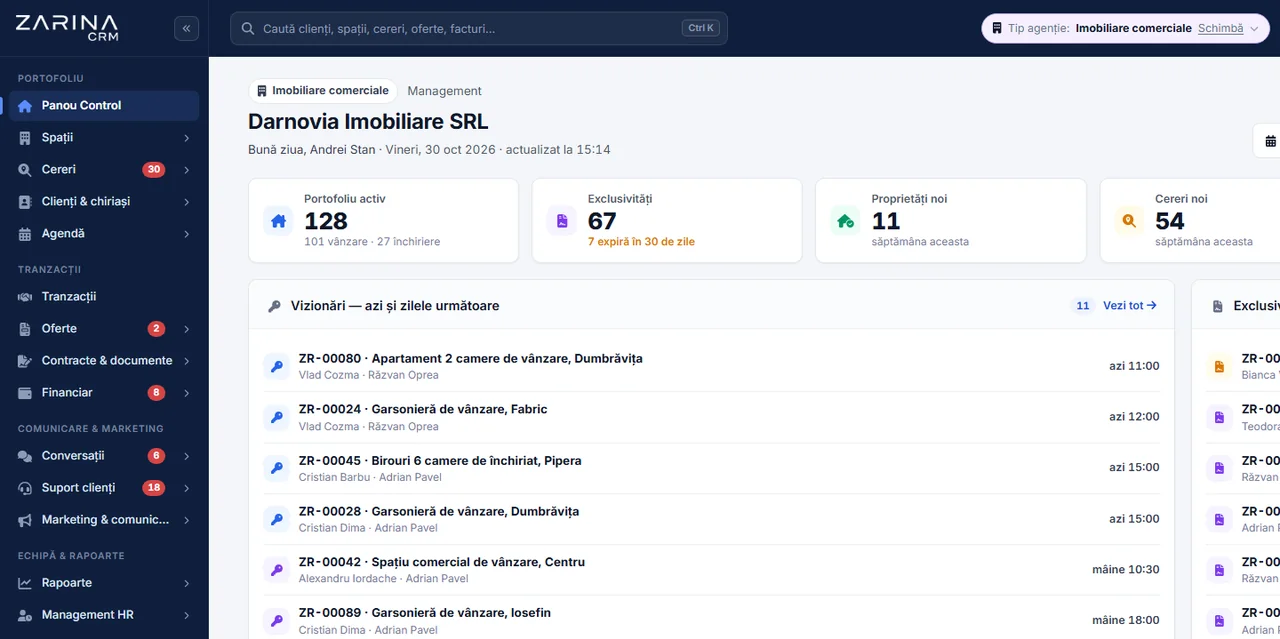
Screenshot from Zarina CRM Real Estate: a commercial agency’s dashboard with spaces, clients and tenants, requirements and viewings
The course of a lease

From requirement to signed contract

Every step exists as such in the application. It is not a presentation diagram; it is the order in which data is entered.

1

The company’s requirement

What they are looking for is entered: space type, size, area, floor, facilities, budget and urgency.

2

Matching

The application compares the requirement with available spaces and shows which ones fit.

3

The viewing

It is scheduled, and if the space was not liked, the reason for refusal is recorded too.

4

The offer

It goes out from the application, with the space details and the proposed terms.

5

The contract

It is generated from a template, with the agency’s and parties’ details filled in automatically.

6

Signing and term

You see when it was opened and signed, and the end date goes into the alerts.

Requirement–space matching

The part the software does, not your memory

With thirty spaces in the portfolio and fifty active requirements, manual matching does not scale. Here comparison is done on criteria, not from memory.

The requirement’s criteria

  • Space type
  • Size and floor
  • Area
  • Required facilities
  • Budget, with currency and conversion

How it compares

The weight of each criterion is configurable, so matching reflects the way you work.

  • Configurable weights
  • Active spaces only
  • Ranked results

Tracking the requirement

The requirement has a status, source and urgency, so you know what is hot and where it came from.

  • Statuses and urgency
  • Requirement source
  • Reason for refusal, per space
Contracts

Alerts 30, 15, 7 and 0 days before expiry

A signed contract is not the end of the relationship but the start of a term. The application tracks it on its own.

  • Automatic alerts before the deadline. For signed contracts, the application alerts you 30, 15, 7 and 0 days before the end date, so renewal does not catch you unprepared.
  • Five contract types. Sale brokerage, purchase brokerage, lease brokerage, exclusive mandate and pre-contract.
  • Templates with automatic filling. The agency’s and parties’ details go into the text on their own, so nothing is copied by hand.
  • Statuses are visible, not assumed. Draft, sent, viewed, signed, refused, expired, cancelled, terminated — including the moment the client opened it.
  • PDF and scan. The contract comes out as a PDF, and the paper copy signed by hand can be uploaded to the same record.
The application’s vocabulary

On commercial, you work with spaces and tenants

The Real Estate edition has three profiles. They are not different products: you choose the profile at installation and change it if your activity changes.

Commercial

The portfolio is made up of spaces, and contacts are called clients and tenants.

  • Spaces, not properties
  • Clients and tenants
  • Requirements with technical criteria
  • Contracts with a term

Residential

The classic agency profile: properties, owners, buyers.

  • Properties
  • Sales and rentals
  • Same licence

Developer

For those selling their own stock: units and buyers.

  • Units
  • Buyers
  • Through to transfer
Publishing

Listings go out from the same record

  • One place for the space’s data. Description, size, photos and location are filled in once.
  • Portal publishing module. The edition includes a module that sends the listing to supported portals, in the UAE and Romania.
  • The accounts are yours. Each portal requires the company’s account and keys. We do not act as an intermediary for accounts and do not guarantee their policies.
  • Photos and map. The space has a gallery and coordinates, not just text.
Transparency

What to know beforehand

This profile is for those brokering leases, not for those managing buildings. We say exactly what it does not do.

  • It does not issue monthly rent invoices automatically. There is no recurring rent invoicing and no automatic rent escalation. Invoicing in the application is done per document, not per subscription.
  • It does not split utilities between tenants. Allocation of common costs is not covered.
  • It does not manage owners’ associations. For service charges, reserve funds and payment lists there are dedicated programs.
  • It does not replace accounting software. It holds documents and payments linked to the file, but the books stay with your accountant.
  • Electronic signature certificates are not included. The application tracks sending, opening and signing, but does not supply a qualified signature certificate.
  • Installation requires a server. The application runs on your side. If you have no hosting, we set it up together, but it remains the company’s.
Where you are today

If the portfolio is an Excel file and contracts are a folder

The problems below are not hypothetical. They are the reasons commercial agencies look for software.

The contract that expired unnoticed

The term ended, the tenant left, and renewal was never raised anywhere.

Alerts 30, 15, 7 and 0 days before the end date.

The requirement that matched

A space became available, and the company looking for exactly that had been waiting for two months in an email.

Requirement–space matching is done on criteria.

The space shown twice for nothing

A second colleague went with another client, not knowing the first had turned it down because of the ceiling height.

The reason for refusal stays on the space.

Licensing model

Lifetime licence, no commission per transaction

In commercial property, a single lease can bring a commission larger than the cost of the application. We do not take a percentage of it.

  • No commission per transaction. The application takes no percentage of your commissions.
  • Unlimited users. You can give access to all agents without the cost going up.
  • Prices are published. You will find them on the pricing page, with what each package includes.
  • The data belongs to the company. The portfolio sits on your server, with export, and no conditions on exit.
Implementation

What you get when you sign the contract

Installation on your company’s server

We put the application on your hosting and configure it for the Commercial profile.

Portfolio and templates

We import existing spaces and enter the contract templates you work with.

Users and roles

We configure access: agents, coordinator, back office, accounting.

Security

Where the data lives and who sees it

A portfolio of commercial spaces and the tenant list are data nobody else should hold.

  • Installation is on your side. The portfolio and client data do not pass through our infrastructure.
  • Access is by role. An agent sees what is assigned to them, not the whole portfolio and not colleagues’ commissions.
  • Personal data in contracts is kept separate. Fields with identification data are handled separately from the rest of the text.
  • No vendor lock-in. The database belongs to the company, exportable at any time.
Active connections

The portals and services the CRM connects to

The space is described once in the CRM and published on portals with size, rent and availability updated from the same record.

OpenStreetMap integration with Zarina CRMOpenStreetMap
MapTiler integration with Zarina CRMMapTiler
Stadia Maps integration with Zarina CRMStadia Maps
WhatsApp integration with Zarina CRMWhatsApp

Enquiries received on the portals come back into the CRM as leads linked to the listed space. The space’s location, footfall and surroundings are shown on the map, useful when the tenant chooses by area, not by price. Rent invoices are issued with VAT, and payment can be taken through a Stripe payment link sent by email or WhatsApp. The full list is on the connectors and API page.

Frequently asked questions

Answers about the Commercial profile

Is it a separate program from the Real Estate edition?

No. Commercial is one of the three profiles of the Real Estate edition, alongside residential and developer. One licence, and the profile is chosen at installation and can be changed.

Does it issue monthly rent invoices automatically?

No. There is no recurring rent invoicing and no automatic escalation. The profile is built for lease brokerage, not for day-to-day building management.

Does it alert me when a contract expires?

Yes. For signed contracts, the application generates alerts 30, 15, 7 and 0 days before the end date.

How does matching between requirement and space work?

The requirement is filled in with type, size, floor, area, facilities and budget, and the application compares these criteria with active spaces. The weight of each criterion can be configured.

Which contract types does it generate?

Sale brokerage, purchase brokerage, lease brokerage, exclusive mandate and pre-contract, from templates that automatically fill in the agency’s and parties’ details.

Can I see whether the client opened the contract I sent?

Yes. The status goes through sent and viewed before signed, so you can see whether the document was opened.

Does it publish listings to portals?

Yes, the edition includes a publishing module for supported portals in the UAE (Bayut, Dubizzle, Property Finder) and Romania. Each portal works with your company’s own account and keys.

Can I work in several currencies?

Yes, requirements accept different currencies, with conversion when compared with the budget.

Does it manage owners’ associations?

No. Service charges, reserve funds and payment lists are not covered; there are dedicated programs for those.

How do I see the application before ordering?

Ask for demo access. You receive a personal link to the Real Estate edition test installation, where you can switch to the Commercial profile.

No commission per transaction

Spaces, requirements and contracts in one place

We install Zarina CRM on your company’s server, configure it for the Commercial profile, import your portfolio of spaces and enter the contract templates you work with. From that moment on, the application is an asset of the company, not a monthly expense.