Activities linked to records
Every event has context.
- Linked to the client or the lead
- Linked to the quote or the job
- An owner and participants
- Notes and documents



Meetings, scheduled calls, visits and service rounds go into the same calendar, linked to their client or job. The calendar syncs both ways with Google Calendar and Outlook, online meetings are generated automatically, and the reminders reach the owner before, not after.
From $2,900 excl. VATone-time payment, no monthly subscription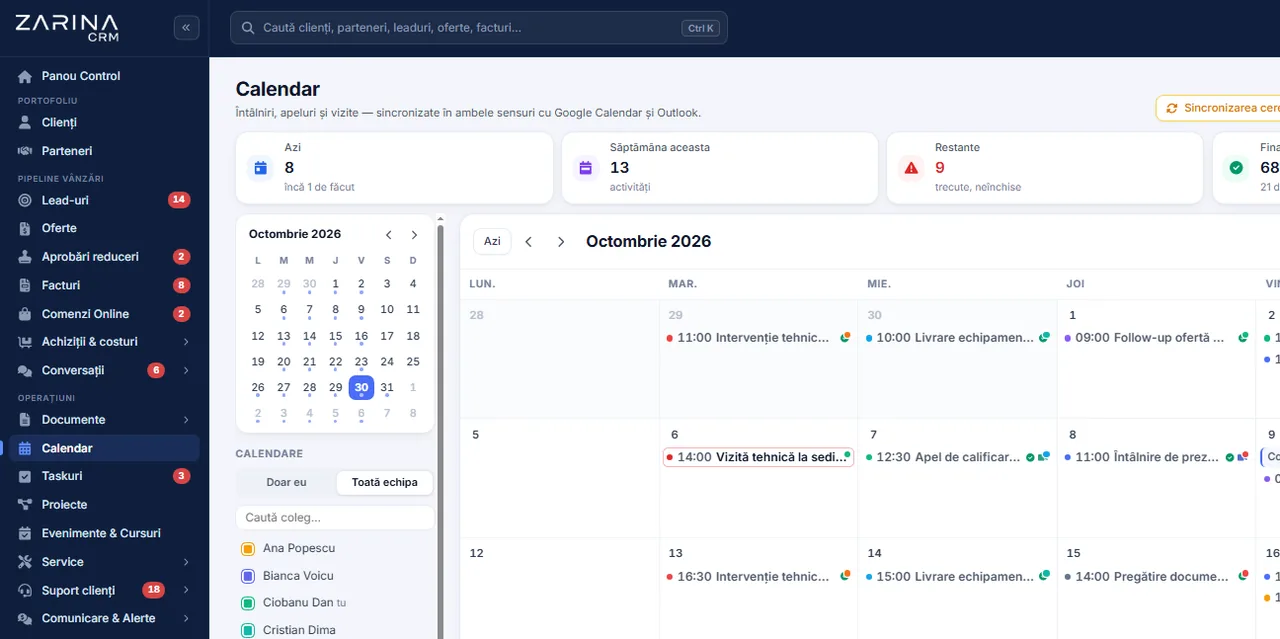
An activity calendar in a CRM, linked to clients and team. Meetings, scheduled calls, visits and service rounds go into the same calendar, linked to their client or job. The Operations and projects package. A permanent licence, installed on the company’s server, with unlimited users.
Works together with: Events and registrations, Integrated telephony, Service and interventions.
The team’s schedule exists nowhere in full, so coordination happens by asking around.
It is part of the Operations and projects package and is where the team’s real schedule becomes visible.
Every event has context.
The schedule is read at a glance.
Coordination no longer takes phone calls.
One schedule, not two.
The link creates itself.
Nothing is forgotten.
The direct effects of the team’s schedule being visible and linked to clients.
Availability is visible.
Follow-ups enter the schedule.
Preparing takes a minute.
The personal and the company calendar match.
The link already exists.
Field work becomes visible.
The same flow for a meeting at the client and for a scheduled call.
From the client record, from the opportunity or from the ticket, so the link with the record exists from the start.
The availability of the others is visible, and clashes are flagged before saving.
The link is created automatically through the configured service and sent to the participants.
If synchronisation is active, the event reaches Google Calendar or Outlook, with the same details.
A move made in the personal calendar is reflected in the CRM, and the other way round, within seconds.
After the activity, notes are added, completion is marked and, where relevant, the next step is scheduled.
This is where most questions come up, so we explain exactly what happens.
Each person connects their own calendar.
Not only from the CRM to the calendar.
There is no waiting for an hourly sync.
Authorisations expire, and the system says so.
A shared calendar does not mean full access to everyone’s diary.
Their own activities, with all the details and the links to the records.
A manager has the picture of the schedule of the team they lead, for real coordination.
An activity marked private appears as a busy slot, with no details, to the others.
Details linked to a client are visible only to users with rights on that client.
Moving or cancelling an activity is logged, with the author and the date.
The activities stay in your own installation; what reaches the external calendars is what you send there.
Mechanisms that cut manual coordination.
Activities are not forgotten.
The schedule fills itself.
The link is no longer created by hand.
The calendars stay aligned.
Conflicts are visible beforehand.
The work becomes visible.
The diary of a sales team is sensitive information.
We do the configuration at implementation. The calendar accounts stay the users’ own.
The schedule has to be readable.
Needed for checking conflicts.
Synchronisation is optional.
Only if you want automatic links.
When and to whom.
For reminders and synchronisation.
The calendar organises the team’s schedule. It does not optimise routes and does not replace advanced field planning.
Appointments in the platform can be synced with the calendar the team uses, and online meetings get a link generated automatically.



Synchronisation is configured on each user account, at implementation.
We prefer to say from the start in which situations the module is not worth its cost, so the sales conversation does not begin with the wrong expectations.
The situations in which the module pays for itself quickly.
The situations in which we recommend not buying it now.
It is part of the Operations and projects package, included from the Pro tier.
It is licensed together with the Operations and projects package, included from the Pro tier.
Users and roles, clients and contacts, leads and the sales pipeline, custom fields and 15 interface languages.
Activities and tasks complement each other: the task management module.
Package composition and prices by edition are on the pricing page.


You pay once. Everything that follows is written here, not in hidden conditions.
It is part of the Operations and projects package: $570 excl. VAT, on top of the core ($2,320). Bought separately, together with the core: $2,890.
Cheaper in a bundle. The tiers group several packages at a price lower than their sum:
List prices, excl. VAT, one-time payment, unlimited users. The struck-through price is the sum of the packages bought individually. Current offers apply on the pricing page.
Over 3 years, the subscription costs $10,480; the Zarina Pro licence costs $3,480, once.
An indicative comparison: enter the subscription price you pay now. The licence does not grow with the number of users.
A six-page document with everything you need to know before a sales conversation. No obligation and no sales call.
We install Zarina CRM on your hosting, configure it around your own workflow and train your team. From that moment on, the application is an asset of your company, not a recurring expense.