Developer
The profile for those selling their own stock, from a project they are building.
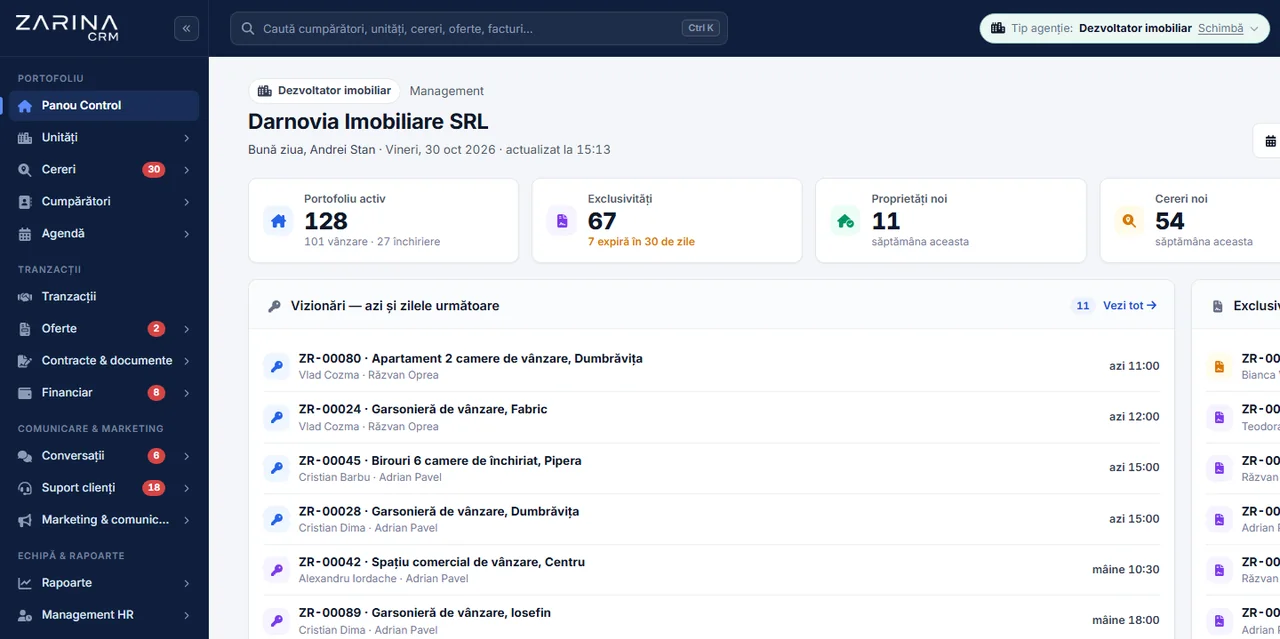
- Properties are called units
- Contacts are called buyers
- The menu and setup steps adapt
- Terminology appears the same everywhere



When you sell your own stock, the costliest mistake is a unit promised twice. If what is available, reserved or sold lives in files kept by several people, discrepancies appear late and usually in front of the client. Zarina CRM keeps units, buyers and documents in one place, from offer to transfer, so you know at any moment what you still have to sell and what stage each sale is at. It is installed on your company’s server, with a lifetime licence.
The stages below are the ones in the application, not a presentation diagram. Every transaction sits on one of them.
Your own stock is loaded once, with photos, map location and its own documents.
The buyer comes in with what they are looking for: size, bedrooms, budget, area.
The application links the requirement to the units that meet it, instead of someone searching through lists.
The transaction starts at the offer stage and moves into negotiation, with the history kept.
On signing, the transaction moves to the sale agreement (MOU/SPA) stage, with documents attached to the unit.
The last stage before completion, tracked separately because it takes time and depends on third parties.
It is not a label on the front page. Choosing the profile changes the names throughout the application, in menus, lists and documents.
The profile for those selling their own stock, from a project they are building.
The classic agency profile, for residential brokerage.
The profile for retail units and offices, where you work with tenants.
The part a developer loses most often: who asked for what, and which unit would suit them now, after the stock has changed.
The unit is filled in once, and the listing is generated from it. Descriptions are no longer rewritten for every portal.
The edition has publishing modules for the main portals in the UAE and Romania.
Visual material and location sit on the unit, not in separate folders.
A unit’s documents are made available to the buyer in a controlled space.
We prefer to be precise from the start, including about the things the application does not do.
The problems below are not hypothetical. They are the reasons developers look for software.
Two agents promise the same unit, because the spreadsheet was not updated in time.
The unit’s status is a single one, in the application.
Someone asked for an apartment you did not have at the time. When it appears, nobody remembers them.
The requirement stays and is matched against new stock.
The same description is written separately for each portal, and when something changes only some are updated.
The listing is generated from the unit, a single source.
The Developer profile is part of the Real Estate edition. It is paid once, installed on your side and remains the company’s.
We install the application on the company’s hosting and configure it for the Developer profile, with the matching terminology.
Units are imported from the list you have, so the team works on real data from day one.
Your contract and sheet templates are loaded into the application, so documents come out in the form you use.
Developers selling their own stock who want a single record of units, buyers and documents.
Companies with their own sales team, where several people touch the same unit and must see the same status.
Anyone looking for construction tracking, estimates and progress valuations. Those are in the Construction edition.
Buyers’ data and transaction documents are personal data. Their place is not with us.
Units in the project are described once and go out to the portals you choose, with status and price updated from the same record.


Enquiries received on the portals come into the CRM as leads linked to the listed unit, so they are not lost between portal accounts and agents’ inboxes. The project location and nearby points of interest are shown on the map, with the base map switchable between three sources. Invoices for instalment payments are issued with VAT, and the payment link is sent to the buyer by Stripe or WhatsApp. The full list is on the connectors and API page.
No. It is one of the three profiles of the Real Estate edition, alongside residential and commercial. You get the Real Estate edition, configured for the Developer profile.
The terminology throughout the application and the menu structure. On the Developer profile, properties are called units and contacts are called buyers, consistently in lists, menus and documents.
Yes. The profile is an installation setting, not a separate licence, so it can be changed if the company also starts brokerage.
Offer, negotiation, sale agreement, mortgage and transfer, then completed or lost. The mortgage and transfer stage is separate because it depends on third parties and takes time.
Yes, the edition has publishing modules for Bayut, Dubizzle and Property Finder in the UAE, as well as the main Romanian portals, plus an XML feed and publishing on your own website. Each works through your own account with the portal.
No. The application covers selling units. For execution, estimates and progress valuations there is the Construction edition.
Not in the form of a schedule tied to construction milestones. The transaction has stages, and payments are tracked on it. If you need something else, it can be discussed as development.
On the company’s server. The application is self-hosted, so data does not pass through our infrastructure.
Unlimited. The licence is not paid per agent, so the size of the team does not change the price.
Ask for demo access. You receive a personal link to the Real Estate edition test installation, where you can switch between profiles.
The Real Estate edition on the residential profile, for brokerage.
The edition for execution, estimates and progress valuations.
The seven Zarina CRM editions, with what each one covers.
We install Zarina CRM on your side, configure it for the Developer profile, import the stock and load your own templates. From that moment on, the application is an asset of the company, not a monthly expense.