Part of the Zarina CRM core

Client management, one record that gathers everything the company knows

The client record gathers the identification details, the contact people, the quotes, the invoices, the balance, the documents, the activities and the conversations from every channel. Whoever takes over a relationship has the full context in seconds, and the information no longer depends on the memory of the consultant who handled the client until then.

From $2,900 excl. VATone-time payment, no monthly subscription
  • Included in the core
  • All channels on one record
  • Balance and overdue amounts visible
  • The history stays with the company
  • Custom fields
Clients · Zarina CRM
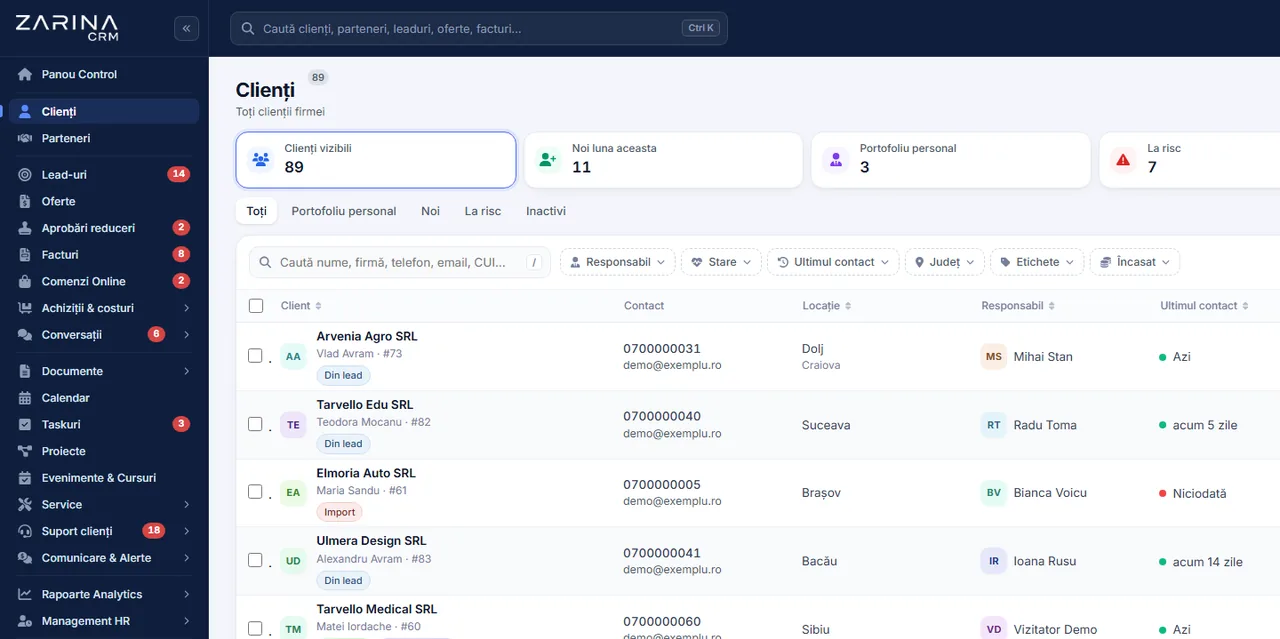
The client list in Zarina CRM with owner, region, last contact and filters by status, tags and payments
Included in the core
All channels on one record
Balance and overdue amounts visible
In short

Client management in a CRM: a complete record, history and roles. The client record gathers the identification details, the contact people, the quotes, the invoices, the balance, the documents, the activities and the conversations from every channel. Part of the Zarina CRM core. A permanent licence, installed on the company’s server, with unlimited users.

Works together with: Partners, Integrated telephony, Multilingual CRM.

The problem

The situation today, when information about the client is scattered

The company has the data, but not in one place. The client pays the difference, in time and in repetition.

  • Everyone has their own list One spreadsheet in sales, another in invoicing, a third on someone’s phone. No version is complete.
  • The client repeats the same information At every contact with someone else in the company, the conversation starts from zero.
  • Nobody knows what was promised Terms accepted verbally exist nowhere, so they are negotiated again at every order.
  • The balance is not visible at the point of sale A consultant offers new terms to a client with overdue invoices, because there was no way of knowing.
  • The history leaves with the employee A relationship built over two years stays largely in one person’s head.
  • The data cannot be checked Tax numbers, addresses and contact people go out of date, and nobody owns the updating procedure.
What the module does

What the client record includes

It is part of the application core and is where all the other modules converge.

Identification details

The official information, in a single place.

  • Company name, TRN and trade licence
  • Registered and delivery addresses
  • Bank details
  • Client type and category

Contact people

The relationship is with people, not with companies.

  • Several people per client
  • Role and contact details
  • A main contact
  • A history on each one

The commercial situation

What was sold and what was collected.

  • Quotations and orders
  • Invoices and balances
  • Overdue amounts with days late
  • The total value of the relationship

A communication history

All channels, on the same record.

  • Email, WhatsApp, social messages
  • Phone calls
  • Internal notes
  • Documents sent and received

Activities and tasks

What comes next, not only what has been.

  • Planned activities
  • Tasks with a deadline
  • Scheduled meetings
  • Follow-ups taken on

Custom fields

Every industry has its own information.

  • Custom fields
  • Your own value lists
  • Used in filters
  • Used in reports
What changes

What changes in the first month after the client module is switched on

The direct effects of the whole relationship being visible on a single screen.

01

Conversations prepared

Every contact starts informed.

  • A visible history
  • The latest documents
  • Balance and overdue amounts
  • No repeated questions
02

Correct commercial decisions

Terms are granted in full knowledge.

  • The balance visible when quoting
  • A payment history
  • The volume handled
  • Arguments in a negotiation
03

Handover in a few minutes

Taking over a portfolio is no longer a risk.

  • Full context on the record
  • Attached documents
  • Activities in progress
  • The client does not feel the change
04

Clean data

The records stay usable.

  • Data checked at entry
  • Duplicates flagged
  • A controlled merge
  • Updates from official sources, where they exist
05

Useful segmentation

Clients can be grouped by real criteria.

  • Categories and tags
  • Filters on commercial criteria
  • Lists for campaigns
  • Controlled export
06

Compliance made possible

Requests about personal data can be handled.

  • Search by person
  • Export of the associated data
  • Anonymisation on request
  • A record of the operations
In the application

How the record is built, step by step

The record is not filled in by hand: it is fed by the day-to-day work.

The client list in Zarina CRM with owner, region, last contact and filters by status, tags and payments
  1. 1

    The client appears from a lead or is entered directly

    When a lead is converted, the data is carried over in full. Manual entry stays available, with checks on the data.

  2. 2

    The official details are verified

    The tax number and the company details are validated at entry, to avoid the errors that cause rejections at invoicing.

  3. 3

    The documents attach themselves

    The quotes, invoices and contracts generated in the application appear automatically in the client’s folder.

  4. 4

    The communication gathers on the record

    Emails, messages from the active channels and calls are linked to the client automatically, by address or by phone number.

  5. 5

    The balance updates from the payments

    Every payment recorded changes the client’s financial situation, with no manual calculations.

  6. 6

    The history stays with the company

    When the owner changes, the record does not. The relationship continues where it left off.

Video tour

Client management, in short, inside the application

Coming soonThe video presentation of the module is being prepared.
Segmentation

The segmentation that produces sales

A client base without criteria is a list. With criteria, it becomes a commercial instrument.

Categories and tags

The classification follows the reality of the company.

  • Categories by client type
  • Multiple tags
  • Your own criteria
  • Used in filters and lists

Filters on commercial data

Selections are made on figures, not on memory.

  • The value handled
  • The last order
  • Overdue amounts
  • Products purchased

Lists for campaigns

Targeted communication starts here.

  • Saved segments
  • Automatic updating
  • Used in email marketing
  • Respecting consent

Inactive clients

The cheapest source of sales.

  • No order for X months
  • A list for re-contacting
  • Tasks by owner
  • The result tracked
Rights

Who sees what on the client record

The record holds commercial and financial data. Visibility is configured, not assumed.

  1. 01

    Visibility by portfolio and team

    A consultant sees the clients assigned to them and, depending on the configuration, those of the team and the unassigned ones.

  2. 02

    The “everyone sees everything” option exists, but it is a decision

    Small companies prefer it. We switch it on only if that is your explicit decision.

  3. 03

    The balance and the margin have their own rights

    Financial information is limited to the roles that are granted this right.

  4. 04

    Support does not see everything commercial

    Support roles have access to what they need, without the pipeline and without price information, if that is how it is configured.

  5. 05

    Reassignment stays recorded

    A change of owner is logged, with the author and the date.

  6. 06

    Exports respect the rights

    A user exports only what they are entitled to see, and the operation stays recorded.

Automations

What runs automatically in the client module

Mechanisms that keep the record complete and clean.

Automatic linking of the communication

Messages land on the right client.

  • Matching by email
  • Matching by phone
  • Manual linking when needed
  • A unified history

Updating the balance

The financial situation is not calculated by hand.

  • From invoices and payments
  • Overdue amounts recalculated
  • Advances included
  • Visible at all times

Duplicates flagged

The database does not duplicate.

  • A check at entry
  • At import
  • A controlled merge
  • History kept

Follow-up tasks

The relationship does not go cold.

  • Scheduled follow-ups
  • On inactive clients
  • An owner and a deadline
  • The result recorded

Notifications to the owner

Important events are not lost.

  • A payment received
  • A document uploaded by the client
  • A support request
  • Configurable

Scheduled reports

The picture reaches management.

  • New clients in a period
  • Value per client
  • Inactive clients
  • Export attached
Who sees what

Protecting client data

The client base is the company’s most valuable asset and, legally, a responsibility.

  • Access by role and team Contact details and commercial information are not visible to the whole company.
  • Export controlled and logged Exports are made by users with the right, within the limits of their visibility, and the operation stays in the log.
  • Deletion goes through the bin Records do not disappear at one click, and restoring is possible.
  • Protection against injection in exported files The CSV files generated are protected against executable formulas, a real security issue.
  • Requests about personal data Search, export and anonymisation cover the client, the contact people and the associated records.
  • Data on the company’s server The client base stays in your own installation, with no copy at an external provider.
What you need

What needs preparing to switch the client module on

We do the configuration at implementation, starting from your current records.

01

The existing client base

The starting point.

  • A file with the clients
  • Identification details
  • Contact people
  • The import is checked before saving
02

The classification structure

It decides how useful the segmentation is.

  • Categories by client type
  • The tags used
  • Commercial criteria
  • Agreed together
03

The fields specific to your industry

Only the ones actually used.

  • Custom fields
  • Value lists
  • Mandatory, where needed
  • Used in reports
04

The visibility rules

Who sees what.

  • Their own portfolio or the team
  • Access to balances
  • Support roles
  • Reviewable later
05

The opening balances

The financial situation starts out correct.

  • Unpaid invoices
  • Advances
  • Taken over at implementation
  • Checked against accounting
06

The personal data policy

Compliance is settled beforehand.

  • The retention period
  • The deletion procedure
  • An internal owner
  • Agreed at implementation
What it does not do

The limits of the client module, stated explicitly

The client record gathers the information you already have. It does not invent it and does not clean it up on its own.

  • It does not fill in data you do not have The record shows what is entered and what the other modules produce. A client with no history stays a record with identification details.
  • It does not check company status from official sources in every scenario The validations available are settled at implementation. We do not promise permanent updating from public registers.
  • It does not clean a messy database effortlessly Duplicates and out-of-date data are handled at import, with decisions from you.
  • It does not replace accounting The balances are operational, for commercial decisions. The accounting position stays in your accounting software.
  • It is not a mass marketing tool The segments can be used in campaigns, but the sending is done from the marketing modules, with the rules on consent.
  • The quality depends on the team’s discipline A conversation that is not logged does not appear on the record. The record reflects what is recorded, not everything that happens.
CRM implementations

Companies that have trusted Zarina CRM

Metod Sistem - Zarina CRM clientMetod Sistem
SICC Project Services - Zarina CRM clientSICC Project Services
Lapis Residence - Zarina CRM clientLapis Residence
Onyx Residence - Zarina CRM clientOnyx Residence
Iași Clinical Hospital of Pulmonology - Zarina CRM clientIași Clinical Hospital of Pulmonology
Regional Office for Cross-Border Cooperation Iași - Zarina CRM clientRegional Office for Cross-Border Cooperation
Arpa Imobiliare - Zarina CRM clientArpa Imobiliare
Rubin Capital - Zarina CRM clientRubin Capital
Hotel Palas Grand View - Zarina CRM clientHotel Palas Grand View
Grey Boutique Hotel Palas - Zarina CRM clientGrey Boutique Hotel Palas
Bucovina Resort and Spa - Zarina CRM clientBucovina Resort & Spa
HighLife Events - Zarina CRM clientHighLife Events
PavMar Beton - Zarina CRM clientPavMar Beton
Clinica Lauderma - Zarina CRM clientClinica Lauderma
Axa Traduceri Iași - Zarina CRM clientAxa Traduceri
AFQ Accounting - Zarina CRM clientAFQ Accounting
Moldo Garage - Zarina CRM clientMoldo Garage
Zuzu Land - Zarina CRM clientZuzu Land
Ziarul Unirea - Zarina CRM clientZiarul Unirea
Meat Me Up Belgium - Zarina CRM clientMeat Me Up Belgium
Joues et Croquettes Belgium - Zarina CRM clientJoues et Croquettes Belgium
Who it is for

When this module makes sense and when it does not

We prefer to say from the start in which situations the module is not worth its cost, so the sales conversation does not begin with the wrong expectations.

It makes sense if

The situations in which the module pays for itself quickly.

  • Client data sits in separate files, with several people
  • The history of the relationship disappears when someone leaves the team
  • You need fields specific to your own industry
  • You want control over who sees what in the portfolio

It does not make sense if

The situations in which we recommend not buying it now.

  • You have fewer than thirty clients, and everyone knows them
  • The relationship is one-off, with no follow-up or repeat business
  • The data is already in a system the team uses every day
  • Nobody will enter the data unless they are required to
How to buy

How client management is licensed

It is part of the mandatory core, so it is included in every configuration.

Included in the core

It is not bought separately and is available in all packages.

What the core includes

Users and roles, clients and contacts, leads and the sales pipeline, custom fields and 15 interface languages.

Together with the portal

For the client to see their own documents and invoices, the client portal is used.

Pricing and configurations

Package composition and prices by edition are on the pricing page.

Price, warranties and implementation

Client management: what it costs and what you get

You pay once. Everything that follows is written here, not in hidden conditions.

The price

Included in the Zarina CRM core — $2,320 excl. VAT, one-time payment. The core is part of every tier below, so the function is available in any configuration.

Cheaper in a bundle. The tiers group several packages at a price lower than their sum:

  • Start2 packages + core
    $2,900$3,570
    −19%
  • Pro5 packages + core
    $3,480$5,280
    −34%
  • Business8 packages + core
    $4,640$7,460
    −38%
  • Enterprise13 packages + core
    $6,970$10,080
    −31%

List prices, excl. VAT, one-time payment, unlimited users. The struck-through price is the sum of the packages bought individually. Current offers apply on the pricing page.

Subscription or licence

What you pay over time for a subscription CRM

Subscription$10,480
Zarina Start$2,900

Over 3 years, the subscription costs $10,480; the Zarina Start licence costs $2,900, once.

An indicative comparison: enter the subscription price you pay now. The licence does not grow with the number of users.

After purchase

What you get

  • A lifetime licence, with no subscription and no per-user charge
  • Unlimited users, on the same licence
  • 6 months of warranty on correct operation: fixing errors and inconsistencies
  • Implementation, configuration and team training, included in the price
  • The licence is verified locally, on your own server: the application does not depend on our servers to work
Implementation and server

How long it takes and what is needed

  • 48 hours in the standard configuration; up to 14 working days with customisation around the company’s workflow
  • Your own server or web hosting with cPanel, with an SSL certificate
  • PHP 7.4 or newer (8.x recommended) and MySQL / MariaDB
  • The PHP extensions mysqli, json, mbstring; curl, gd and zip for integrations, PDF and exports
  • One cron task, for reminders and automations
Security and data protection

Where data lives

  • The data stays on your server and does not pass through ours
  • Roles and rights per user, two-factor authentication
  • An audit trail and limits on login attempts
  • Consents and data subject requests, managed in the application
  • Digitally signed updates and backups from the application

Do you have a question about client management?

We answer in writing, with the exact price for your configuration.

Frequently asked questions

Questions about client management

Can I import the client base I already have?
Yes, from CSV or XLSX files, with automatic column mapping, a check before saving, duplicates flagged and the option to undo the import.
Do consultants see colleagues’ clients?
It depends on the configuration. By default visibility follows the structure of roles and teams; the option where everyone sees every client exists, but we switch it on only at your decision.
Does the client balance appear on the record?
Yes, if the role has the right to financial information: total receivable, overdue amounts with days late and advances, updated from invoices and payments.
Do WhatsApp and email messages land on the client record?
Yes, if those modules are active. The linking is done by phone number or email address, with the option of manual linking.
What happens when a consultant leaves?
The clients are reassigned to an active user and the records stay untouched. The history, the documents and the activities in progress are in the system, not with the person.
Can I add fields specific to my industry?
Yes, through custom fields, including your own value lists. We recommend only fields that will be used in filters or in reports.
How are duplicates handled?
They are flagged at entry and at import, and merging is done in a controlled way, keeping the history of both records.
Can I build lists for campaigns?
Yes, through segments saved on commercial criteria. The sending is done from the marketing modules, respecting consent and unsubscribes.
How do we answer a request to delete data?
Through the personal data procedures: all the records associated with the person are identified, can be exported and can be anonymised, and the operations stay recorded.
Is it included in the price or bought separately?
It is part of the mandatory core, so it is in every configuration, at no extra cost.
Product sheet

Get the complete product sheet by email

A six-page document with everything you need to know before a sales conversation. No obligation and no sales call.

  • The platform core and the 13 module packages, with what each one contains
  • The features and modules of the edition you choose, plus available integrations
  • Full pricing and what it includes: installation, training, data import, warranty
  • The native integrations available and the situations where the platform is not a good fit

No monthly subscription

Take control of your operations, once

We install Zarina CRM on your hosting, configure it around your own workflow and train your team. From that moment on, the application is an asset of your company, not a recurring expense.
