Nothing is lost
Promises become records.
- A task from any context
- A mandatory deadline
- A reminder beforehand
- Verifiable at any time



Tasks are created from the context they appear in — a client, a quote, a ticket, a job — and keep the link with that record. Each one has an owner, a deadline and a status, and overruns are flagged. What was promised in a conversation no longer depends on a note scribbled on paper.
From $2,900 excl. VATone-time payment, no monthly subscription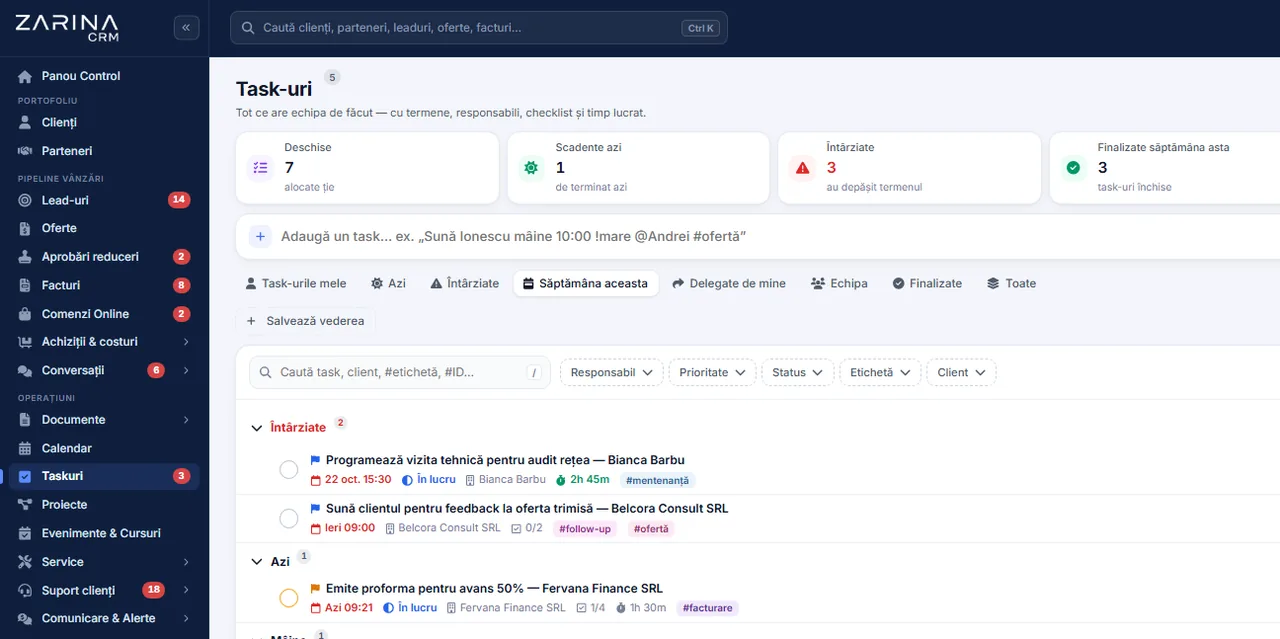
Task management in a CRM: owner, deadline and history. Tasks are created from the context they appear in — a client, a quote, a ticket, a job — and keep the link with that record. The Operations and projects package. A permanent licence, installed on the company’s server, with unlimited users.
Works together with: Notification centre, Smart reminders, Integrated telephony.
A task handed over verbally or in a chat has no owner, no deadline and leaves no trace.
It is part of the Operations and projects package and connects to all the other modules.
Every task has what it needs.
The context comes with the task.
Every role sees what it needs.
Recurring operations are not forgotten.
The conversation stays on the task.
Delays do not go unnoticed.
The direct effects of tasks having an owner, a deadline and context.
Promises become records.
The ambiguity disappears.
The team works in the right order.
Staffing decisions are taken on data.
Holidays no longer block anything.
The routine gets done.
The same flow for a commercial follow-up and for an administrative operation.
From a client, a quote, a ticket or a job. The link stays, so whoever picks it up immediately sees what it is about.
Without those two, the task makes no sense. They are mandatory by configuration.
And, where relevant, in the calendar. The reminder goes out before the deadline.
Comments, attachments and status changes stay on the task, with the author and the date.
A task past its deadline is marked and reported, and the owner and the coordinator are notified.
The completed task stays in the history of the record it was linked to, useful at the next conversation with the client.
A task system used badly produces more work than it solves.
Not for everything that gets discussed.
Three levels get used, seven do not.
Periodic operations are automated.
A task without context is done wrong.
Visibility follows the structure of roles, like the rest of the application.
Mechanisms that turn processes into tasks, with no administrative work.
The processes generate their own steps.
The routine generates itself.
Deadlines are not forgotten.
Delays become visible.
Tasks enter the schedule.
The picture reaches management.
Tasks frequently contain sensitive commercial and operational details.
We do the configuration at implementation, on the way you actually work.
They decide the structure of the lists.
Few and meaningful.
Assignment depends on it.
The routine is identified once.
When and how.
For generation and reminders.
The module organises operational tasks. It is not an advanced project management tool.
The problem is not the lack of a tool, but that the tasks do not sit next to the client they refer to.
The option most companies start from.
The platforms where you pay per user, every month.
Installed on the company’s server, with a permanent licence.
We prefer to say from the start in which situations the module is not worth its cost, so the sales conversation does not begin with the wrong expectations.
The situations in which the module pays for itself quickly.
The situations in which we recommend not buying it now.
It is part of the Operations and projects package, included from the Pro tier.
It is licensed together with the Operations and projects package, included from the Pro tier.
Users and roles, clients and contacts, leads and the sales pipeline, custom fields and 15 interface languages.
Tasks and activities complement each other: the activity calendar module.
Package composition and prices by edition are on the pricing page.


You pay once. Everything that follows is written here, not in hidden conditions.
It is part of the Operations and projects package: $570 excl. VAT, on top of the core ($2,320). Bought separately, together with the core: $2,890.
Cheaper in a bundle. The tiers group several packages at a price lower than their sum:
List prices, excl. VAT, one-time payment, unlimited users. The struck-through price is the sum of the packages bought individually. Current offers apply on the pricing page.
Over 3 years, the subscription costs $10,480; the Zarina Pro licence costs $3,480, once.
An indicative comparison: enter the subscription price you pay now. The licence does not grow with the number of users.
A six-page document with everything you need to know before a sales conversation. No obligation and no sales call.
We install Zarina CRM on your hosting, configure it around your own workflow and train your team. From that moment on, the application is an asset of your company, not a recurring expense.