Zarina CRM · Sales edition

Sales CRM software, from the first lead to payment

Sales CRM software developed in Romania, the Sales edition covers the entire sales process in one platform, installed on your company’s server: lead capture, a staged pipeline, quotations with e-signature, VAT invoicing, agent commissions and follow-up automations. The licence is lifetime, and the number of users is unlimited.

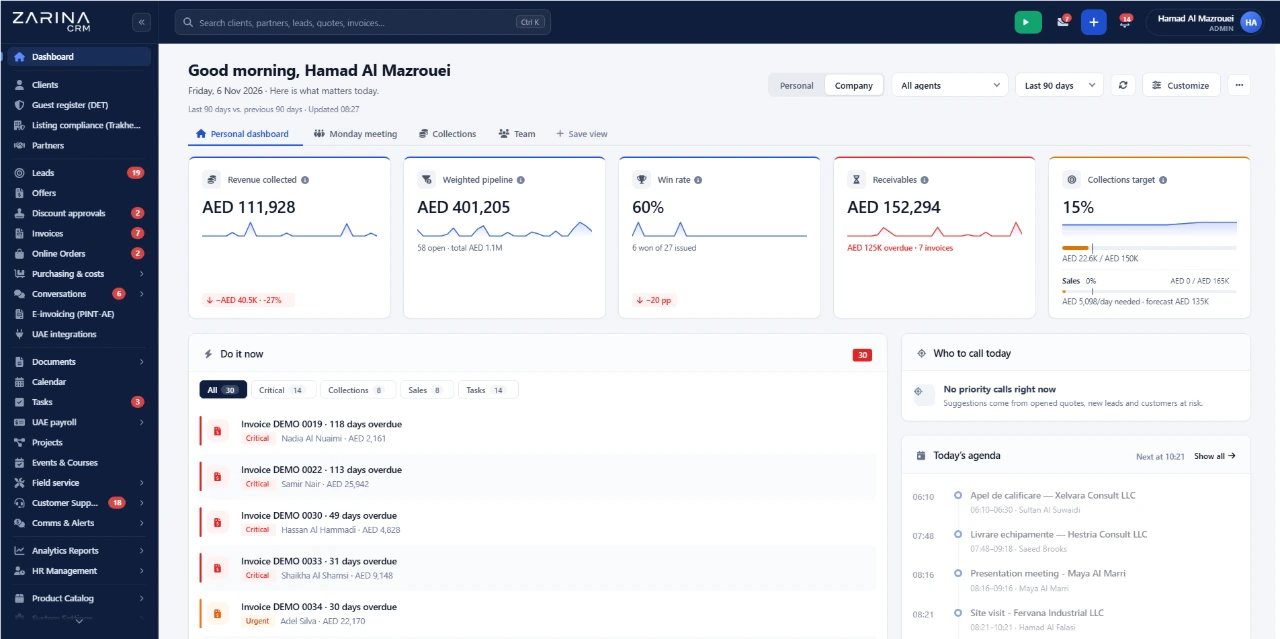
Sales pipeline, quotations and invoices in Zarina CRM
Lifetime licenceUnlimited usersVAT invoicingInstalled on your serverNo monthly subscription
The sales flow

From enquiry to payment, in 6 steps

Every step stays in the same platform, with a complete client history and no manual transfers between separate files. You can also follow the flow step by step in the platform video tour.

1

Lead

The enquiry comes in automatically from a form, a campaign, an online store or an import, with its source and owner assigned.

2

Qualification

The agent completes the record, checks for duplicates and moves the lead to the right pipeline stage.

3

Quotation

The quotation is built from the product catalogue, sent as a PDF and as a public link, and opens are tracked.

4

Acceptance

The client signs electronically, and discounts above the set limit go through internal approval.

5

Invoicing

The invoice is issued from the quotation or the order, with VAT calculated, and can carry a payment link.

6

Payment and loyalty

Payment is reconciled against the invoice, overdues go into automatic reminders, and the client receives a review request.

Modules and features

What you get in the Sales CRM package

Zarina CRM is a complete CRM system, and the Sales package includes 12 feature groups, from lead capture to payment, reports and security. The list describes the features in the current version of the platform. We do not include features still in development. Industry configurations are described separately on the CRM by industry page.

Leads and sales pipeline

Capture from website forms, webhooks, Meta Lead Ads, email or Excel import, with the source kept on every record.

  • Duplicate detection and merging, recycle bin with restore
  • Configurable pipeline stages, with hand-over between agents and history
  • Opportunities in Kanban, with products attached and forecast by period
  • Custom fields on any record type

Quotations, contracts and online acceptance

Quotation editor with products and bundles, PDF generated automatically and a public link sent to the client.

  • Quotation options and open tracking
  • E-signature on quotation and contract
  • Internal approval of discounts before sending
  • Direct conversion into an order or an invoice

Follow-up sequences and communication

Automatic message series by email, SMS or WhatsApp, triggered after a quotation is sent, an invoice is issued or a review is requested.

  • A/B testing on subject and content
  • Email campaigns through Brevo, with double opt-in
  • IMAP and SMTP inbox, with messages linked to the client record
  • WhatsApp Business through the Cloud API, Messenger and Instagram

Clients, partners and portal

Client record with history, documents, invoices, communications and notes on a single screen.

  • Multiple contacts per company, partners and suppliers kept separate
  • A portal where clients see their quotations, invoices and tickets
  • Calls through Zadarma telephony, in the client history
  • Consents and data-subject requests managed in the platform

Commissions, targets and reports

Commissions per agent, targets per period and team leaderboards, calculated from recorded sales.

  • Reports on leads, conversion, quotations, sales and payments
  • Scheduled reports, emailed automatically
  • Dashboard configurable per role
  • Export to Excel and CSV

Invoicing and payments

Proformas, tax invoices, credit notes and recurring invoices, issued directly from a quotation or an order.

  • VAT calculated per line, in AED or any currency
  • Invoice data ready for your e-invoicing service provider
  • Payment link through Stripe or PayPal, reconciled against the invoice
  • Cash register, expenses, budgets and overdue report

Orders, products and inventory

Orders from WooCommerce, PrestaShop, Shopify, Amazon.ae and noon come into the platform automatically.

  • Shipping labels through Aramex and Emirates Post, with delivery status
  • Picking, delivery confirmation and returns on the same record
  • Products with categories, variants, bundles and multiple warehouses
  • Purchasing from suppliers, receipts and cost per product

Activities, projects and calendar

Tasks with checklists, comments and time tracking per activity, projects with owners and deadlines.

  • Calendar synced with Google Calendar and Outlook Calendar
  • Public booking pages, straight into the calendar
  • Activities linked to a lead, quotation, invoice or ticket
  • Notifications for missed deadlines

Documents, forms and signature

Contracts and documents sent by public link and e-signed, with OTP validation.

  • Document templates filled in with client data
  • Forms built in the platform, flowing straight into the CRM
  • Surveys sent to clients after delivery
  • Events with registrations and attendee lists

Support and customer satisfaction

Tickets with tracked response times, quick replies and history per client.

  • Knowledge base, internal and client-facing
  • Automatic review collection after delivery
  • Link between ticket, invoice and order
  • The client portal, for opening and tracking tickets

Automations, API and AI assistant

Rules that run when a stage changes, an invoice is issued or a deadline is missed.

  • REST API with per-application keys and limited permissions
  • Signed webhooks to your own systems
  • Connection through Zapier and Make
  • AI assistant for drafting and summaries, on your company’s key

Security and administration

Roles and permissions per module and per action, defined for every job in the company.

  • Two-factor authentication and management of active sessions
  • Audit log: who changed what, and when
  • Backups, server checks and signed updates
  • 15 interface languages and installation as a phone app

How to buy

How the features above translate into packages

The features described on this page are included in the 3 packages and, from PRO, in the modules specific to your field. The full mapping, area by area, and the prices are on the pricing and packages page.

Included in every package

Clients, partners, leads, opportunities, dashboard, roles and permissions, custom fields, reminders, 15 languages. Part of every configuration, whatever packages you choose.

Three packages

The same in every edition: sales, invoicing, inventory, procurement, operations, service, support, omnichannel communication, marketing, integrations, AI, reports, HR. Only the ones you need are activated.

No industry-specific module package

This edition has no separate industry modules: everything it needs is covered by the 3 packages. You do not pay for a vertical package.

The essential packages for this field

For sales, the packages that matter first are Complete sales and Invoicing and payments. The rest are added as needs arise.

Modules and automations included

48 features, grouped into 6 work areas

Nothing is charged per user: every activated module runs for the whole team, on your company’s server. The package is configured by module, according to what you actually use.

Sales

Customer managementLead managementSales pipelineKanban opportunitiesCreate quotationsTracked web quotationE-signatureCommissions

Invoicing and payments

PDF invoicingRecurring invoicesCredit notesVAT invoicesOnline paymentsCash registerExpenses and budgetsOverdues

Operations

Email integrationActivity calendarTask managementDocument generationFile centralisationFormsDocumentationPartners

Management

Interactive dashboardStatisticsScheduled reportsRolesHR and employeesAutomatic attendanceInventoryCustom fields

Marketing and support

SLA supportAutomatic reviewsEmail marketingNotificationsWhatsApp BusinessMessenger & InstaTelephonyMultilingual CRM

Automations and Zarina Smart

Automatic leadsAutomatic ordersAutomatic follow-upRemindersREST API and webhooksAI for leadsAI for quotationsAI for reviews
Automations for Sales CRM software

What runs on its own, after a single setup

Automations reduce the sales team’s repetitive tasks and eliminate leads lost through lack of follow-up.

Follow-up that is never forgotten

Sequences by email, SMS or WhatsApp, started by sending a quotation, issuing an invoice or closing a ticket.

Deadline reminders

Expired quotations, overdue invoices, contracts nearing their end date and missed activities reach the owner without manual intervention.

Event-based rules

When the stage changes, a task is created, a colleague is notified, a field is updated or a webhook is sent.

Scheduled reports

Key reports are emailed automatically, at the interval you set, to the people you choose.

Connection to other systems

Signed webhooks, REST API and connection through Zapier or Make, for the applications your company already uses.

Optional AI assistant

Drafting emails and quotation descriptions, summaries on the client record, with Claude, ChatGPT or Gemini, on your company’s key.

Artificial intelligence in the CRM

The AI assistant that writes, summarises and prepares replies

Zarina CRM includes an AI assistant that drafts emails and quotations, summarises a client’s history and suggests the next step. It runs on your company’s own key with Claude, ChatGPT or Gemini, is optional and can be switched off at any time.

Assisted drafting

The assistant writes email variants, client messages and quotation descriptions from the data already on the client record. The text stays editable before sending.

Summaries on the client record

A history of dozens of interactions becomes a summary of a few lines, useful before a meeting or when taking over a client from a colleague.

Next-step suggestions

Based on the pipeline stage and the history, the assistant proposes the next action: a follow-up, a revised quotation or an appointment.

You choose the model

The platform connects to Claude, ChatGPT or Gemini. You can change provider without changing the platform.

Runs on your company’s key

The API key belongs to your company, and usage is billed directly by the AI provider. We do not act as an intermediary and add no usage fees.

Optional and can be switched off

The platform works fully without AI. The module is activated when you decide and can be switched off at any time, per role or for the whole company.

Connected ecosystem

Integrations and automations in the sales CRM application

Native international integrations: online stores and marketplaces such as Amazon.ae and noon, couriers, payments, communication and productivity — no separately paid connectors and no extra development. Enter your company’s account details and the connection is live.

Trendyol integration with Zarina CRMTrendyol
Amazon.ae integration with Zarina CRMAmazon.ae
noon marketplace integration with Zarina CRMnoon
WooCommerce integration with Zarina CRMWooCommerce
Shopify integration with Zarina CRMShopify
PrestaShop integration with Zarina CRMPrestaShop
Aramex courier integration with Zarina CRMAramex
Emirates Post integration with Zarina CRMEmirates Post
Stripe integration with Zarina CRMStripe
PayPal integration with Zarina CRMPayPal
Wafeq e-invoicing integration with Zarina CRMWafeq
Zoho Books integration with Zarina CRMZoho Books
ClearTax e-invoicing integration with Zarina CRMClearTax
TallyPrime integration with Zarina CRMTallyPrime
Pagero e-invoicing network integration with Zarina CRMPagero
WhatsApp integration with Zarina CRMWhatsApp
Messenger integration with Zarina CRMMessenger
Instagram integration with Zarina CRMInstagram
Facebook Lead Ads integration with Zarina CRMFacebook Lead Ads
Zadarma integration with Zarina CRMZadarma
3CX integration with Zarina CRM3CX
Brevo integration with Zarina CRMBrevo
Google Calendar integration with Zarina CRMGoogle Calendar
Outlook Calendar integration with Zarina CRMOutlook Calendar
Google Sheets integration with Zarina CRMGoogle Sheets
Google Forms integration with Zarina CRMGoogle Forms
Google Ads integration with Zarina CRMGoogle Ads
Zoom integration with Zarina CRMZoom
Google Meet integration with Zarina CRMGoogle Meet
Zapier integration with Zarina CRMZapier
Make integration with Zarina CRMMake
Claude integration with Zarina CRMClaude
ChatGPT integration with Zarina CRMChatGPT
Gemini integration with Zarina CRMGemini
Digitalisation and automation

What the company actually gains

Digitalising the sales process means one place for clients and documents, repetitive tasks taken over by the platform and decisions based on figures. Below are the benefits companies report after implementation.

A single source of truth

Clients, quotations, invoices and conversations sit in the same place. No more searching through Excel files, personal emails and agents’ notebooks.

Nothing gets lost between people

Every lead has an owner, a deadline and a history. Taking over a client from a colleague on leave or who has left no longer depends on anyone’s memory.

Time recovered from repetitive work

Quotations are generated from the catalogue, invoices from the quotation, reminders and reports go out on their own. The sales team has time for selling, not for reporting.

Decisions based on data, not impressions

Conversion by stage, pipeline value, performance per agent and overdues are visible in reports, not estimated in meetings.

Know-how stays in the company

The client base, history and processes stay on your company’s server. When an agent leaves, the portfolio does not leave with them.

Predictable long-term cost

Lifetime licence, no per-user fees. The budget does not grow with the team, and the platform does not stop if you postpone a monthly payment.

Video tour · 15 minutes

Sales CRM at work, on real screens

Everything described on this page, shown in the application: from the first lead and the quote to the invoice, collection and reports. Pick a chapter and jump straight to what you care about.

Zarina CRM full product tour – Zarina CRM video tour
15:04 running time21 chaptersSubtitles in EnglishPublished on 10 November 2026
Transparency

What to know before implementing a CRM

We prefer to be precise from the start, including about the platform’s limits and the things that depend on external providers.

  • Integrations run through your own accounts. Stripe, PayPal, couriers, online stores, WhatsApp, Brevo and telephony connect to your company’s accounts with those providers. We deliver the connection and configuration, not the accounts.
  • WhatsApp follows the rules set by Meta. Outside the 24-hour window after the client’s last message, company-initiated messages can only be sent through Meta-approved templates. Approval does not depend on us.
  • The AI assistant is paid separately. The artificial intelligence features run on your company’s own key with Claude, ChatGPT or Gemini. Usage is billed by that provider.
  • The platform runs on your server. Installation is done on your company’s hosting. Speed, backups and the SSL certificate depend on the server used, and the recommended minimum configuration is checked before installation.
  • We do not replace a manufacturing ERP. We cover sales, invoicing, inventory and commercial operations. We do not replace a production planning system or your accounting software. The HR module covers time tracking, leave and basic payroll data, not a complete payroll system.
  • The import depends on the quality of the export. We bring data in from Excel, CSV or your current platform, with duplicate checks before loading. Fields that do not exist in your export cannot be reconstructed.
Where you are today

If sales are currently run from Excel, WhatsApp and a diary

These tools work up to a certain volume. Below are the points where they usually break down and what changes after moving the work into the platform. Migration of existing data is included in the implementation.

A client base kept in Excel

Two people cannot work on the same file at the same time, parallel versions appear, and the history of conversations exists nowhere.

In the platform: A single client register, with simultaneous access, a complete history for every company and instant search.

Leads received on WhatsApp and email

Enquiries stay on a colleague’s phone, have no owner, and nobody knows which ones got a reply.

In the platform: Leads come in automatically from forms, campaigns or messages, with source, owner and response deadline.

Quotations made in Word, sent and forgotten

You do not know whether the quotation was opened, who was supposed to follow up and when, and follow-up runs on memory.

In the platform: A quotation generated from the catalogue, sent as a tracked link, with a follow-up sequence started automatically.

Prices and discounts negotiated by phone

Every agent works with a different discount, and the real margin is only known at the end of the month.

In the platform: A single price catalogue, internal approval of discounts and margin visible on every quotation.

Invoices issued separately, at month end

Data is re-entered by hand, differences from the order appear, and payments are delayed.

In the platform: The invoice is issued from the same quotation, with VAT calculated, and can carry a payment link.

A sales report built by hand

Data is gathered from several files, it takes a day and is already out of date when it reaches the meeting.

In the platform: Real-time reports on conversion, agents and payments, emailed automatically.

CRM licensing model

Monthly subscription or lifetime licence

Zarina CRM is sold with a lifetime licence, paid once, not as a monthly per-user subscription. The difference between a cloud CRM charged per user and a lifetime licence installed on your company’s server is clearest when the sales team grows.

The cost does not grow with the number of agents

The licence is lifetime and is not charged per user. A department that grows from 5 to 25 agents uses the same licence, with no extra platform costs.

There are no monthly invoices for the platform

Recurring payments to a cloud CRM vendor disappear. Payment is made once, and updates released during the warranty period are included.

What you still pay for

Your company’s server or hosting, the domain and SSL certificate, subscriptions with external providers you already use (telephony, WhatsApp, email marketing, AI) and, optionally, a maintenance contract.

Cost calculator

What it costs you NOT to have Zarina CRM

A monthly per-user subscription never stops: you pay it every month, it grows with every new employee and, at the end, you are left with nothing. The lifetime licence is paid once. Move the two sliders to your team’s real size and see the difference over 36 months.

If you pay a flat subscription, divide the monthly amount by the number of users. If you do not use a system yet, leave the default values: they are typical cloud platform rates.

Monthly subscription, 36 months —
Zarina CRM lifetime licence $3,480

What you lose over three years with the subscription

—

—

The calculation covers the licence only, not hosting. The licence price does not change when you add users. At the end, the licence remains an asset of the company.

Request a quote Packages and pricing

Modular licensing

The platform is activated by module, not as an all-inclusive licence

The platform base covers clients, users, roles and the sales pipeline. The modules of your field are included from the PRO package, and the price is that of the package you choose. Modules can be added at any time, without reinstalling and without losing data.

Sales and documents

Quotations with online tracking, documents and contracts with signature, client portal.

Invoicing and payments

VAT invoicing, online payments, cash register, expenses and budgets.

Products, inventory and commerce

Products and stock management, orders from online stores, purchasing and costs.

Operations and projects

Tasks, synced calendar, projects with Kanban and Gantt, events, service and field jobs.

Communication and support

Email inbox, WhatsApp Business, Facebook and Instagram, telephony, tickets, surveys.

Marketing and integrations

Email marketing, automations, REST API, webhooks and connectors.

Intelligence and reports

Zarina AI on your company’s key and advanced reports, scheduled by email.

Human resources

HR, time tracking, leave and recruitment, for companies that want everything in one place.

Implementation

What you get when you sign the contract

Delivery is not just an archive with the application. Below is what the implementation actually includes, whatever the number of users.

Installation on your infrastructure

On your company’s server or on the hosting of your choice, with an SSL certificate and backups configured.

Migration of existing data

Clients, contacts, products, prices and sales history, brought over from your current files, with duplicate checks.

Configuration for your company’s workflow

Pipeline stages, custom fields, roles, document numbering and templates for quotation, contract and invoice.

Team training

A training session, a PDF manual for your configuration and email guidance during go-live.

Dedicated documentation

Written material for the installed configuration, accessible directly from the platform.

6-month technical warranty

Fixing of bugs that appear in operation and updates released during this period, at no extra cost.

A CRM built for sales

Who the Sales edition is for and who it is not for

We prefer an honest conversation before a quote, not an implementation that does not solve the company’s problem. Examples of companies using the platform are in the success stories.

It fits companies that

sell repeatedly to businesses or consumers, work with quotations and contracts, have a sales team of 2 agents or more, and want their data on their own server.

Worth discussing in detail if

you have very specific sales processes, an existing ERP that must remain the main data source, or integrations with your own internal systems. All of these can be covered, but they need analysis before implementation.

It is not the right solution if

you need production planning, full accounting or payroll, if you have no server of your own and do not want managed hosting, or if you need a platform fully configured the same day.

CRM security and compliance

Where the data lives and who is responsible for it

On-premise CRM software raises a fair question for any decision-maker: who steps in if something goes wrong on the company’s server. The answer is written down, not implied.

Your data goes nowhere

The CRM application runs on your company’s server or hosting. No third-party processor stores your client base, and your company remains the sole data controller under the UAE PDPL.

Role-based access

Each user gets permissions per module and per action. An agent sees their own portfolio, the administrator sees everything, and accounts are disabled when people leave.

Backups under your control

Backup and retention policy stays with your company, on your own infrastructure. It does not depend on a cloud vendor’s retention rules and is not lost when a subscription ends.

Warranty and support

A 6-month technical warranty is included in the price, with remote intervention on your company’s server at the administrator’s request. Ongoing maintenance afterwards is optional.

Case studies

What actually changed in these companies

Three implementations from different industries, described by what was done before and what happens now in the CRM application.

EventsHighLife Events SRL
Before
Thousands of attendees, corporate partners and sponsors tracked in separate files, with payments checked by hand before every conference.
In Zarina CRM
One pipeline for attendees, partners and sponsors, with payments monitored in the platform and access granted automatically once payment is confirmed.
Sorana AmuntenceiProject coordinator
ConstructionPavMar Beton SRL
Before
Teams coordinated across several sites at once, with execution times and proof of work gathered from chats and paper.
In Zarina CRM
Work assigned as tasks on a Gantt chart, real production times tracked on site, and reports and proof attached directly to the project record.
Marian MilcuManaging director
MedicalClinica Lauderma
Before
Patient records holding sensitive data, and doctors’ schedules kept separately from patient records.
In Zarina CRM
The platform installed on the clinic’s own server, with patient records kept entirely in-house and doctors’ appointments managed in the same application.
Dr Laura Gheuca SolovastruSenior consultant dermatologist
CRM implementations

Companies that have trusted Zarina CRM

Metod Sistem - Zarina CRM clientMetod Sistem
SICC Project Services - Zarina CRM clientSICC Project Services
Lapis Residence - Zarina CRM clientLapis Residence
Onyx Residence - Zarina CRM clientOnyx Residence
Iași Clinical Hospital of Pulmonology - Zarina CRM clientIași Clinical Hospital of Pulmonology
Regional Office for Cross-Border Cooperation Iași - Zarina CRM clientRegional Office for Cross-Border Cooperation
Arpa Imobiliare - Zarina CRM clientArpa Imobiliare
Rubin Capital - Zarina CRM clientRubin Capital
Hotel Palas Grand View - Zarina CRM clientHotel Palas Grand View
Grey Boutique Hotel Palas - Zarina CRM clientGrey Boutique Hotel Palas
Bucovina Resort and Spa - Zarina CRM clientBucovina Resort & Spa
HighLife Events - Zarina CRM clientHighLife Events
PavMar Beton - Zarina CRM clientPavMar Beton
Clinica Lauderma - Zarina CRM clientClinica Lauderma
Axa Traduceri Iași - Zarina CRM clientAxa Traduceri
AFQ Accounting - Zarina CRM clientAFQ Accounting
Moldo Garage - Zarina CRM clientMoldo Garage
Zuzu Land - Zarina CRM clientZuzu Land
Ziarul Unirea - Zarina CRM clientZiarul Unirea
Meat Me Up Belgium - Zarina CRM clientMeat Me Up Belgium
Joues et Croquettes Belgium - Zarina CRM clientJoues et Croquettes Belgium
Frequently asked questions

Questions about the Sales edition

What is the Sales edition of Zarina CRM?

It is the configuration designed for sales teams: leads, pipeline, opportunities, quotations with e-signature, VAT invoicing, commissions, reports and follow-up automations. The platform is installed on your company’s server and works with unlimited users.

Is there a monthly per-user subscription?

No. The licence is lifetime and is not charged per user. You can add new agents without the platform cost growing.

Is it ready for UAE e-invoicing?

The platform issues VAT tax invoices with the structured data they need. Under the UAE e-invoicing system, invoices are exchanged over the Peppol network through an Accredited Service Provider (ASP); transmission goes through the ASP you appoint, and the rollout is phased from 2026 onwards.

Can the quotation or contract be signed online?

Yes. The quotation and documents are sent by public link and signed electronically, with OTP validation on documents. Discounts above the set limit go through internal approval before sending.

Which automations work without manual intervention?

Follow-up sequences by email, SMS and WhatsApp, reminders for expired quotations and overdue invoices, rules triggered by stage changes and reports scheduled by email.

Where is client data stored?

On your company’s server. We hold no copy of the database, and access is controlled through roles, two-factor authentication and an audit log.

Can I import my existing database?

Yes. Import from Excel or CSV for clients, contacts, products and sales history is included in the implementation, with duplicate checks before loading.

How much do the artificial intelligence features cost?

The module is included in the platform, but it runs on your company’s own key with Claude, ChatGPT or Gemini, and usage is billed directly by that provider, according to how much you use it. If you do not activate the module, there is no extra cost.

What does the 6-month warranty include?

Fixing of functional bugs and updates released during this period, at no extra cost. Installation, basic configuration, data import and team training are part of the implementation. After the warranty, maintenance remains optional, under contract.

How long does implementation take?

Installation on the server and basic configuration take a few working days. The total duration depends on the volume of data imported and the number of integrations requested.

The same platform

Other CRM configurations for different activities

All editions start from the same base and can run together on a single licence, if the company covers several types of activity.

CRM by industry

90 industries covered, each with the right configuration of modules and workflows.

All CRM solutions

The available editions, from the shared base to the specialised configurations.

Integrations and API

Invoices issued in the CRM go straight to the invoicing software the company uses.

Multilingual CRM

Interface in 15 languages, for teams and clients in several countries.

Pricing

The 3 packages and the final cost, with no monthly subscription.

Installation on your own server

Hosting options, server requirements, data protection and security responsibilities. CRM on your own server

How implementation works

Workflow audit, configuration, data migration and role-based training, included in the price. CRM implementation

Product sheet

Get the complete product sheet by email

A six-page document with everything you need to know before a sales conversation. No obligation and no sales call.

  • All the modules of the platform and the package that includes each one
  • The features and modules of the edition you choose, plus available integrations
  • Full pricing and what it includes: installation, training, data import, warranty
  • The native integrations available and the situations where the platform is not a good fit

No monthly subscription

Take control of your operations, once

We install Zarina CRM on your hosting, configure it around your own workflow and train your team. From that moment on, the application is an asset of your company, not a recurring expense.