HVAC and district cooling
HVACChillersDistrict coolingPPM visitsAnnual maintenance contracts



Field service software developed in Romania and used in the UAE: maintenance contracts with self-scheduling PPM visits, dispatch with technician allocation, a phone app that works even without signal, van stock and on-the-spot payment. The licence is lifetime, and the number of technicians is unlimited.
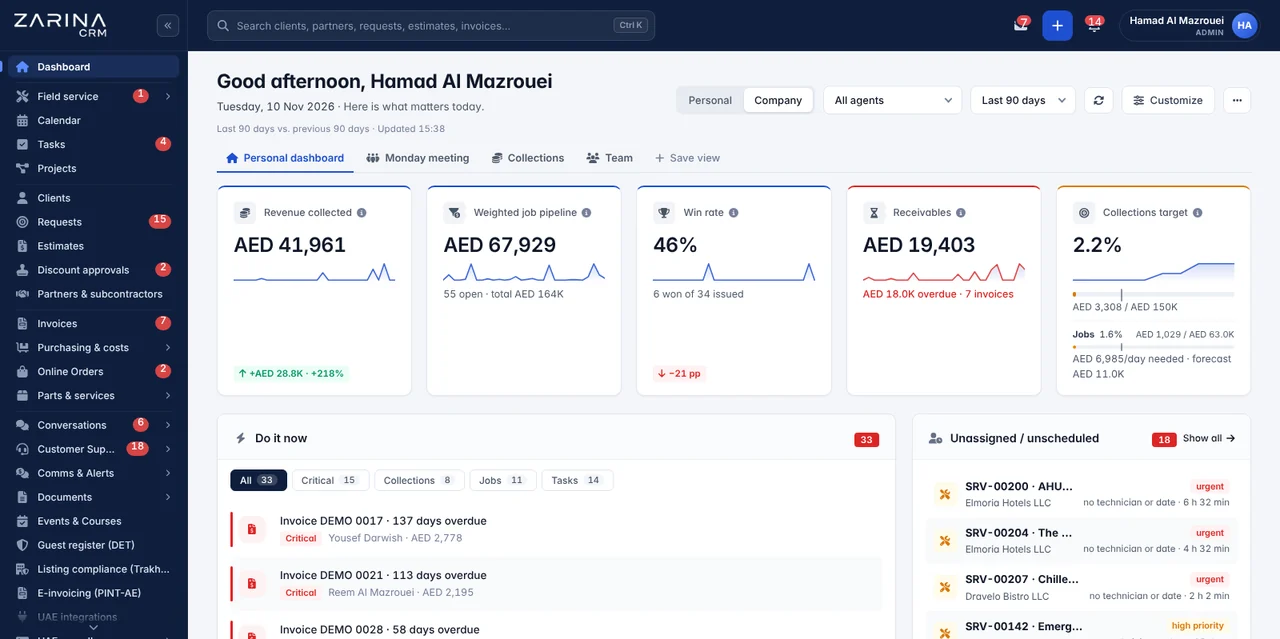
The platform is not built for a single trade. Job types, checklists, job sheet templates and the parts catalogue are configured during implementation, and a company that does both HVAC and electrical work runs both in the same database.
Service software is only useful if it holds the job end to end. Each step leaves behind a document and a figure, and the next step starts from them.
The client calls, writes on WhatsApp, fills in the form or scans the QR code on the equipment. The request lands in one place, with the location and equipment already filled in.
After inspection, the estimate goes out with two or three repair options. The client chooses and approves online, with no account and no phone calls.
The dispatcher sees the board of technicians and days, moves a job with the mouse, and the platform warns about clashes and contract deadlines.
The technician has the day’s schedule on the phone, checks in with GPS, works through the checklist, adds before and after photos and records the parts used.
The client signs on the phone, the job sheet is generated on the spot and can be paid immediately, by link or QR code.
Parts and labour flow into the invoice automatically, with VAT calculated, and the client is asked for a review after the job is closed.
Zarina CRM Services is complete technical service software and maintenance CRM, developed in Romania, covering service contracts, technician dispatch, field jobs and invoicing. The list below describes the features in the current version of the platform. We do not include features still in development.
Equipment covered, visit frequency and committed response times.
A dispatch board for technicians: people and days, with drag-and-drop moves.
Installs on the phone as an app, without an app store, and works without signal.
The document is done on the spot, not in the office at night.
Two or three solutions to the same problem.
Every technician has their own warehouse.
The history lives on the equipment, not in a folder.
The job is paid before the technician leaves.
Clients no longer call to ask where the technician is.
The financial side starts from the job, not from Excel.
The indicators a maintenance company needs.
The sales and administrative side comes included.
Everything you have read above, shown in the application: from the service request and the dispatch board to the signed service report and the invoice. Pick a chapter and jump straight to what you care about.
The features described on this page are included in the 3 packages and, from PRO, in the modules specific to your field. The full mapping, area by area, and the prices are on the pricing and packages page.
Clients, partners, leads, opportunities, dashboard, roles and permissions, custom fields, reminders, 15 languages. Part of every configuration, whatever packages you choose.
The same in every edition: sales, invoicing, inventory, procurement, operations, service, support, omnichannel communication, marketing, integrations, AI, reports, HR. Only the ones you need are activated.
4 modules available only in this edition, included from the PRO package. They are added once, to any configuration.
For service and field work, the packages that matter first are Service and jobs and Invoicing and payments. The rest are added as needs arise.
Every CRM has the sales side. The difference shows in what happens at the client’s site, in the field, where paperwork and parts usually get lost.
The technician confirms arrival on site from the phone, with time and position recorded. The client sees when work actually started.
The app keeps everything on the phone — checklists, photos, parts, signature — and sends it automatically when the connection comes back.
A boiler service is nothing like a fire safety inspection. Each job type has its own steps, and nothing closes with unticked steps.
The client signs on screen, and the job sheet is generated and emailed before the technician reaches the van.
A part used on a job is deducted from the technician’s warehouse and goes into the invoice, without anyone writing it down anywhere.
The client scans the label and opens a request with the equipment and location already filled in, with its full history.
From the contract, the platform generates visits on time and places them in dispatch, with a warning as the due date approaches.
A payment link or QR code is generated from the job sheet, and the job can be paid on the spot.
Nothing is charged per technician: every activated module runs for the whole team, on your own server. The package is configured by module, according to what you actually use.
Automations are switched on once, during implementation, and run on your company’s server. They are not charged per action and do not depend on an external service.
From every contract, the platform generates visits on time and places them in dispatch. Nobody has to remember what expires when.
Booking confirmation, a reminder before the visit and a notice when the technician leaves for the site, on the channel the client prefers.
Whatever the technician uses on the job is deducted from van stock and added to the client’s invoice, with labour and travel.
After the client signs, the document is generated and emailed to the client and filed in the equipment archive.
When a request approaches the response time committed in the contract, the dispatcher gets the notification, not the client.
A few hours after the job is closed, the client receives the feedback request, and the result goes into the per-technician report.
Losses do not come from one big mistake, but from dozens of small things that never make it onto paper. The platform catches them at the source, in the field.
The technician replaces a part, writes it on a slip and the slip gets lost. At invoicing time, nobody knows what was fitted.
In Zarina CRMThe part is recorded on the phone, deducted from van stock and added to the invoice.
The contract includes four visits a year. Two are done, the client notices and asks for money back or does not renew.
In Zarina CRMThe platform generates visits on time and warns before they fall due.
Two trips to the same client because the part was not in the van. The second trip goes unbilled, out of embarrassment.
In Zarina CRMTravel and work time are recorded automatically and visible on every job.
Paper gets crumpled in the van, the signature cannot be read, and when the client disputes the job you have nothing to show.
In Zarina CRMThe job sheet is done on the phone, with photos and a signature, and stays in the equipment archive.
You only find out you missed the response time when an angry client calls.
In Zarina CRMAn alert to the dispatcher before the deadline, not after.
An annual contract with too many included call-outs can run at a loss without anyone noticing.
In Zarina CRMEvery contract has its revenue and cost, with the margin up to date.
Native international integrations: on-the-spot payments, client communication, calendar, campaigns and productivity. Each integration runs on your company’s own accounts with the respective providers.
 Stripe
 PayPal
 Wafeq
 Zoho Books
 ClearTax
 TallyPrime
 Pagero

 Messenger
 Instagram


 Google Calendar

 Google Sheets
 Google Forms


 Zapier
 Make


We prefer to say from the start what the platform does not do. A project that starts with the right expectations ends well far more often than one that starts with promises.
It is not a question of tidiness but of volume: once the company has more than two or three technicians in the field, the information no longer fits in a WhatsApp group and a spreadsheet.
The dispatcher messages each technician where to go. If something changes, five more messages follow and still nobody knows the final version.
In Zarina CRMEach technician has their own schedule in the app, updated in real time from dispatch.
Nobody can quickly say what equipment the contract covers, how many visits are left and what is included in the price.
In Zarina CRMThe contract holds its equipment, visits and deadlines in the app, with alerts before they fall due.
Technicians bring the paper in on Friday, someone types it in on Monday, and invoices go out two weeks later.
In Zarina CRMThe job sheet is signed on the phone and the invoice can go out the same day.
Every van has something in the back, but nobody knows exactly what. The same parts get bought twice.
In Zarina CRMEvery technician has their own warehouse in the system, with automatic deduction per job.
These calls eat up the dispatcher’s time and bring in no money.
In Zarina CRMThe client automatically receives the confirmation, the reminder and the on-the-way notice.
At the end of the month you have a total figure, but you do not know which contract or which type of job is costing you money.
In Zarina CRMEvery job and every contract has its own revenue, cost and margin.
The difference does not show in the first month, but in the third year. The calculator below does the maths on your company’s figures.
At 12 technicians and $40 a month each, a subscription platform means $5,760 a year, every year, however many jobs you do.
The package is paid at installation, technicians are unlimited, and the cost does not rise when you hire two more people for the field.
The application sits on your company’s server. If you stop working with us tomorrow, contracts, jobs and job sheets stay exactly where they are.
Cost calculator
A monthly per-user subscription never stops: you pay it every month, it grows with every new employee and, at the end, you are left with nothing. The lifetime licence is paid once. Move the two sliders to your team’s real size and see the difference over 36 months.
If you pay a flat subscription, divide the monthly amount by the number of users. If you do not use a system yet, leave the default values: they are typical cloud platform rates.
What you lose over three years with the subscription
—
—
The calculation covers the licence only, not hosting. The licence price does not change when you add users. At the end, the licence remains an asset of the company.
You pay for what you use, once: the licence is for life, not per month. You choose one of the 3 packages; moving to a larger one later needs no reinstallation and no data migration.
Mandatory in every configuration: users and roles, clients, locations, sales pipeline, custom fields and reminders.
Equipment covered, recurring visits, committed response times, renewal and recurring invoicing.
Board of technicians and days, map, clash and deadline warnings.
The day’s schedule, GPS check-in, checklists, photos, signature and offline work.
Solution options, online approval and conversion into a job.
Van stock, transfers, parts catalogue, equipment register and QR codes.
VAT invoicing, on-the-spot payments, subscriptions and overdue tracking.
API, webhooks, WhatsApp, SMS, email, Zapier and Make, plus the internal automations.
Implementation does not mean a link and a password. It means a platform that works the way your company works, with your people trained on it.
We put the application on your company’s hosting, with a certificate, backups and email accounts configured.
We adapt job types, checklists, job sheet templates and the parts catalogue to your trade.
We bring in clients, locations, equipment and running contracts from the files you have now.
Separate sessions for dispatch, for technicians and for management, on your company’s real data.
Anything that does not work as agreed is fixed during the warranty period, at no extra cost.
The application and the database are on your company’s server. There is no lock-in and no dependence on a subscription.
We also say plainly when we are not the right solution. An implementation that does not fit costs more than a lost sale.
Service and maintenance companies with 3–100 technicians in the field, with contracts that include periodic visits, that issue job sheets and invoice parts and labour. HVAC, district cooling, MEP, fire safety, lifts, security, IT or facility management.
Companies that want to know the margin on every job and every contract, that lose time on paperwork and client phone calls, or that forget contract visits and unbilled parts.
A tradesperson working alone, with a few jobs a month and no maintenance contracts, has nothing to recover from a platform like this. Nor is it for a company whose first need is automatic route optimisation.
Four service companies in Romania, from car service and translation to events and bookings, each with a different type of job and the same platform. Reviews are translated from Romanian.
Our tyre hotel service is integrated with the inventory catalogue. Automatic reminders help us call customers proactively at the change of season, fully optimising the workshop schedule.
Allocating projects to translators is now fully traceable. Requests from the website become leads instantly, PDF quotations are tracked when opened, and clients receive automatic communication.
Zarina CRM organised our medical conference management workflows down to the last detail. We centralise thousands of attendees, corporate partners and sponsors in a clean pipeline, monitoring payments and granting access automatically.
Birthday bookings and group appointments are organised asynchronously right on the calendar. Automatic push sync sends the data to operators’ phones in real time, eliminating double bookings.


The day’s schedule, checklists, photos, parts used and the client’s signature are stored on the phone even when there is no signal. When the phone is back in coverage, everything is sent to the platform automatically, with the time and position of the moment it was recorded, not of the sync.
The contract defines the equipment covered and the visit frequency. The platform generates the jobs on time and places them in dispatch, with a warning before they fall due. Nobody has to remember what expires when.
The default rule is that the client’s signature closes the job. It can be configured differently during implementation, but we recommend keeping it, because the signed job sheet is the only proof when a client disputes the work.
Each technician has their own warehouse in the system, stocked by transfer from the central warehouse. A part recorded on a job is deducted from van stock and added to the client’s invoice, together with labour and travel.
For the same problem you send two or three solutions, for example repair, repair with new parts or replacement. The client chooses and approves online, without an account, and the approved option becomes a scheduled job.
Yes. Through the client portal or by scanning the QR code on the equipment. In the second case, the request arrives with the equipment, location and history already filled in.
Yes. A payment link or QR code is generated from the job sheet or the invoice, through Stripe. The client pays by card, and the payment appears in the platform immediately.
No. The dispatcher allocates jobs manually, helped by the map, each technician’s schedule and the clash warnings. Automatic optimal route calculation is not implemented and we do not promise it.
Usually between two and six weeks, depending on the number of job types configured, the volume of data imported and the integrations requested. Running contracts can be brought in with their equipment and the visits already done.
On your company’s hosting, not ours. Clients, contracts, job sheets and photos stay there, and the licence is lifetime: if you stop working with us entirely, the application keeps running.
The base is the same. What changes are the active modules, the terms and the templates, depending on what the company does.
All available configurations, by the company’s type of activity.
What the platform covers, by module and by licence package.
Leads, quotations, invoicing and commissions, for sales teams.
Estimates, sites, real cost and progress valuations.
Invoices issued in the CRM go straight to accounting.
The licence packages and what each one includes, with no per-user cost.
The 3 packages, role structure and groups of companies. CRM for companies and institutions
Hosting options, server requirements, data protection and security responsibilities. CRM on your own server
Workflow audit, configuration, data migration and role-based training, included in the price. CRM implementation
A six-page document with everything you need to know before a sales conversation. No obligation and no sales call.
We install Zarina CRM on your hosting, configure it around your own workflow and train your team. From that moment on, the application is an asset of your company, not a recurring expense.
We have sent the access link to the e-mail address you entered. It usually arrives within a minute.
