


The customer portal, documents and payments in one place
The customer receives a link of their own and sees there the quotations to review, the invoices to pay, the documents to sign, the meetings booked and the support conversations. They can accept a quotation, pay an invoice, send a document or open a request, with no account and no password. The volume of calls asking “could you send me the invoice again, please” drops from the first week.
From $2,900 excl. VATone-time payment, no monthly subscription- Own link, no account
- Invoices paid online
- Quotations accepted online
- Documents signed
- Revocable at any time
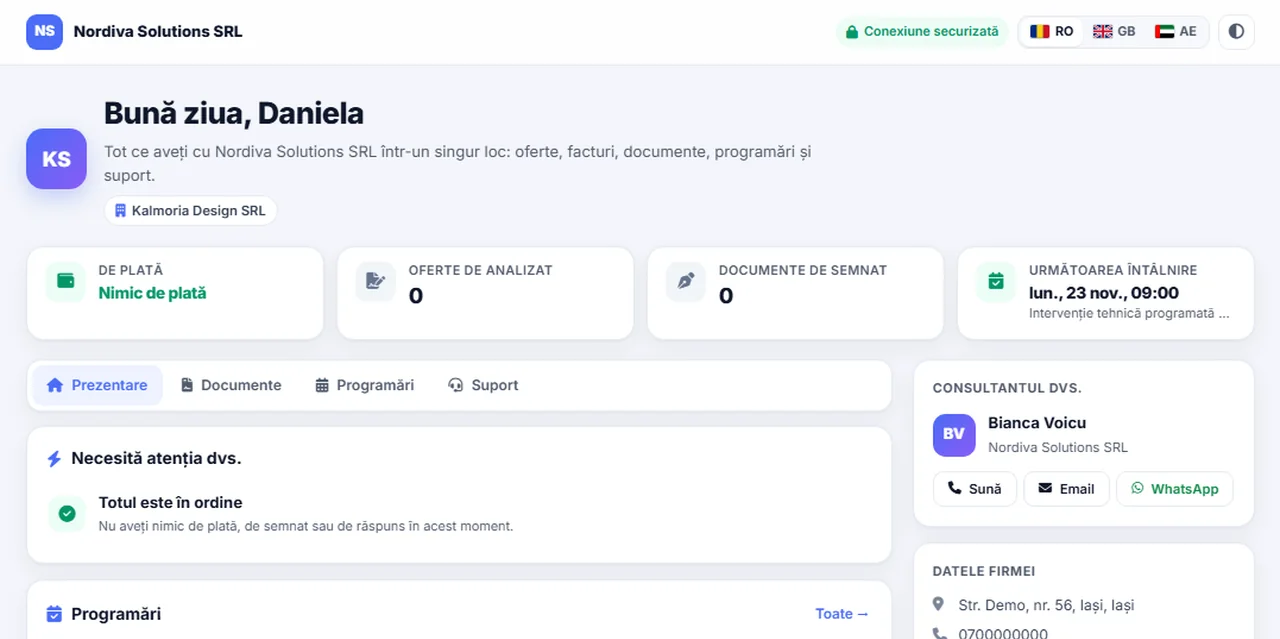
The customer portal: invoices, documents and payments in one account. The customer receives a link of their own and sees there the quotations to review, the invoices to pay, the documents to sign, the meetings booked and the support conversations. The Complete Sales package. A lifetime licence, installation on the company server and unlimited users.
Works together with: Multilingual CRM, File centralisation, Satisfaction surveys.
The situation today, when every document is sent on request
The time lost does not show up in a report, because it is spent two minutes at a time, a few dozen times a day.
- Documents are sent again and again The quotation, the invoice, the contract: each one is looked up in the archive and re-sent by email, usually by the busiest person on the team.
- The customer does not know what is due Without their own view of the balance, the conversation about arrears starts from scratch on every call and frequently turns into a dispute.
- Signing a quotation takes days The document is printed, signed, scanned and sent back. Every step adds a day and another chance to drop out.
- Payments are late for administrative reasons The customer intends to pay, but does not have the invoice to hand and has no simple way to pay at the moment they decide to.
- Requests get lost between channels The requests arrive by phone, on WhatsApp and by email, with no reference number and no committed deadline.
- The customer has nobody to talk to When the assigned consultant is unavailable, the customer is left without information, even though the data was in the system.
A space of their own for every customer, on the company domain
The portal runs on your installation and shows exactly that customer’s data, with no account and no password.
Access through a personal link
No registration, no forgotten passwords.
- A unique link per customer
- No user account
- Sent by email or WhatsApp
- Revocable at any time
The quotations to review
The commercial decision can be taken straight away.
- Quotations with the validity shown
- View and download
- Online acceptance
- Options compared, where they exist
The invoices and the balance
The customer sees exactly what is due.
- Invoices with their real status
- Overdue amounts with days late
- Credit notes marked correctly
- No drafts visible
Online payment
The moment of the decision coincides with the moment of payment.
- Card payment, if enabled
- Several invoices in a single payment
- Bank transfer with a copyable IBAN
- Automatic confirmation in the CRM
The documents to sign
Signing no longer means printing.
- Documents with online signing
- Confirmation code by email
- Signed document, archived automatically
- History of the signatures
Support and bookings
The relationship continues without extra calls.
- Requests opened from the portal
- A history of the conversations
- The next meeting shown
- The consultant’s contact details
What changes after the portal is sent to customers
The direct effects of the customer having permanent access to the data that concerns them.
Fewer administrative calls
The team answers commercial questions, not documentary ones.
- The documents, permanently available
- The balance, visible without asking
- The history, within the customer’s reach
- Time recovered for selling
Faster collection
Payment happens at the moment of the decision.
- The invoice accessible at any time
- Card payment in one step
- Several invoices at once
- Immediate confirmation in the system
Quotations accepted faster
The sales cycle gets shorter.
- Online acceptance
- No printing and scanning
- Validity visible
- A reminder before expiry
A more transparent relationship
Conversations about amounts become rare.
- The same figures for both sides
- Credit notes marked correctly
- Full history
- Fewer disputes
A professional image
Your own portal sets you apart from the competition.
- On the company domain
- Your own visual identity
- Available in several languages
- Works on a phone
Useful commercial signals
Customer behaviour becomes information.
- A notification when the portal is opened
- Quotations seen, but not accepted
- Documents awaiting action
- The right moment to follow up
How the customer reaches the portal and what they find there
The whole process takes a single step on the customer’s side: opening a link.
- 1
The consultant sends the portal
From the customer record, the link is sent by email or on WhatsApp, in the customer’s language, with an optional personalised message.
- 2
The customer opens the link
No registration is asked for and no password is created. The page opens directly, on any device, in the configured language.
- 3
The first screen shows what needs attention
The arrears, the documents to sign, the quotations waiting and the next meeting appear grouped, with a direct button to each.
- 4
The customer acts
They accept a quotation, pay an invoice, sign a document, send a file or open a support request.
- 5
The action reaches the CRM immediately
The payment is recorded against the invoice, the signed document is archived, the request becomes a ticket. The consultant is notified.
- 6
The history stays on the customer record
Every action in the portal appears in the customer timeline, so whoever takes over the relationship has the full context.
The customer portal, in short, inside the application
Paying and signing, without administrative steps
The two operations that are most often delayed are also the ones that can be moved entirely to the customer.
Paying several invoices at once
The customer settles the balance in a single operation.
- A selection of invoices in the same currency
- A single payment link
- Automatic allocation across the invoices
- Confirmation on each document
Assisted bank transfer
The classic route, without transcription errors.
- An IBAN copied in one click
- Payment details pre-filled
- The exact amount shown
- Useful for payments made by accounting
Online signing of documents
Contracts close on the same day.
- The document opened from the portal
- Confirmation code by email
- The signature recorded with date and time
- Automatic archiving on the customer record
Documents sent by the customer
The documents needed arrive without an exchange of emails.
- Upload from the portal
- File types checked
- They enter the document register
- Notification to the consultant
What the company controls about the portal
Customer access is only useful if its limits are set explicitly by the company.
- What is displayed is decided by the company The sections available in the portal are enabled selectively. Documents in progress and unissued ones are never visible to the customer.
- The link can be revoked When the contact person changes or the relationship ends, a new link is generated and the old one stops working immediately.
- Online payment is enabled optionally The portal works without card payment as well. Bank transfer stays available in every configuration.
- Uploads from the customer can be switched off If you do not want documents received through the portal, the section is disabled without affecting the rest of the functions.
- Openings are recorded The company sees when the customer opened the portal, information that is commercially useful but used strictly within the relationship with that customer.
- The portal is not indexed The pages do not appear in search engines and do not pass information to third-party sites.
What happens automatically around the portal
Mechanisms that move administrative work off the team and into the natural flow of the relationship.
The link in everyday communications
The customer always has the portal to hand.
- A line in the quotation email
- A line in the invoice email
- A line in the documents to sign
- A global switch for the administrator
Bulk sending
The portal reaches all customers in a single operation.
- A selection from the customer list
- Sent in batches, with progress shown
- Customers informed recently are skipped
- A detailed result at the end
Notifications to the consultant
The team finds out about every action immediately.
- The portal being opened
- A document uploaded by the client
- An online payment made
- A new support request
Automatic confirmations
The customer is never left in doubt.
- Confirmation after payment
- Confirmation after signing
- A message after a document is sent
- No administrative intervention
Recovery of unconfirmed payments
No payment goes unrecorded.
- A periodic check of pending payments
- Recorded without duplication
- Closing the link that was used
- An alert to the administrator
A reminder on documents awaiting action
Quotations and signatures do not get forgotten.
- Scheduled follow-ups
- It stops at the first action
- Visible in the consultant’s activity
- Configurable per company
How the customer’s access is protected
The portal exposes commercial data to somebody outside the company. The mechanisms are designed for exactly that situation.
- A link with a secret element, per customer Access uses an identifier of its own that cannot be guessed. One customer cannot reach another one’s data by editing the address.
- Immediate revocation Generating a new link instantly invalidates the previous one, which is useful when the contact person changes.
- Signing asks for an extra confirmation Documents are signed after confirming a code received by email, so the signature can be attributed to a person.
- Limits against abuse Requests, uploads and payment attempts have limits per customer and per address, to prevent abusive use.
- The files received are checked The real type of the uploaded files is checked, not only the extension. Files that do not match are rejected.
- The pages are not indexed The portal sends headers that prevent indexing and display in frames on other sites.
What needs to be prepared to put the customer portal module into service
We do the configuration ourselves at implementation. The data displayed is decided together with you.
Correct contact details in the records
The portal is sent to the real people.
- Email addresses up to date
- Phone numbers for sending on WhatsApp
- Contact persons per customer
- Cleaned up at implementation
The decision on the sections displayed
Not everything that exists has to be shown.
- Quotations, invoices, documents
- Bookings and support
- Uploads from the portal
- Settled before launch
An email server configured
The link and the confirmations go out through it.
- An active sending account
- A domain with its reputation configured
- The consultant’s signature
- Checked at implementation
A payment processor, optional
Needed only for card payment.
- An account with a processor
- Keys entered by you
- Tested in trial mode
- Bank transfer stays available in any case
Visual identity
The portal looks like your own company.
- Logo and colours
- Company details
- The languages needed
- Configured at implementation
Internal rules for responding
The customer’s actions call for a response.
- Somebody responsible for the notifications
- A response time for requests
- A procedure for documents received
- Agreed at implementation
The limits of the customer portal module, stated explicitly
The portal is a space for the customer to consult and to act, not an administration application.
- It is not a user account The customer does not administer data, does not change records and has no access to internal information. They see only what concerns their own commercial relationship.
- The signature is not a qualified one Online signing with code confirmation has the value of evidence of agreement. For documents that require a qualified electronic signature, dedicated tools are used.
- Card payment requires a processor The fees are paid directly to the processor, from the company account. The CRM licence does not include processing costs.
- It does not display unissued documents Drafts and documents in progress stay internal. That is a design decision, not a technical limitation.
- It depends on the data being correct A wrong balance in the system becomes a wrong balance visible to the customer. Checking the data before launch is part of the implementation.
- It does not replace communication The portal cuts the administrative calls, but the commercial relationship stays with the consultant. We are not proposing to automate the relationship with the customer.
Paying documents from the customer portal
The customer sees their own quotations and invoices, and where a payment link exists they can pay directly, with no exchange of emails.



The money is received into your own company account. The platform does not handle the funds.
When this module makes sense and when it does not
We prefer to say from the start in which situations the module is not worth its cost, so the sales conversation does not begin with the wrong expectations.
It makes sense if
The situations in which the module pays for itself quickly.
- Customers often ask for documents you have already issued
- You send the same files several times over
- You want the payment to happen in the same place as the document
- You work with customers who have verification procedures of their own
It does not make sense if
The situations in which we recommend not buying it now.
- Your customers prefer email and do not want new accounts
- You issue few documents, and you send them once
- You have no quotations, invoices or tickets to show
- The portfolio is made up of a few close customers
Which package the customer portal belongs to
The module is licensed together with the customer-relationship tools.
The customer relationship package
It contains the portal, support with tickets and the documents to sign.
What the core includes
The mandatory core brings users and roles, clients and contacts, a lead and sales pipeline, custom fields and 15 interface languages.
Together with online payments
For card payment it is used together with the receipts and payments module.
Pricing and configurations
Package composition and prices by edition are on the pricing page.
Companies that have trusted Zarina CRM


The customer portal: what it costs and what you get
You pay once. Everything that follows is written here, not in hidden conditions.
It is part of the complete Sales package: $570 + VAT, on top of the core ($2,320). Bought separately, together with the core: $2,890.
Cheaper in a bundle. The tiers group several packages at a price lower than their sum:
- Start2 packages + core$2,900−19%
$3,570 - Pro5 packages + core$3,480−34%
$5,280 - Business8 packages + core$4,640−38%
$7,460 - Enterprise13 packages + core$6,970−31%
$10,080
List prices, excl. VAT, one-time payment, unlimited users. The struck-through price is the sum of the packages bought individually. Current offers apply on the pricing page.
What you pay over time for a subscription CRM
Over 3 years, the subscription costs $10,480; the Zarina Start licence costs $2,900, once.
An indicative comparison: enter the subscription price you pay now. The licence does not grow with the number of users.
What you get
- A lifetime licence, with no subscription and no per-user charge
- Unlimited users, on the same licence
- 6 months of warranty on correct operation: fixing errors and inconsistencies
- Implementation, configuration and team training, included in the price
- The licence is verified locally, on your own server: the application does not depend on our servers to work
How long it takes and what is needed
- 48 hours in the standard configuration; up to 14 working days with customisation around the company’s workflow
- Your own server or web hosting with cPanel, with an SSL certificate
- PHP 7.4 or newer (8.x recommended) and MySQL / MariaDB
- The PHP extensions mysqli, json, mbstring; curl, gd and zip for integrations, PDF and exports
- One cron task, for reminders and automations
Where data lives
- The data stays on your server and does not pass through ours
- Roles and rights per user, two-factor authentication
- An audit trail and limits on login attempts
- Consents and data subject requests, managed in the application
- Digitally signed updates and backups from the application
Questions about the customer portal
Does the customer have to create an account?
Is access without a password safe?
What exactly does the customer see?
Can I switch certain sections off?
What happens if the contact person leaves the customer company?
Can the customer pay several invoices at once?
Does the portal appear in Google?
Does it work on a phone?
Do we find out whether the customer opened the portal?
Can it be used in several languages?
Get the complete product sheet by email
A six-page document with everything you need to know before a sales conversation. No obligation and no sales call.
- The platform core and the 13 module packages, with what each one contains
- The features and modules of the edition you choose, plus available integrations
- Full pricing and what it includes: installation, training, data import, warranty
- The native integrations available and the situations where the platform is not a good fit
Take control of your operations, once
We install Zarina CRM on your hosting, configure it around your own workflow and train your team. From that moment on, the application is an asset of your company, not a recurring expense.