Medical CRM · ophthalmology and optics profile

Software for ophthalmology clinics, with the prescription and lens order in the same file

In a clinic with its own optical shop, the chain almost always breaks in the same place: the examination is in the record, the prescription on paper, the lab order in a notebook, and the customer calls to ask whether their glasses have arrived and nobody can answer without searching. Zarina CRM keeps measurements for each eye, generates the prescription from the examination, with the spherical equivalent and vertex correction for contact lenses, and tracks the order through all its stages, to handover and payment. It is installed on the clinic’s own server, with a lifetime licence.

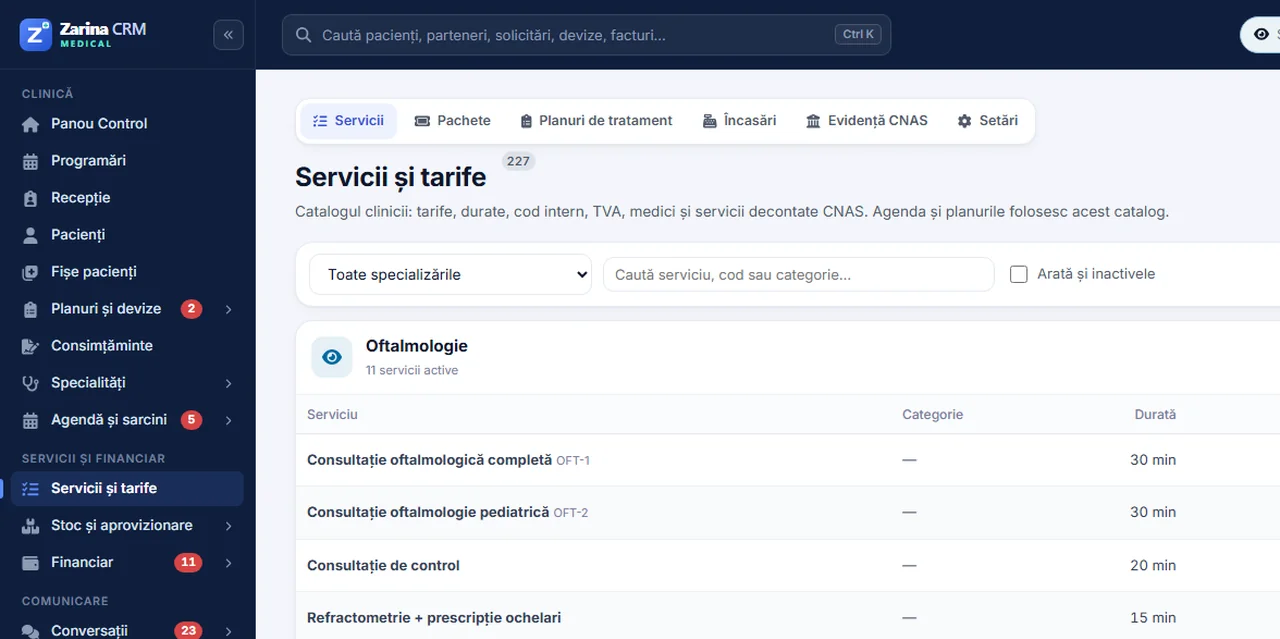
Screenshot from Zarina CRM Medical: the service catalogue and fees for an ophthalmology practice
Clinic workflow

From examination to handing over the glasses, in 6 steps

The same route you follow today between the consulting room, the workshop and reception, except every step stays linked to the patient.

1

Examination

Values are recorded for each eye separately, with sphere, cylinder and axis, in dedicated fields, not free text.

2

Prescription

It comes out of the examination, for glasses or contact lenses, numbered and ready to print.

3

Lens selection

Refractive index and coatings are chosen from configured lists, not written by hand on every order.

4

Lab order

The order is entered with its status and stays linked to the prescription and patient. You can see at any time where it is.

5

Fitting and notification

When the job is ready, the customer is notified in a single click, with the clinic’s name in the message.

6

Handover and payment

Handover closes the order, and payment is recorded on it, with the method used.

Examination and refraction

Values sit in fields, not free text

Each eye has its own fields. That is why the prescription can be generated automatically, and the progression of dioptres can be read across visits rather than reconstructed from cards.

For each eye separately

Sphere, cylinder and axis, recorded separately for the right and left eye, with the sign and two decimals displayed correctly.

  • Separate values per eye
  • Standardised sign and decimals
  • History per visit
  • Comparison between examinations

Spherical equivalent, calculated

Sphere plus half the cylinder — a trivial calculation, but done dozens of times a day and exactly where transcription errors appear.

  • Calculated on save
  • Shown next to the values entered
  • No calculator on the desk
  • The same rounding every time

Vertex correction

For contact lenses, powers are corrected for vertex distance when they exceed four dioptres, on both principal meridians.

  • Applied automatically above the threshold
  • On both meridians
  • Glasses and contact lenses, separately
  • Values remain traceable
Prescription

It comes out of the examination, it is not written twice

The prescription is generated from the examination already recorded, gets its own number and stays in the patient’s history.

  • Its own numbering. Each prescription issued gets the next number in the series, so it can be found and referenced without ambiguity.
  • Two types, from the same examination. For glasses or contact lenses, with values adjusted accordingly for each type.
  • Printable on the spot. The document is generated ready to print, with the clinic’s details, with no need for another program.
  • Linked to the patient. It stays in the file. At the next visit you see what was prescribed then and what has changed since.
The lens order

Every job, with its status up to date

The part of the business that gets lost most easily: what was ordered, where it is now and who needs to be notified.

The lens, chosen from lists

Refractive index and coatings are selected from the configured values, so two orders for the same job look the same.

  • Indices from 1.50 to 1.74
  • Anti-reflective, blue-cut, photochromic
  • Hard coating, polarised, hydrophobic
  • No handwritten descriptions

Order statuses

Ordered, at the lab, received, fitted, handed over. Each status has its own colour, and transitions stay in the history, with their dates.

  • Five statuses plus cancellation
  • History of changes
  • List filterable by status
  • Nothing stays forgotten at the lab

Notifying the customer

When the job is ready, the message to the customer is sent from one place, with the clinic’s name included, and stays on record.

  • Notification at “fitted” status
  • The clinic’s name in the message
  • Recorded on the order
  • No separate call lists
Money per job

Payment sits on the order, not in a separate register

A clinic with an optical shop takes payment in three ways and often in two instalments. That is why payment belongs to the order.

  • Cash, card or transfer. The method is recorded on the payment, so the end-of-day close no longer needs reconstruction.
  • Deposit and balance. An order can have several payments; the balance due is visible on every job, not at the end of the month.
  • Linked to invoicing. The invoice comes from the same data, with the clinic’s series and VAT.
  • Per patient, not just per day. You can see what a patient ordered and paid over time.
What the application does not do

It calculates and tracks, it does not decide

Limits are stated as clearly as features, because this is a tool used next to the patient.

  • It does not set the correction. The application records the measured values and calculates from them. The decision on the prescription belongs entirely to the doctor.
  • It does not recommend treatment. It does not propose therapy, optical correction or referral to another specialist.
  • It does not diagnose. It does not interpret results and does not flag eye conditions.
  • It does not connect to devices. There is no automatic import from the autorefractor or phoropter; values are entered in the application.
  • It does not order from the lab on its own. The order is tracked in the application, but actually sending it to the supplier remains your procedure.
  • We are not a healthcare provider. We deliver a working tool. Professional liability remains with the clinic.
The rest of the clinic

What else is included, from the Medical CRM

The profile sits on top of the complete Medical CRM; it is not a separate, smaller application.

Appointments and calendar

Calendar per doctor and per device, with different durations for consultation and follow-up.

  • Day, week and month view
  • Reminders to patients
  • No-shows marked
  • Booking from the file

The patient file

Consultations, prescriptions, orders and documents, in a single history.

  • Full history
  • Attached documents
  • Medical history and allergies
  • Quick search

Products and stock

Frames, contact lenses and solutions, with stock moved by sales.

  • Stock per product
  • Movements linked to documents
  • Reorder requirements
  • Your own price per product

Invoicing and payments

The invoice for the consultation and the job, with outstanding amounts tracked.

  • Your own series
  • Payments and outstanding amounts
  • Invoicing to companies
  • VAT invoices, where applicable

Patient portal

Access with their own account to appointments and published documents.

  • Access with their own account
  • Visible appointments
  • Documents published selectively
  • Prescriptions accessible

Users and roles

The consulting room, workshop and reception each see what they need, not everything.

  • Roles by job
  • Access log
  • Restrictions per module
  • Permissions on payments
Where you are today

3 things that happen without a system

These are not hypotheses: they are the reasons clinics with optical shops come to us.

The order forgotten at the lab

The job went out three weeks ago, nobody checked, and the customer calls, unhappy. It turns out it was never confirmed.

Every order has a status, and stuck ones are visible in the list.

The dioptre transcribed wrongly

The value is copied from the record to the prescription and from there to the order. On the third transcription the wrong sign appears, and the job is redone at the clinic’s expense.

The prescription and the order come from the same values, entered once.

Lost history

The patient comes back after two years and asks what their prescription was. The old card is in a folder, and the comparison can no longer be made.

All examinations stay in the file, comparable with each other.

Transparency

What to know beforehand

The information we would rather share before the contract, not after.

  • No connection to devices. There is no import from the autorefractor, phoropter or lensmeter. Values are entered in the application.
  • The lens catalogue does not come populated. Indices and coatings are the standard lists; your supplier’s catalogue, with prices, is entered during implementation.
  • Customer notification depends on the configured channel. The message is generated from the application; sending uses the channel you have active.
  • There is no native mobile app. The interface is web-based and works on a tablet too, but there is no app in the App Store or Google Play.
  • We are not a healthcare provider. Professional liability and reporting obligations remain with the clinic.
Licensing model

A lifetime licence, not a monthly subscription

You pay once for the licence. There is no per-user cost and no monthly fee to keep using the application.

  • Unlimited users. The doctor, optometrist, workshop and reception all get access, with no per-account cost.
  • It runs on your side. On the clinic’s server or on hosting of your choice. Patients’ data does not pass through us.
  • Prices are not invented here. You will find them on the pricing page, together with what is and is not included in each package.
  • Maintenance is optional. The application works without a support contract.
Implementation

What you get when you sign the contract

Installation and profile

We install the application on your server and configure the ophthalmology profile, with the examination form and prescription series.

The lens catalogue

We enter your supplier’s indices, coatings and prices, so the first order can be placed on installation day.

Training by role

Separate sessions for the consulting room, workshop and reception, because each uses a different part of the application.

Fit

Who it is for and who it is not for

It is for

Ophthalmology clinics with their own optical shop, where the examination and lens order must stay linked to the same patient.

It is for

Optical shops with an optometrist that issue prescriptions, track lab orders and take payment in instalments.

It is not for

Anyone looking for direct integration with measuring devices or automatic sending of orders to the supplier. Those are separate projects.

Security

Where the data lives and who is responsible for it

Prescriptions are medical data. The question deserves a short answer.

  • On your server. Installation is at the clinic or on the hosting you choose — in the UAE, if you wish. There is no copy of the data with us.
  • You are the controller. Under data protection law, the clinic is the data controller. We intervene only on request, for support.
  • Role-based access, with a log. The workshop sees the orders, not the whole medical file. You see who logged in and when.
  • Backups in your hands. We show you how they are made and restored.
Frequently asked questions

Answers about the ophthalmology profile

Is the prescription generated automatically from the examination?

Yes. The prescription is issued from the values recorded at examination, for glasses or contact lenses, with its own numbering and ready to print. The values are not rewritten.

What is vertex correction and when is it applied?

It is the adjustment of dioptric power according to the distance between the lens and the eye, needed for contact lenses. The application applies it when the power exceeds four dioptres, on both principal meridians.

Is the spherical equivalent calculated?

Yes, as sphere plus half the cylinder, when the examination is saved, with the same rounding every time.

Can I track orders at the lab?

Yes. Every order has a status — ordered, at the lab, received, fitted, handed over — with the history of changes and the option to filter the list by status.

Is the customer notified when the job is ready?

The message is generated from the application, with the clinic’s name, and stays recorded on the order. Sending uses the channel you have configured.

Can payment be taken in two instalments?

Yes. An order can have several payments, with the method recorded on each — cash, card or transfer — and the balance due is visible on the job.

Are values imported from the autorefractor?

No. There is no connection to measuring devices; values are entered in the application. We state this explicitly, before the contract.

Does it work for an optical shop without a doctor?

Yes, for the optometry, prescription and order side. The medical optics speciality is configured separately, with the same module.

Can the progression of dioptres be seen over time?

Yes. All examinations stay in the patient’s file and can be compared with each other, for each eye.

How do I see what it looks like before buying?

Ask for demo access to the ophthalmology profile. You receive an email link that opens exactly this version, with sample data.

Other medical profiles

The same solution, configured for another practice

The Medical CRM is configured by speciality. If you do not work only in ophthalmology, go straight to your own version.

Medical CRM

The complete solution: patient file, appointments, invoicing and portal.

Gynaecology CRM

The pregnancy file, with gestational age and tests at the right time.

Paediatrics CRM

Growth charts on WHO references and the immunisation schedule.

Dental CRM

The dental chart, the per-tooth treatment plan and the estimate that comes out of it.

Psychology CRM

Encrypted session notes, the PHQ-9 and GAD-7 scales and the therapy plan.

Lifetime licence

Examination, prescription and order, in the same file

Unlimited users, installed on the clinic’s server, no monthly subscription. Request a demo environment of the ophthalmology profile and issue a sample prescription before any sales conversation.