The complete Sales package

Quote creation, from the catalogue, with approval and tracking

Quotes are drawn up from the catalogue of products and services, with prices, quantities and lead times carried over automatically, and go to the client as a document or as a link. Discounts above the agreed limit require approval, stock is reserved on issue, and acceptance turns the quote into an invoice without re-entering the data.

From $2,900 excl. VATone-time payment, no monthly subscription
  • Included from the Start tier
  • Lines from the catalogue
  • Approval on discounts
  • Stock reserved on issue
  • Conversion into an invoice
Quotes · Zarina CRM
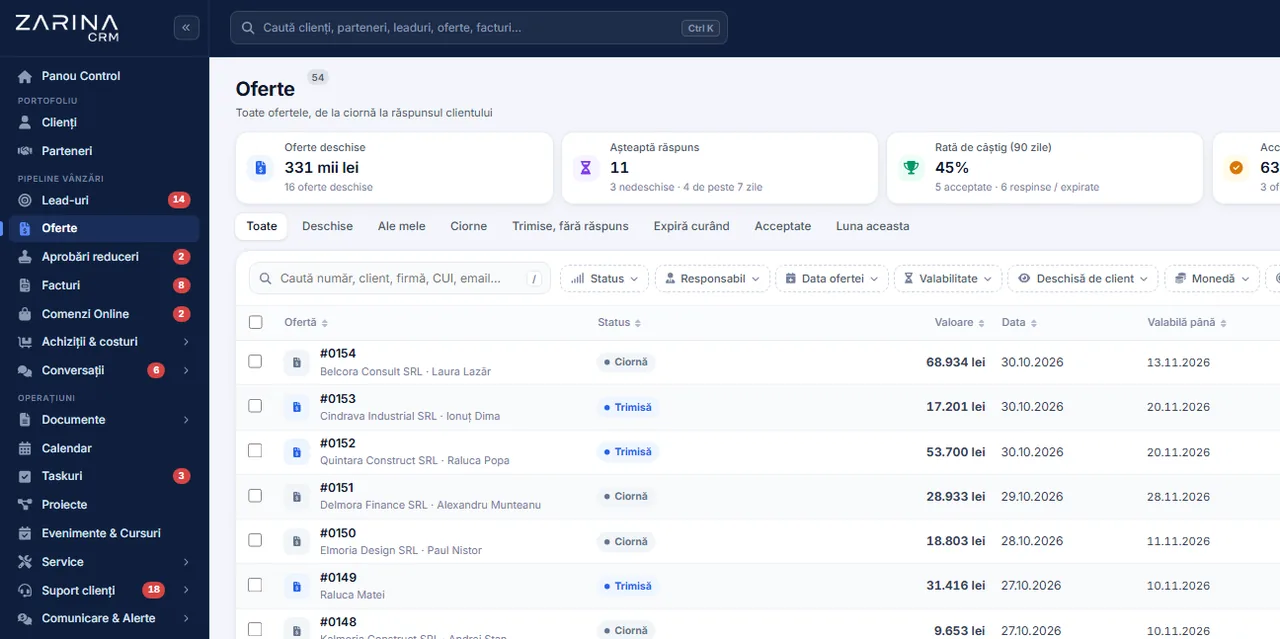
The quote list in Zarina CRM with status, value, date and validity, plus the 90-day win rate
Included from the Start tier
Lines from the catalogue
Approval on discounts
In short

Quote creation in a CRM, from the catalogue and with approval. Quotes are drawn up from the catalogue of products and services, with prices, quantities and lead times carried over automatically, and go to the client as a document or as a link. The complete Sales package. A permanent licence, installed on the company’s server, with unlimited users.

Works together with: Web quotes with tracking, Multilingual CRM, Document generation.

The problem

The situation today, when quotes are written in a text editor

Every quote written by hand is a source of errors in price, in lead times and in how the company looks.

  • Every quote looks different The documents differ from one consultant to another: different wording, different terms, different format. The client gets an inconsistent picture.
  • Prices are typed by hand One wrong figure means either a loss accepted in silence or an awkward conversation with the client after acceptance.
  • Discounts are given without control Everyone negotiates as they see fit. The company finds out the real margin at invoicing, when nothing can be corrected.
  • Nobody knows whether the quote was read After sending comes a period of silence, where the only option is a check-up call.
  • Re-quoting starts from zero An old quote cannot be picked up quickly. It is rebuilt, with the risk of leaving out something from the earlier conversation.
  • There is no learning from quotes Without records, nobody knows the acceptance rate of the quotes, on which products and at what level of discount.
What the module does

What the quoting module includes

It is part of the complete Sales package and works on the same data as the pipeline, the stock and the invoicing.

Drawn up from the catalogue

The data comes from the catalogue, not from memory.

  • Products and services with a price
  • Quantities and units of measure
  • Discounts per line or on the total
  • Automatic calculation with VAT

Documents with the company’s identity

The quote looks the same, whoever sends it.

  • Your own document template
  • Logo, company details, terms
  • PDF generation
  • Consecutive numbering

Discount approval

The margin no longer depends on each negotiator.

  • Discount limits by role
  • An approval request when exceeded
  • The decision recorded
  • Transferring to another user does not bypass the rule

The link with the stock

What you promise exists, not just on paper.

  • A reservation when the quote is issued
  • Released on rejection or expiry
  • Reinstated when reopened
  • Available stock visible

Validity and status

Every quote has a clear cycle.

  • A validity period
  • Statuses: sent, accepted, rejected, expired
  • Automatic expiry
  • History of changes

Conversion into an invoice

Acceptance requires no re-entry.

  • An invoice generated from the quote
  • The lines carried over in full
  • It respects the discount approval
  • The link stays visible
What changes

What changes in the first month after the quoting module is switched on

The direct effects of quoting becoming a process, not a document each person writes as best they can.

01

Quotes sent faster

The time to draw one up drops significantly.

  • Lines from the catalogue
  • A template already configured
  • Reusing an earlier quote
  • Sending from the application
02

The margin protected

Discounts no longer get out of control.

  • Limits by role
  • Approval when exceeded
  • Visibility over the discounts granted
  • The margin known before signing
03

Fewer price errors

The document is no longer typed.

  • Prices from the catalogue
  • Automatic calculation
  • A check before sending
  • No embarrassing corrections after acceptance
04

Follow-up without phone calls

The status of the quote is visible in the system.

  • The status updated
  • A validity period
  • Scheduled follow-ups
  • A history on the client
05

Invoicing without double work

The accepted quote becomes a tax document.

  • Conversion in one step
  • The lines carried over in full
  • No retyping
  • No differences between the quote and the invoice
06

Learning from the results

Quoting becomes measurable.

  • The acceptance rate
  • The products with the best conversion
  • The level of the discounts granted
  • Price decisions backed by evidence
In the application

The path of a quote, step by step

The same flow for a quote with a few lines and for one with dozens of positions.

The quote list in Zarina CRM with status, value, date and validity, plus the 90-day win rate
  1. 1

    The quote starts from the opportunity or from the client record

    The client details and the context of the conversation are already in the system, so they are not re-entered.

  2. 2

    The lines are added from the catalogue

    The products and services come with a price, a unit of measure and a VAT rate. Quantities and discounts are filled in on the spot.

  3. 3

    A discount above the limit requires approval

    If the level exceeds the role’s limit, the quote goes into approval and the decision stays recorded. The rule is not bypassed by transferring the quote.

  4. 4

    The document is generated and goes to the client

    The PDF document is produced and sent from the application, or transmitted as a link if the web quote module is active.

  5. 5

    The stock stays reserved while the quote is active

    On rejection or expiry the reservation is released. On reopening it is reinstated, so the availability shown is real.

  6. 6

    Acceptance leads to an invoice

    The accepted quote turns into an invoice or proforma, with the lines carried over in full and respecting the discount approval.

Video tour

Quote creation, in short, inside the application

Coming soonThe video presentation of the module is being prepared.
Documents

The quote document, in the company’s identity

The quote is often the first official document the client sees from you.

Your own template

Not a format imposed by the software.

  • Logo and company details
  • A configurable structure
  • Standard commercial terms
  • Your own closing text

Several templates

Different situations call for different documents.

  • A template by type of sale
  • Versions in several languages
  • Selectable at issue
  • Changeable later

Numbering and records

Every document has an identity.

  • A series and consecutive numbering
  • The issue date
  • The author recorded
  • Reviewable at any time

Annexes and attached documents

The quote can come as a package.

  • Technical sheets attached
  • Presentation documents
  • They stay linked to the quote
  • Sent together with the document
Follow-up

Control over discounts and margin

This is where a sales company loses the most money: in discounts granted without rules.

  1. 01

    Discount limits by role

    Every role has a maximum discount level. Above it, the quote does not go out without the decision of the person in charge.

  2. 02

    The approval request stays recorded

    It is known who asked, who approved or rejected and when. Responsibility is no longer debatable.

  3. 03

    The rule is not bypassed by transferring

    Transferring the quote to a user with a higher limit does not avoid the approval. It is an explicit check in the application.

  4. 04

    Conversion into an invoice respects the approval

    A quote with an unapproved discount does not become an invoice. The control applies to the end of the flow.

  5. 05

    The discounts granted are reportable

    You can see the average discount level by consultant, by product and by period.

  6. 06

    The margin is visible only where it should be

    Access to cost and margin is granted by role, not to everyone by default.

Automations

What cuts administrative work in the quoting module

Mechanisms that shorten the road from a conversation to a signed document.

Reusing a quote

Re-quoting does not start from zero.

  • Duplication in one click
  • The lines kept
  • Prices refreshed
  • The new quote, numbered separately

Automatic expiry

Quotes do not stay open indefinitely.

  • A validity period
  • Automatic move to expired
  • The reserved stock is released
  • A report on expired quotes

Scheduled follow-ups

Quotes awaiting an answer get followed up.

  • Follow-up sequences
  • They stop at the first reply
  • Configurable by type of quote
  • A log of what was sent

Sending from the application

The document goes out with no manual steps.

  • An email with the document attached
  • A message template
  • Recorded in the client’s history
  • A log of what was sent

Conversion into an invoice

One step, not a process.

  • An invoice or proforma from the quote
  • The lines carried over in full
  • The link stays visible
  • No differences between the documents

Reports on quoting

The results become information.

  • The acceptance rate
  • The value quoted in a period
  • The discounts granted
  • Export for analysis
Who sees what

Access to quotes and prices

Prices, discounts and margins are commercially sensitive information.

  • Visibility by portfolio and team A consultant sees the quotes of their own clients and, depending on the configuration, those of the team.
  • Cost and margin have separate rights Access to the purchase price and to the margin is granted explicitly, to the financial and management roles.
  • Changes stay in the history Changes to lines, prices or discounts are logged, with the author and the date.
  • The documents are protected The generated documents are served only to users with the right, through verified links.
  • Cancelling and deleting are controlled Operations on issued documents follow rules; they are not executed at a simple click.
  • Data on the company’s server The quotes, the prices and the documents stay in your own installation.
What you need

What needs preparing to switch the quoting module on

We do the configuration at implementation, on the way you actually quote.

01

The catalogue of products and services

The foundation of correct quoting.

  • Items with a price and a unit
  • VAT rates
  • Import from your existing records
  • A check before saving
02

The quote template

The document the client sees.

  • Visual identity
  • Standard commercial terms
  • A closing text
  • Versions by language, if needed
03

The discount policy

The decision that protects the margin.

  • Limits by role
  • Who approves
  • Exceptions, if any
  • Agreed before go-live
04

The validity periods

They set the cycle of the quote.

  • A default validity
  • By type of quote
  • Behaviour on expiry
  • Reviewable later
05

Document numbering

It has to continue your existing records.

  • A series and a starting number
  • Numbering rules
  • Taken over at implementation
  • Checked on the first document
06

The rights on prices

It is settled who sees the cost.

  • Roles with access to the margin
  • Roles that approve discounts
  • Visibility across teams
  • Reviewable later
What it does not do

The limits of the quoting module, stated explicitly

The module produces and tracks commercial quotes. It is not an industrial configurator and does not replace accounting.

  • It is not a configurator for complex products For products with dozens of interdependent options, the configuration needs a separate analysis; it is not included by default.
  • It does not calculate standardised cost estimates For construction estimates with official norms and indicators there is the dedicated edition, not the standard quoting module.
  • Comparative variants are not part of the standard module Quotes with several variants presented to the client to choose from exist in the edition for service companies.
  • It does not guarantee acceptance The module shortens the time and protects the margin. The acceptance rate depends on the offer and on the commercial relationship.
  • It does not replace the accounting software Commercial documents and proformas are produced in the application; the accounting entry stays in your accounting software.
  • The quality depends on the catalogue An incomplete catalogue produces incomplete quotes. Cleaning the data is part of the implementation.
Who it is for

When this module makes sense and when it does not

We prefer to say from the start in which situations the module is not worth its cost, so the sales conversation does not begin with the wrong expectations.

It makes sense if

The situations in which the module pays for itself quickly.

  • You send more than a few quotes a week
  • The quotes have products, variants and terms that repeat
  • You want to know whether the quote was opened
  • Price or VAT errors appear from manual copying

It does not make sense if

The situations in which we recommend not buying it now.

  • You quote in writing once a month, with a short text
  • The price is fixed and public, with no negotiation
  • You work only on orders received, with no quoting stage
  • You have no catalogue of products or services
How to buy

How the quoting module is licensed

It is part of the complete Sales package, included from the Start tier.

The complete Sales package

It is licensed together with the complete Sales package, included from the Start tier.

What the core includes

Users and roles, clients and contacts, leads and the sales pipeline, custom fields and 15 interface languages.

Together with the web quote

For sending as a link, with the openings tracked and online signing, the web quote module is used.

Pricing and configurations

Package composition and prices by edition are on the pricing page.

CRM implementations

Companies that have trusted Zarina CRM

Metod Sistem - Zarina CRM clientMetod Sistem
SICC Project Services - Zarina CRM clientSICC Project Services
Lapis Residence - Zarina CRM clientLapis Residence
Onyx Residence - Zarina CRM clientOnyx Residence
Iași Clinical Hospital of Pulmonology - Zarina CRM clientIași Clinical Hospital of Pulmonology
Regional Office for Cross-Border Cooperation Iași - Zarina CRM clientRegional Office for Cross-Border Cooperation
Arpa Imobiliare - Zarina CRM clientArpa Imobiliare
Rubin Capital - Zarina CRM clientRubin Capital
Hotel Palas Grand View - Zarina CRM clientHotel Palas Grand View
Grey Boutique Hotel Palas - Zarina CRM clientGrey Boutique Hotel Palas
Bucovina Resort and Spa - Zarina CRM clientBucovina Resort & Spa
HighLife Events - Zarina CRM clientHighLife Events
PavMar Beton - Zarina CRM clientPavMar Beton
Clinica Lauderma - Zarina CRM clientClinica Lauderma
Axa Traduceri Iași - Zarina CRM clientAxa Traduceri
AFQ Accounting - Zarina CRM clientAFQ Accounting
Moldo Garage - Zarina CRM clientMoldo Garage
Zuzu Land - Zarina CRM clientZuzu Land
Ziarul Unirea - Zarina CRM clientZiarul Unirea
Meat Me Up Belgium - Zarina CRM clientMeat Me Up Belgium
Joues et Croquettes Belgium - Zarina CRM clientJoues et Croquettes Belgium
Price, warranties and implementation

Quote creation: what it costs and what you get

You pay once. Everything that follows is written here, not in hidden conditions.

The price

It is part of the complete Sales package: $570 + VAT, on top of the core ($2,320). Bought separately, together with the core: $2,890.

Cheaper in a bundle. The tiers group several packages at a price lower than their sum:

  • Start2 packages + core
    $2,900$3,570
    −19%
  • Pro5 packages + core
    $3,480$5,280
    −34%
  • Business8 packages + core
    $4,640$7,460
    −38%
  • Enterprise13 packages + core
    $6,970$10,080
    −31%

List prices, excl. VAT, one-time payment, unlimited users. The struck-through price is the sum of the packages bought individually. Current offers apply on the pricing page.

Subscription or licence

What you pay over time for a subscription CRM

Subscription$10,480
Zarina Start$2,900

Over 3 years, the subscription costs $10,480; the Zarina Start licence costs $2,900, once.

An indicative comparison: enter the subscription price you pay now. The licence does not grow with the number of users.

After purchase

What you get

  • A lifetime licence, with no subscription and no per-user charge
  • Unlimited users, on the same licence
  • 6 months of warranty on correct operation: fixing errors and inconsistencies
  • Implementation, configuration and team training, included in the price
  • The licence is verified locally, on your own server: the application does not depend on our servers to work
Implementation and server

How long it takes and what is needed

  • 48 hours in the standard configuration; up to 14 working days with customisation around the company’s workflow
  • Your own server or web hosting with cPanel, with an SSL certificate
  • PHP 7.4 or newer (8.x recommended) and MySQL / MariaDB
  • The PHP extensions mysqli, json, mbstring; curl, gd and zip for integrations, PDF and exports
  • One cron task, for reminders and automations
Security and data protection

Where data lives

  • The data stays on your server and does not pass through ours
  • Roles and rights per user, two-factor authentication
  • An audit trail and limits on login attempts
  • Consents and data subject requests, managed in the application
  • Digitally signed updates and backups from the application

Do you have a question about quote creation?

We answer in writing, with the exact price for your configuration.

Frequently asked questions

Questions about the quote creation module

Can I use my own quote format?
Yes. The document template is configured with the company’s identity, the commercial terms and your own texts, and several templates can be defined for different situations.
How are the discounts granted controlled?
Every role has a discount limit. Above it, the quote goes into approval and the decision stays recorded. Transferring the quote to a user with a higher limit does not bypass the rule.
Is stock reserved when the quote is issued?
Yes, if the stock module is active. On rejection or expiry the reservation is released, and when the quote is reopened it is reinstated, so the availability shown is real.
Does an accepted quote become an invoice automatically?
The conversion happens in one step, at the user’s decision, with the lines carried over in full. A quote with an unapproved discount cannot be converted.
Can I reuse an old quote?
Yes, by duplicating it. The lines are kept, the prices can be refreshed from the catalogue, and the new quote gets its own number.
What happens to quotes the client does not answer?
They expire at the validity date set, and the stock reservation is released. In the meantime they can get scheduled follow-ups, through the follow-up module.
Can I send the quote as a link instead of an attachment?
Yes, with the web quote module. The client opens the quote on a page, and you see whether it was opened and when.
Can I quote in another currency?
Yes. The currency is chosen on the quote, and the conversion into the base currency uses the configured rate, so the reporting stays comparable.
Do consultants see the margin on each line?
Only if their role has that right. By default, cost and margin are limited to the financial and management roles.
Is it included in the price or bought separately?
It is part of the complete Sales package, included in the Start, Pro, Business and Enterprise tiers. Separately, the package costs $570 + VAT, on top of the core.
Product sheet

Get the complete product sheet by email

A six-page document with everything you need to know before a sales conversation. No obligation and no sales call.

  • The platform core and the 13 module packages, with what each one contains
  • The features and modules of the edition you choose, plus available integrations
  • Full pricing and what it includes: installation, training, data import, warranty
  • The native integrations available and the situations where the platform is not a good fit

No monthly subscription

Take control of your operations, once

We install Zarina CRM on your hosting, configure it around your own workflow and train your team. From that moment on, the application is an asset of your company, not a recurring expense.
