Included in the core

A multilingual CRM, 15 interface languages, with right-to-left display for Arabic

The platform’s interface is translated into 15 languages: English, Arabic, Romanian, Bulgarian, Hungarian, German, Italian, Polish, Czech, Slovak, Greek, Dutch, French, Spanish and Portuguese. Each user picks their language in their own account, and for Arabic the whole interface is displayed right to left. The platform is in use in the United Arab Emirates and in Europe, so the languages are proven in daily work, not just listed in a catalogue.

From $2,900 excl. VATone-time payment, no monthly subscription
  • 15 interface languages
  • A language per user
  • Right-to-left display
  • A single installation
  • Included in the core
Multilingual · Zarina CRM
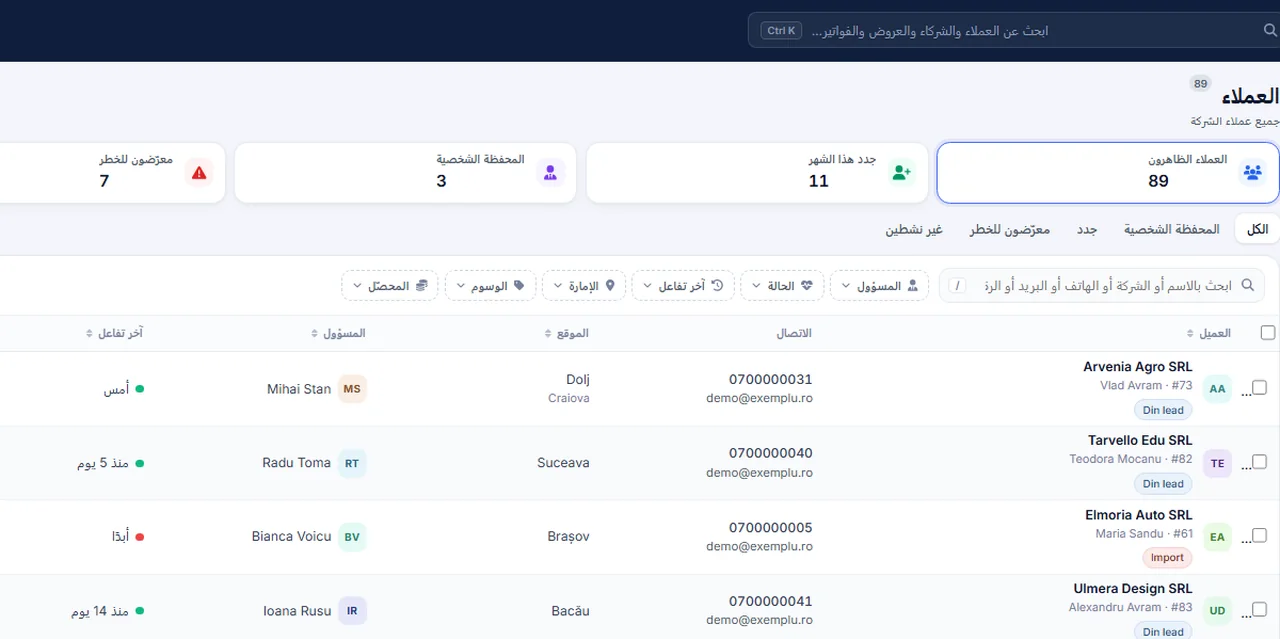
Screenshot from Zarina CRM: the client list in the Arabic interface, displayed right to left; the CRM has 15 languages, including English and Arabic
15 interface languages
A language per user
Right-to-left display
In short

A multilingual CRM: 15 interface languages, with RTL support. The platform’s interface is translated into 15 languages: English, Arabic, Romanian, Bulgarian, Hungarian, German, Italian, Polish, Czech, Slovak, Greek, Dutch, French, Spanish and Portuguese. Included in the core. Lifetime licence, installation on the company’s server and unlimited users.

Works together with: The client portal, Web quotations with tracking, Documentation.

The problem

What happens when an international team works in a single language

A CRM half the team does not understand becomes a CRM half the team does not use.

  • The data never gets entered Users who do not understand the interface avoid the platform and go back to their own files.
  • Training takes a long time Every new colleague needs an explanation for every screen.
  • Errors come from misunderstanding A field read the wrong way produces wrong data in every report.
  • Improvised translations do not last Translation files made ad hoc are lost at the first update.
  • Right-to-left writing is more than translated text An Arabic interface with Western alignment stays hard to use.
  • Documents to the client stay in one language The quotation and the invoice reach the client in a language they do not prefer.
What the module does

What multilingual support contains

The interface translated into 15 languages, a language chosen per user, and correct display for Arabic.

15 interface languages

The translation covers the platform’s modules.

  • English, Arabic, Romanian
  • Bulgarian, Hungarian, German, Italian
  • Polish, Czech, Slovak, Greek
  • Dutch, French, Spanish, Portuguese

Chosen per user

Everyone works in their own language.

  • Set in their own account
  • Changed at any time
  • No effect on anyone else
  • No separate installations

Right-to-left display

For Arabic, it is not only the text that changes.

  • The direction of the interface
  • The alignment of menus
  • The order of columns
  • Forms adapted

Shared data

The language changes the interface, not the information.

  • The same database
  • The same records
  • The same reports
  • No duplication

Documents in the language you want

Templates can be made per language.

Messages to the client per language

Communication follows the recipient’s preference.

  • Email templates per language
  • Selected manually or on the client record
  • Through the communication modules
  • Configurable

The languages shipped

The 15 languages included in the core

No extra licence and no separately paid module. Arabic is displayed fully right to left.

RORomanianGBEnglishAEArabic (RTL)BGBulgarianHUHungarianDEGermanITItalianPLPolishCZCzechSKSlovakGRGreekNLDutchFRFrenchESSpanishPTPortuguese
What changes

What changes for a company operating in several countries

The advantage is not the translation itself, but the fact that the whole team works in the same system.

One installation for every office

You do not buy separate platforms per country.

  • The same database
  • The same reports
  • A single licence
  • Unlimited users

Faster adoption

People use what they understand.

  • Shorter training
  • Fewer questions
  • Data entered correctly
  • Less resistance

Reports comparable between countries

The data is in the same structure.

  • The same fields
  • The same stages
  • Direct comparison
  • No manual consolidation

Documents that suit the client

The quotation arrives in the right language.

  • Templates per language
  • Data filled in automatically
  • An identical look
  • No retyping

Mixed teams on the same portfolio

Two colleagues, two languages, the same data.

  • A different interface
  • Shared records
  • One history
  • No confusion

Ready for expansion

A new office does not require a new system.

  • Users added
  • The language set
  • Rights configured
  • No extra licence cost
In the application

How the language choice works

The mechanism is simple, because the translations are part of the platform.

Screenshot from Zarina CRM: the client list in the Arabic interface, displayed right to left; the CRM has 15 languages, including English and Arabic
  1. 1

    The user picks their language

    In their own account settings, from the languages available.

  2. 2

    The interface loads translated

    Menus, labels, buttons, error messages and help texts.

  3. 3

    For Arabic, the direction changes

    The interface is displayed right to left, with alignment and order adapted.

  4. 4

    The data stays unchanged

    Client names, product names and notes entered by the team are not translated automatically.

  5. 5

    Documents use the template you choose

    At generation, you select the template in the language the client prefers.

  6. 6

    Changing the language affects nobody else

    Each account has its own setting, in the same installation.

Video tour

A multilingual CRM, briefly, in the application

Coming soonThe video presentation of the module is being prepared.
What is translated

What is translated and what is not

The distinction matters, because it prevents wrong expectations.

01 / 04

The interface is translated

Everything that is part of the platform.

  • Menus and labels
  • Buttons and messages
  • Column headings
  • Help texts
02 / 04

Your data is not translated

The content you enter stays exactly as written.

  • Client names
  • Product names
  • Notes and remarks
  • Quotation descriptions
03 / 04

Templates are made per language

Documents and messages.

  • One template per language
  • Text written by you
  • Selected at generation
  • An identical look
04 / 04

Custom fields are named once

The fields you added.

  • A name set at configuration
  • The same in every language
  • Or duplicated per language
  • Your decision
Right-to-left

About right-to-left display

For the UAE market, translation without the correct direction is not enough.

  • The interface direction is reversed Not only the text, but the whole layout of the screen.
  • Menus move to the opposite side Navigation follows the reading habit.
  • Tables order their columns accordingly Reading lists stays natural.
  • Forms align correctly Labels and fields follow the direction.
  • Numbers and dates stay readable Numeric and calendar values are displayed in the format that suits the context.
  • Documents can follow the same direction Arabic templates are prepared with the appropriate alignment.
Automations

Where multilingual support shows in the rest of the platform

Language is not an isolated setting; it touches documents, communication and the portal.

quotations

The commercial document in the client’s language.

Invoicing

Tax documents.

  • Templates per language
  • Through the invoicing module
  • Tax rules by edition
  • Checked during implementation

Client portal

The client sees it in their own language.

  • Through the client portal
  • Documents and status
  • Access with a token
  • Optional

Sending email

Messages to the client.

  • Templates per language
  • Through the sending module
  • Selected on the record
  • A log of what was sent

Public documentation

The knowledge base for clients.

Users

The setting sits in each person’s account.

  • Through the users module
  • A language per account
  • No effect on anyone else
  • Changeable at any time
Who sees what

One installation, several languages

Multilingual support does not mean separate copies of the platform.

  • A shared database Every office works on the same records, whatever the interface language.
  • Rights stay the same Language does not affect what a user sees; visibility is set by role.
  • No synchronisation between installations There are no data transfers between separate systems per country.
  • Updates are applied once A new version covers every language.
  • Data stays on the company’s server Whatever country the user is in, the installation is your own.
  • Reports are unified Consolidating across the company needs no extra processing.
What you need

What is decided at implementation

For an international team, the configuration needs a few extra decisions.

01

The languages actually used

Not every installation needs all of them.

  • The list of languages
  • The default language
  • By office
  • Agreed together
02

The names of your custom fields

What they are called in each language.

  • One common name
  • Or one per language
  • Your decision
  • Applied at configuration
03

Document templates

One set per language.

  • Quotations and invoices
  • Contracts
  • Legal texts
  • Written by you
04

The message templates

Communication with the client.

  • Email per language
  • Confirmations
  • Tone and content
  • Reviewed before activation
05

Writing conventions

The format of dates and amounts.

  • Date format
  • Decimal separator
  • Currency
  • Set per edition
06

The users and their languages

The initial setting on each account.

  • The list of users
  • Each one’s language
  • Changeable later
  • Configured at go-live
What it does not do

The limits of multilingual support

We say explicitly what the platform does not do.

  • It does not translate the data you enter Names, descriptions and notes stay in the language they were written in.
  • It does not include machine translation There is no translation of content between languages; templates are written separately.
  • It does not add new languages without development The 15 languages are the ones implemented; an additional language is a development request.
  • It does not resolve tax differences on its own Invoicing rules differ by country and are handled by configuring the right edition.
  • It does not convert currencies automatically in every report Working in several currencies is assessed separately, on the specific situation.
  • It does not guarantee translation of your custom fields Fields you add appear with the name set at configuration.
Who it is for

When this module makes sense and when it does not

We prefer to say from the start in which situations the module is not worth its cost, so the sales conversation does not begin with the wrong expectations.

It makes sense if

The situations in which the module pays for itself quickly.

  • You have colleagues who are not comfortable working in English
  • You operate in several countries, on the same database
  • You send documents to clients in other markets
  • You want reports that are comparable between offices

It does not make sense if

The situations in which we recommend not buying it now.

  • The whole team works in one language
  • You need a language that is not implemented
  • Documents to clients are only in one language
  • The offices use separate systems and will keep doing so
How to buy

How multilingual support is licensed

It is part of the platform’s core, at no extra cost.

Included in the core

The interface in 15 languages, with right-to-left display for Arabic, is part of the mandatory core.

No cost per language

You do not pay separately for each language activated.

What the core contains

Users and roles, clients and contacts, partners, the lead and sales pipeline, custom fields and 15 interface languages.

Pricing and configurations

Package composition and prices by edition are on the pricing page.

CRM implementations

Companies that have trusted Zarina CRM

Metod Sistem - Zarina CRM clientMetod Sistem
SICC Project Services - Zarina CRM clientSICC Project Services
Lapis Residence - Zarina CRM clientLapis Residence
Onyx Residence - Zarina CRM clientOnyx Residence
Iași Clinical Hospital of Pulmonology - Zarina CRM clientIași Clinical Hospital of Pulmonology
Regional Office for Cross-Border Cooperation Iași - Zarina CRM clientRegional Office for Cross-Border Cooperation
Arpa Imobiliare - Zarina CRM clientArpa Imobiliare
Rubin Capital - Zarina CRM clientRubin Capital
Hotel Palas Grand View - Zarina CRM clientHotel Palas Grand View
Grey Boutique Hotel Palas - Zarina CRM clientGrey Boutique Hotel Palas
Bucovina Resort and Spa - Zarina CRM clientBucovina Resort & Spa
HighLife Events - Zarina CRM clientHighLife Events
PavMar Beton - Zarina CRM clientPavMar Beton
Clinica Lauderma - Zarina CRM clientClinica Lauderma
Axa Traduceri Iași - Zarina CRM clientAxa Traduceri
AFQ Accounting - Zarina CRM clientAFQ Accounting
Moldo Garage - Zarina CRM clientMoldo Garage
Zuzu Land - Zarina CRM clientZuzu Land
Ziarul Unirea - Zarina CRM clientZiarul Unirea
Meat Me Up Belgium - Zarina CRM clientMeat Me Up Belgium
Joues et Croquettes Belgium - Zarina CRM clientJoues et Croquettes Belgium
Price, warranties and implementation

A multilingual CRM: what it costs and what you get

You pay once. Everything that follows is written here, not in hidden conditions.

The price

Included in the Zarina CRM core — $2,320 excl. VAT, one-time payment. The core is part of every tier below, so the function is available in any configuration.

Cheaper in a bundle. The tiers group several packages at a price lower than their sum:

  • Start2 packages + core
    2.490 €3.070 €
    −19%
  • Pro5 packages + core
    2.990 €4.540 €
    −34%
  • Business8 packages + core
    3.990 €6.410 €
    −38%
  • Enterprise13 packages + core
    5.990 €8.660 €
    −31%

List prices, excl. VAT, one-time payment, unlimited users. The struck-through price is the sum of the packages bought individually. Current offers apply on the pricing page.

Subscription or licence

What you pay over time for a subscription CRM

Subscription$10,480
Zarina Start$2,900

Over 3 years, the subscription costs $10,480; the Zarina Start licence costs $2,900, once.

An indicative comparison: enter the subscription price you pay now. The licence does not grow with the number of users.

After purchase

What you get

  • A lifetime licence, with no subscription and no per-user charge
  • Unlimited users, on the same licence
  • 6 months of warranty on correct operation: fixing errors and inconsistencies
  • Implementation, configuration and team training, included in the price
  • The licence is verified locally, on your own server: the application does not depend on our servers to work
Implementation and server

How long it takes and what is needed

  • 48 hours in the standard configuration; up to 14 working days with customisation around the company’s workflow
  • Your own server or web hosting with cPanel, with an SSL certificate
  • PHP 7.4 or newer (8.x recommended) and MySQL / MariaDB
  • The PHP extensions mysqli, json, mbstring; curl, gd and zip for integrations, PDF and exports
  • One cron task, for reminders and automations
Security and data protection

Where data lives

  • The data stays on your server and does not pass through ours
  • Roles and rights per user, two-factor authentication
  • An audit trail and limits on login attempts
  • Consents and data subject requests, managed in the application
  • Digitally signed updates and backups from the application

Have a question about the multilingual CRM?

We answer in writing, with the exact price for your configuration.

Frequently asked questions

Questions about the multilingual platform

Which languages are available?
Fifteen languages: English, Arabic, Romanian, Bulgarian, Hungarian, German, Italian, Polish, Czech, Slovak, Greek, Dutch, French, Spanish and Portuguese. For Arabic, the interface is displayed right to left.
Can each user have their own language?
Yes. The setting is on each person’s account, in the same installation, and can be changed at any time.
Is the data I enter translated automatically?
No. The language changes the interface, not the content. Client names, product names and notes stay as they were written.
Can I send the quotation in the client’s language?
Yes, through a document template in that language, with the data filled in automatically from the quotation.
Is the Arabic display complete?
Yes, the interface direction is reversed: menus, alignment, column order and forms follow the reading direction.
Do I need separate installations for each country?
No. One installation, one database, users with different languages.
Can another language be added?
Not without development. The 15 languages are the ones implemented; an additional language is a separate request, to be assessed.
Does the language affect access rights?
No. Data visibility is set by role, independently of the interface language.
Can reports be consolidated between offices?
Yes, because every office works on the same database, with the same fields and stages.
Does the licence cost more for several languages?
No. Multilingual support is part of the platform’s core.
Product sheet

Get the complete product sheet by email

A six-page document with everything you need to know before a sales conversation. No obligation and no sales call.

  • The platform core and the 13 module packages, with what each one contains
  • The features and modules of the edition you choose, plus available integrations
  • Full pricing and what it includes: installation, training, data import, warranty
  • The native integrations available and the situations where the platform is not a good fit

No monthly subscription

Take control of your operations, once

We install Zarina CRM on your hosting, configure it around your own workflow and train your team. From that moment on, the application is an asset of your company, not a recurring expense.
