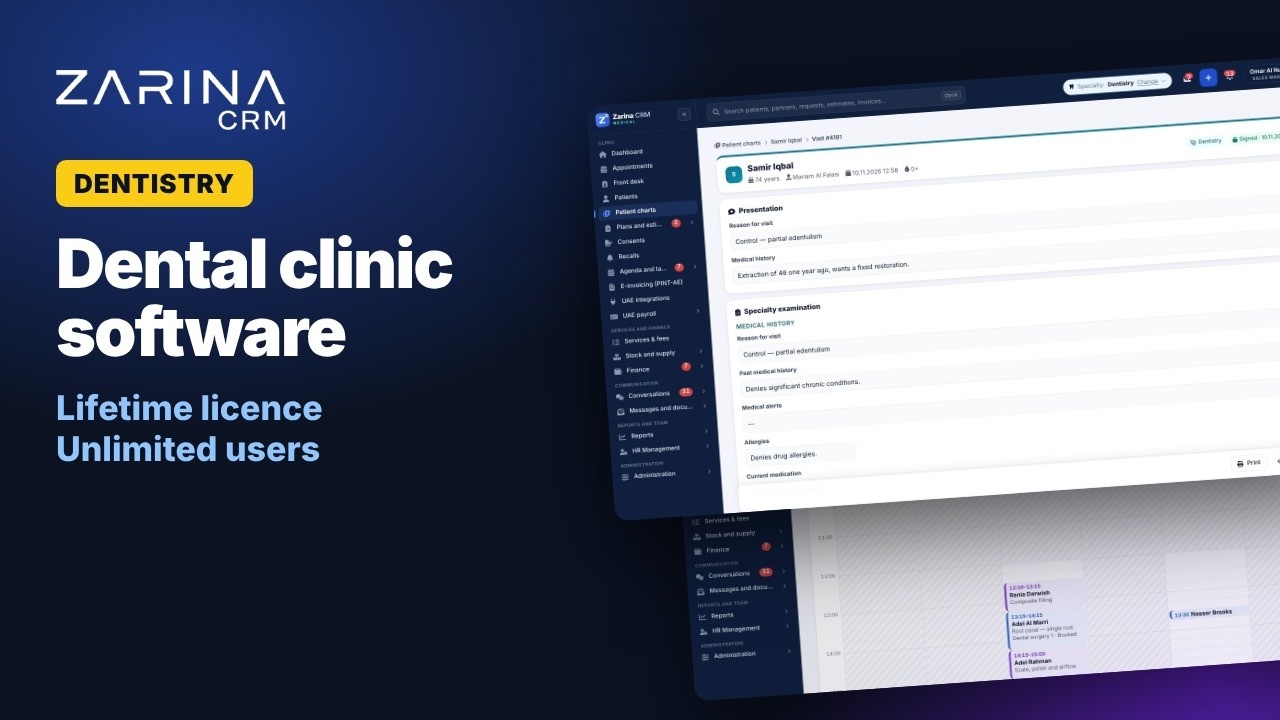
Dentistry and aesthetics
DentistryOrthodonticsAestheticsDermatologyFDI dental chartPeriodontal chartTreatment planBefore/after gallery


Every doctor works on the record of their own speciality, not on a generic form. Online booking, a reception queue for the day, an encrypted medical record, consents signed on a tablet, treatment plans, payments and batch-tracked stock. The platform is installed on the clinic’s own server, with a lifetime licence and unlimited users.
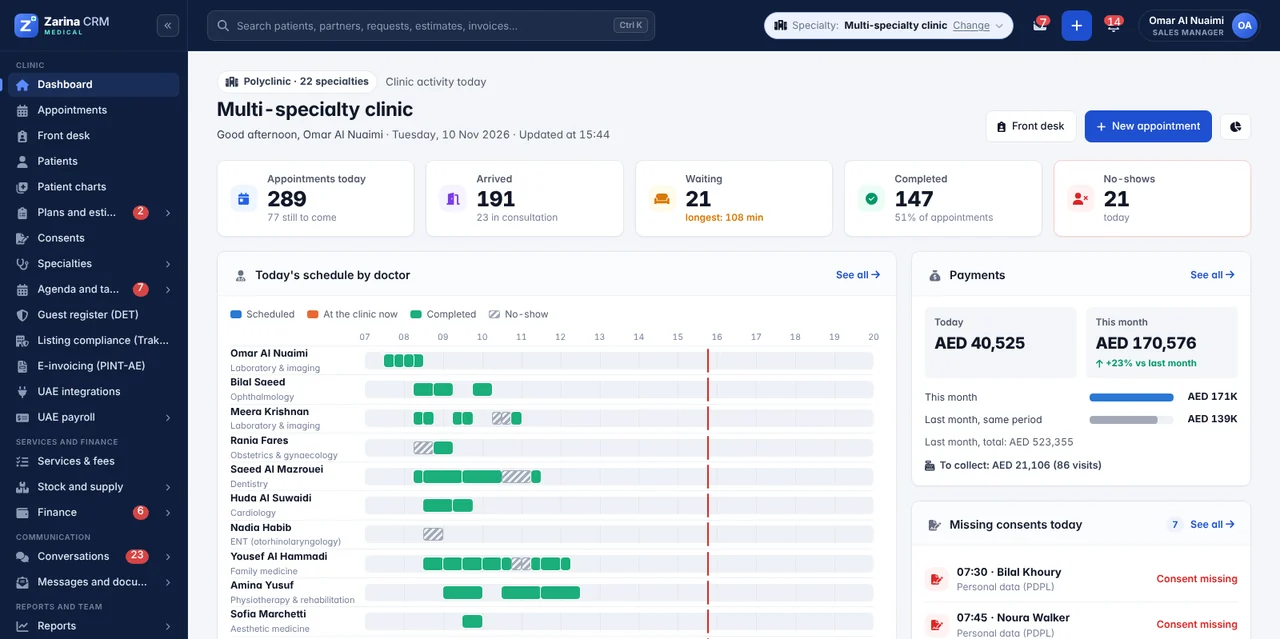
The platform includes 22 specialities as ready-configured packages: their own consultation form, a service catalogue with durations and fees, periodic check-ups, documents and indicators. A multi-speciality clinic can use them at the same time, each doctor on their own speciality, with the tools specific to each field. If a speciality needs its own fields, the consultation form is built from the interface, without programming, and common values are calculated automatically: BMI, mean arterial pressure, estimated due date, gestational age, eGFR and WHO percentiles.
Every step stays in the same platform, with a complete history per patient and separate access for reception, doctors and the administrator.
Patients book online, 24/7: they choose the speciality, the service, the doctor and a free slot. Confirmation and reminders go out automatically by email, SMS or WhatsApp.
On arrival, the patient joins the day’s queue: arrived, waiting, in consultation, done. The waiting-room screen shows initials only, and reception sees immediately if a consent is missing.
The doctor works on the record of their speciality, with clinical fields, scales and automatic calculations. A signed consultation is locked, and any later change is made through an addendum.
Medical report, recommendation, referral letter, certificate or glasses prescription are generated as PDF, with data already filled in from the record.
Payment is taken at reception — cash, card, transfer, from a session package or billed to the insurer — with a receipt or proforma issued on the spot.
The patient is added automatically to the recall list, by speciality, after a consultation or according to the vaccination schedule, with the option to unsubscribe.
Zarina CRM Medical is a complete CRM system for medical practices and clinics, developed in Romania, covering online booking, the medical record and payments. The list below describes the features in the current version of the platform. We do not include features still in development.
Calendar per doctor and per room, with drag and drop and no double bookings.
Patient flow in the clinic, from arrival to the end of the visit.
Complete profile, with allergies highlighted and consultation history.
6 consent types, signed on a tablet or by link.
Catalogue with durations, fees, VAT and insurer tariff for each service.
Payment at reception, with a receipt or proforma issued on the spot.
Consumables and medicines tracked by batch and expiry date.
Details on stock and sterilisation
Patients sign in with a link or a code received by SMS.
Patients come back for follow-ups without anyone calling them manually.
Each role sees exactly the indicators that concern it.
Encrypted clinical data and separate access by role.
The clinic’s administrative side comes from the shared base.
The features described on this page are included in the 3 packages and, from PRO, in the modules specific to your field. The full mapping, area by area, and the prices are on the pricing and packages page. The complete feature list of the medical edition: medical CRM features.
Clients, partners, leads, opportunities, dashboard, roles and permissions, custom fields, reminders, 15 languages. Part of every configuration, whatever packages you choose.
The same in every edition: sales, invoicing, inventory, procurement, operations, service, support, omnichannel communication, marketing, integrations, AI, reports, HR. Only the ones you need are activated.
17 modules available only in this edition, included from the PRO package. They are added once, to any configuration.
For medical practices, the package that matters first is Invoicing and payments. The rest are added as needs arise.
Beyond the consultation form, each speciality has its own working tools, built for real cases in the practice.
FDI dental chart with 5 surfaces, for adults and children, periodontal chart and orthodontic schemes, sent straight into the treatment plan.
Before and after gallery, with same-position comparison, attached to the patient record and the treatment plan.
Session programmes with 41 exercises, the VAS pain scale and a progress chart throughout rehabilitation.
Refraction history, glasses or contact lens prescription as PDF and orders to the optical lab, with a deposit and a notification when the order is ready.
Animal record separate from the paying owner, vaccination and deworming card, weight tracking and pet passport.
Growth charts to WHO standards, with percentiles calculated automatically, and the vaccination schedule with reminders.
Estimated due date, gestational age, fetal biometry and tests by trimester, with alerts for overdue deadlines.
PHQ-9 and GAD-7 questionnaires with calculated scores, a therapy plan and encrypted private notes that not even the administrator can read.
Nothing is charged per user: every activated module runs for the whole clinic team, on your own server. The package is configured by module, according to what you actually use.
Automations take over the repetitive work of reception: confirmations, reminders, follow-up recalls, stock deduction and reporting.
The booking confirmation, the reminder before the visit and the feedback request after the consultation go out automatically, on the channel the patient chose.
The patient is added automatically to the recall list, by speciality, after a consultation or according to the vaccination schedule, with an unsubscribe option.
Consumables used in a service are deducted automatically from stock, from the right batch, and upcoming expiries trigger alerts.
When a consultation is completed, the system can create a task, notify a colleague or send a document to the patient.
Revenue, occupancy and no-show reports are emailed automatically, at the interval you set, to the manager or to accounting.
REST API with per-application keys, signed webhooks and connection through Zapier or Make, for the applications the clinic already uses.
Health data is a special category of personal data. In the UAE, Federal Law No. 2 of 2019 on the use of ICT in health fields generally requires health data to be stored inside the country. The platform runs on the clinic’s own server, with access separated by role, encryption and an access log.
Medical data is encrypted with AES-256 in the database, not just protected by a password.
Reception works with appointments, payments and administrative documents. The medical content of the record stays with the doctor.
Every time someone opens a patient’s record, who and when is logged, including for the administrator.
Psychologists’ notes are encrypted with the author’s key. Not even the platform administrator can read them.
6 consent types, signed on a tablet or by link, with a digitally fingerprinted PDF and the option to revoke.
A register of data-subject requests, export of the file and anonymisation of non-medical data, while keeping legal archiving obligations.
Native international integrations: payments, patient communication, online stores and couriers for clinics that also sell products, campaigns and productivity


 Aramex
 Emirates Post
 Stripe
 PayPal
 Wafeq
 Zoho Books
 ClearTax
 TallyPrime
 Pagero

 Messenger
 Instagram


 Google Calendar

 Google Sheets
 Google Forms


 Zapier
 Make


This applies to every configured speciality, not only those with their own page.
We prefer to be precise from the start, including about the platform’s limits and the things that remain the clinic’s responsibility.
A 7-minute tour of a dental clinic running on Zarina CRM Medical: front desk, patient record, odontogram, treatment plans, payments, UAE payroll and reports.
These tools work up to a certain number of patients and doctors. Below are the points where they usually break down. Migration of existing data is included in the implementation.
Two people cannot book at the same time, and when the book is lost, the history goes with it.
In the platform: Calendar per doctor and per room, with public online booking and no double bookings.
Every doctor uses a different format, and finding a history takes several minutes.
In the platform: Consultation form per speciality, with clinical fields, scales and automatic calculations.
Nobody knows quickly whether a patient has signed, or what.
In the platform: 6 consent types signed on a tablet, with a warning at reception when they are missing.
Reception loses hours every day, and no-shows stay high.
In the platform: Automatic confirmations and reminders by email, SMS or WhatsApp, plus follow-up recalls.
Consumables expire in the cupboard, and at inspection there is no batch traceability.
In the platform: Batches with expiry, automatic consumption per service and batch-to-patient traceability.
At the end of the month, the report for accounting is done by hand.
In the platform: Payment at reception with a receipt or proforma, a monthly insurer report and VAT invoices.
Zarina CRM is sold with a lifetime licence, paid once, not as a monthly per-user subscription. The difference is clearest in a clinic with visiting doctors, nurses and reception staff.
The licence is lifetime and is not charged per user. A clinic that grows from 5 to 30 doctors, nurses and reception staff uses the same licence.
Recurring payments to a cloud medical software vendor disappear. Payment is made once, and updates released during the warranty period are included.
The clinic’s server or hosting, the domain and SSL certificate, accounts with external providers you already use (SMS, WhatsApp, payments) and, optionally, a maintenance contract.
Cost calculator
A monthly per-user subscription never stops: you pay it every month, it grows with every new employee and, at the end, you are left with nothing. The lifetime licence is paid once. Move the two sliders to your team’s real size and see the difference over 36 months.
If you pay a flat subscription, divide the monthly amount by the number of users. If you do not use a system yet, leave the default values: they are typical cloud platform rates.
What you lose over three years with the subscription
—
—
The calculation covers the licence only, not hosting. The licence price does not change when you add users. At the end, the licence remains an asset of the company.
The platform base covers patients, users and roles. The medical modules are included from the PRO package, and the price is that of the package you choose. Modules can be added at any time, without reinstalling and without losing data.
Calendar per doctor and per room, online booking, the day’s queue and the waiting-room screen.
Consultation form per speciality, PDF documents, ICD-10 codes and signed consents.
Catalogue with fees and VAT, session packages, treatment plans, receipts and the insurer report.
Batches with expiry, automatic consumption per service, traceability, goods received notes, write-offs and stock counts.
Appointments, documents, plans to accept, consents to sign and invoices.
SMS, WhatsApp, email, confirmations, follow-up recalls and patient reviews.
Event-based rules, scheduled reports, REST API, webhooks and connectors.
Staff, time tracking, leave and documents, for clinics that want everything in one place.
Delivery is not just an archive with the application. Below is what the implementation actually includes, whatever the number of users.
On the clinic’s server or on the hosting of your choice, with an SSL certificate and backups configured.
Patients, appointments, services and documents, brought over from your current files, with duplicate checks.
The specialities you use, the service catalogue with durations and fees, roles, document numbering and templates.
Separate sessions for reception, doctors and the administrator, with a PDF manual for your configuration.
Written material for the installed configuration, accessible directly from the platform.
Fixing of bugs that appear in operation and updates released during this period, at no extra cost.
We prefer an honest conversation before a quote, not medical practice software that does not solve the clinic’s real problem.
have at least one doctor and one person at reception, work with appointments and medical documents, and want patient data on their own server.
you need automatic submission to eClaimLink or Shafafiya, e-prescriptions or integration with an external laboratory. These can be discussed, but they are not part of the current version.
you need a complete hospital information system, if you have no server of your own and do not want managed hosting, or if you need a platform fully configured the same day.
For a dermatology clinic, the confidentiality of patient records is an absolute priority. The fact that the system runs locally gives us iron-clad protection. Managing the doctors’ appointments works flawlessly every day.


Each speciality comes as a ready-configured package: a consultation form with the clinical fields of the speciality, a service catalogue with durations and fees, periodic check-ups, documents and indicators. In a multi-speciality clinic, every doctor works on their own speciality, in the same platform.
No. The platform tracks insurer-billed services and generates a monthly report in CSV or XLSX for your claims process. Automatic transmission to insurers and electronic prescriptions are not included in the current version.
Clinical data is encrypted with AES-256 on the clinic’s server, reception does not see the medical content of the record, and access to the file is logged. Psychologists’ private notes are encrypted with the author’s key, so not even the administrator can read them.
Yes. The public booking page lets patients choose the speciality, the service, the doctor and a free slot. Confirmation, cancellation and rescheduling are done by link, and the reminder goes out automatically by email, SMS or WhatsApp.
Yes. There are 6 consent types: procedure, processing of medical data, photo and video, marketing, for minors and for telemedicine. They are signed on a tablet or by link, produce a digitally fingerprinted PDF and can be revoked.
No. The licence is lifetime and is not charged per user. You can add visiting doctors, nurses and reception staff without the platform costing more.
Yes. Patients, appointments, services and documents are imported from Excel or CSV, with duplicate checks before loading. The import is part of the implementation.
By batch, with expiry dates and first-expired-first-out consumption. Each service’s bill of materials deducts the materials used automatically, and batch-to-patient traceability lets you quickly identify patients if a batch is recalled.
No. The AI features in the BUSINESS package help draft administrative texts and run on the clinic’s own key with Claude, ChatGPT or Gemini. They do not diagnose, do not propose treatments and do not analyse the medical record.
Installation on the server and basic configuration take a few working days. The total duration depends on the number of specialities configured, the volume of data imported and the integrations requested.
The solution is delivered configured for your speciality. These are the variants with their own pages.
Growth charts on WHO references and the immunisation schedule with overdue doses calculated.
Session notes encrypted in the database, the PHQ-9 and GAD-7 scales and the therapy plan.
The dental chart, the per-tooth treatment plan and the estimate that comes out of it.
The animal record, vaccination schemes by species and the list of this week’s recalls.
Examination for each eye, the optical prescription and the lens order tracked through to handover.
The pregnancy file, with gestational age and each trimester’s tests at the right time.
All editions start from the same base and can run together on a single licence, if the organisation covers several types of activity.
90 industries covered, each with the right configuration of modules and workflows.
The available editions, from the shared base to the specialised configurations.
The configuration for sales teams: leads, quotations, invoicing and commissions.
Portfolio, automatic matching of requirements and listings, signed viewings and portal publishing.
Connect the CRM to the payment, messaging and accounting tools the clinic already uses.
The 3 packages and the final cost, with no monthly subscription.
The 3 packages, role structure and groups of companies. CRM for companies and institutions
Hosting options, server requirements, data protection and security responsibilities. CRM on your own server
Workflow audit, configuration, data migration and role-based training, included in the price. CRM implementation
A six-page document with everything you need to know before a sales conversation. No obligation and no sales call.
Practices in Dubai and across the UAE search for this in two different ways. Some look for a clinic management system or hospital management software, meaning the day-to-day running of the practice: appointment book, patient file, consents, treatment plans, invoicing. Others look for a medical CRM, meaning the relationship side: where the patient came from, which enquiries never turned into a booking, who is due for a recall.
Zarina CRM Medical is both, because in a clinic they are the same records. The appointment that a clinic management system would hold and the enquiry that a CRM would hold belong to one patient, so splitting them across two applications is what creates the double entry most practices are trying to escape.
Installed on the clinic’s own server, so patient data stays on hardware you control. One licence, unlimited users, no monthly fee per practitioner.
We install Zarina CRM on your hosting, configure it around your own workflow and train your team. From that moment on, the application is an asset of your company, not a recurring expense.
We have sent the access link to the e-mail address you entered. It usually arrives within a minute.