Field types
Each piece of information gets the right shape.
- Text, number, date
- A list with defined values
- Checkbox, multiple selection
- Simple calculated fields



Every industry has data a standard CRM does not: a machine serial number, floor area, number of rooms, a permit, a warranty period. Custom fields are defined on clients, leads, quotations or other records, appear in forms and lists, and become usable in filters, reports and generated documents.
From $2,900 excl. VATone-time payment, no monthly subscription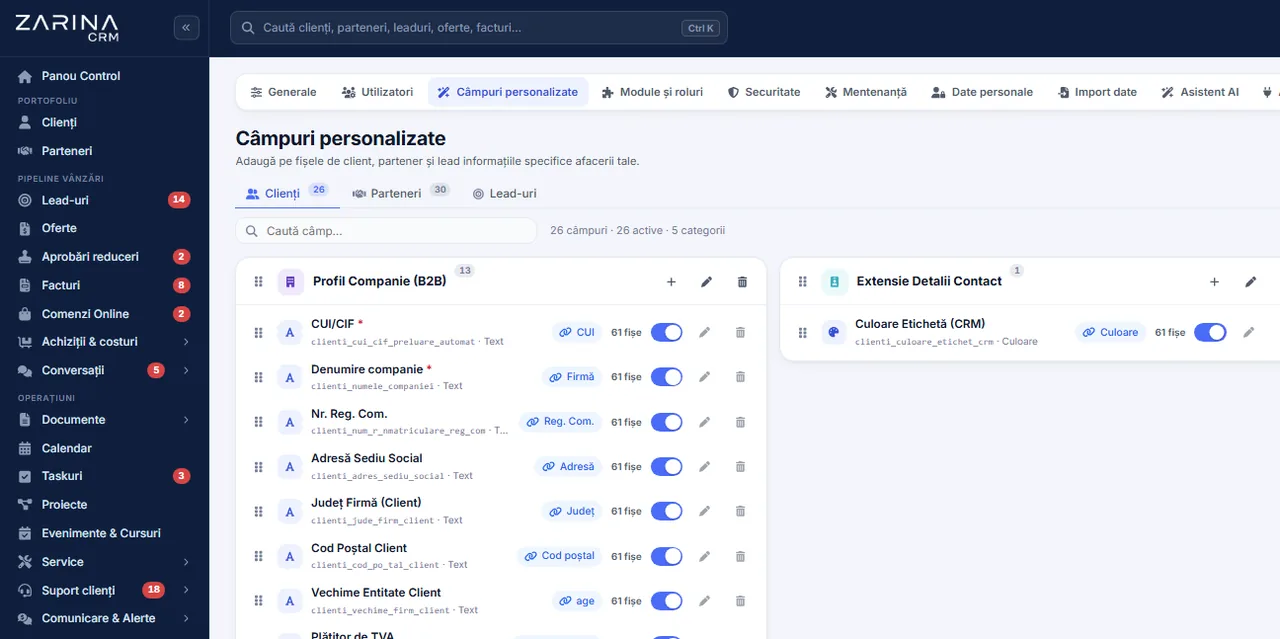
Custom fields in a CRM, with no programming. Every industry has data a standard CRM does not: a machine serial number, floor area, number of rooms, a permit, a warranty period. Included in the core. Lifetime licence, installation on the company’s server and unlimited users.
Works together with: Form builder, Users and roles, Zarina SMART.
Important data ends up in the notes field, where it can no longer be filtered, reported on or used.
The module lets you extend the data structure, with no code changes and without affecting updates.
Each piece of information gets the right shape.
Not only on clients.
The information appears where the work happens.
Critical data is not left out.
It becomes usable information.
Contracts fill themselves in.
Direct effects of specific information becoming structured data.
Lists are built on real criteria.
The statistics actually say something.
Contracts are no longer edited by hand.
The five ways of writing the same thing disappear.
Everything that matters sits in the CRM.
The structure changes when the need changes.
The operation takes a minute, but the decision deserves thought.
Not everything that can be noted deserves a field. The question is whether the information will be used in filters, reports or documents.
Text for what is free-form, a list for what needs grouping, a date for deadlines, a number for calculations.
The field is added to clients, leads, quotations or another record type, wherever the information belongs.
Visible to which roles, mandatory or not, shown in lists or only in the form.
It appears in forms, in filters, in reports, and can be inserted into document templates.
For records already created, the field can be filled in by import or over time, at the next edit.
The same application, different data structures, depending on the activity.
The information that decides the match.
The data of the equipment served.
What is specific to the project.
What matters when quoting.
A CRM with forty custom fields on every form is filled in by nobody.
If the information does not go into a filter, a report or a document, its place is in the notes.
For any information that needs grouping, a value list is the only solution that produces usable data.
A mandatory field filled in at random produces false data, not complete data.
Fields are organised into logical sections, so the form stays readable.
Unused fields are removed. A structure that grows endlessly becomes an obstacle.
If the data already exists in a standard field, a second field is not added for it.
The value of custom fields shows in what you can do with them.
Selections become automatic.
Contracts are generated with everything they need.
Statistics relevant to the industry.
Workflows can take them into account.
Data moves in full.
The specific information goes into the analysis.
Custom fields can hold sensitive information, so they follow the same rules.
We do the configuration at implementation, based on the information you actually use.
The starting point.
It determines how useful they are.
They need to be complete from the start.
It can be filled in retrospectively.
Some information is sensitive.
The fields are inserted into them.
The module extends the data structure. It does not replace development and does not create new functionality.
We prefer to say from the start in which situations the module is not worth its cost, so the sales conversation does not begin with the wrong expectations.
The situations in which the module pays for itself quickly.
The situations in which we recommend not buying it now.
It is part of the application’s core and extends every module.
It contains field definitions, value lists, display, and inclusion in filters, reports and documents.
Users and roles, clients and contacts, leads and the sales pipeline, custom fields and 15 interface languages.
The value of custom fields shows in the reports and statistics module.
Package composition and prices by edition are on the pricing page.


You pay once. Everything that follows is written here, not in hidden conditions.
Included in the Zarina CRM core — $2,320 excl. VAT, one-time payment. The core is part of every tier below, so the function is available in any configuration.
Cheaper in a bundle. The tiers group several packages at a price lower than their sum:
List prices, excl. VAT, one-time payment, unlimited users. The struck-through price is the sum of the packages bought individually. Current offers apply on the pricing page.
Over 3 years, the subscription costs $10,480; the Zarina Start licence costs $2,900, once.
An indicative comparison: enter the subscription price you pay now. The licence does not grow with the number of users.
A six-page document with everything you need to know before a sales conversation. No obligation and no sales call.
We install Zarina CRM on your hosting, configure it around your own workflow and train your team. From that moment on, the application is an asset of your company, not a recurring expense.