The complete Sales package

Document generation, from templates, with the customer data filled in

Contracts, handover notes, authorisations and annexes are generated from your own templates, with the customer, quotation and product data filled in automatically. The resulting document is sent for online signing, archived on the customer record and stays available, with no files scattered across the team’s computers.

From $2,900 excl. VATone-time payment, no monthly subscription
  • Included from the Start tier
  • Your own templates
  • Filled in from the data
  • Online signing with a code
  • Archive on the customer record
Documents · Zarina CRM
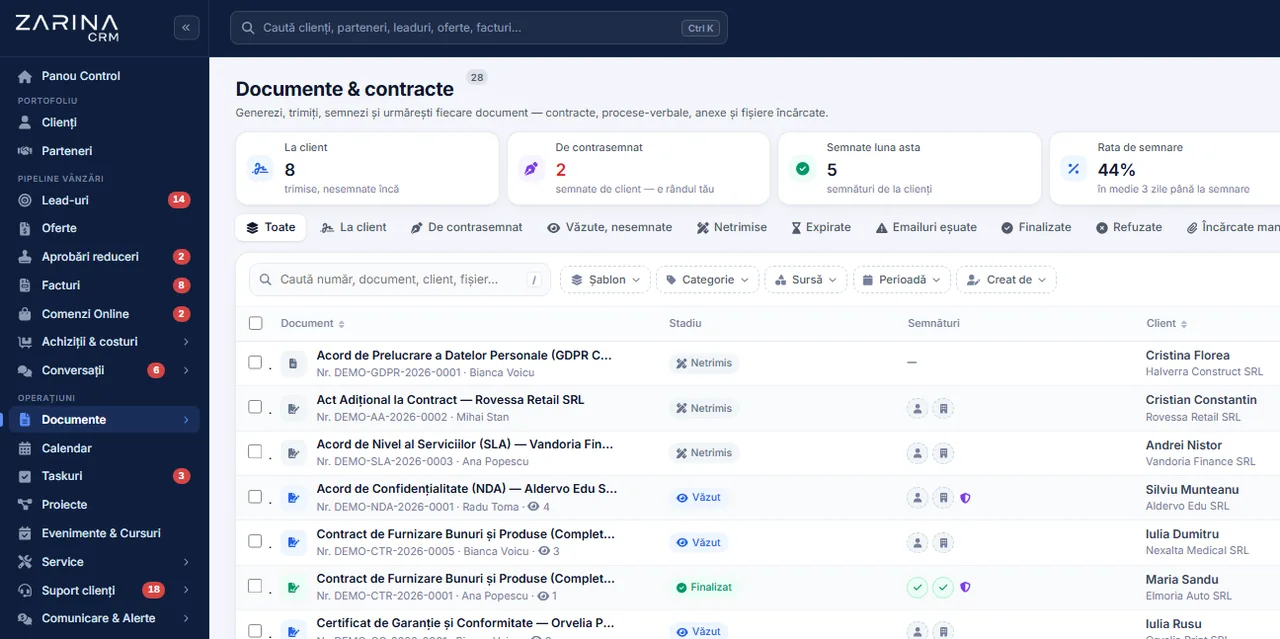
Screenshot from Zarina CRM: the register of documents and contracts with signing status, source and customer
Included from the Start tier
Your own templates
Filled in from the data
In short

Document generation from templates: contracts and handover notes. Contracts, handover notes, authorisations and annexes are generated from your own templates, with the customer, quotation and product data filled in automatically. Part of the Complete sales package. Permanent licence, installed on the company server and unlimited users.

Works together with: Web quotation with tracking, File centralisation, Partners.

The problem

The current situation, when documents are made by copy-paste

Every contract put together by hand starts from an old file and inherits its mistakes.

  • Another customer’s contract gets copied Names, amounts or clauses from the previous document stay behind. The customer notices, and that impression is hard to repair.
  • Nobody knows which version is the approved one There are five versions of the same model across the team’s computers, and nobody can say which one is valid.
  • The data is typed by hand Company name, TRN, address, representative: every field is an opportunity for a mistake.
  • Signing requires printing and a courier The contract travels on paper, and every stage adds days.
  • Signed documents get lost Scans end up in mailboxes, not in an archive. When they are needed, nobody finds them fast.
  • Clause changes do not propagate A change in commercial terms has to be carried by hand into every model the team uses.
What the module does

What the document generation module contains

It is part of the Complete sales package and works on the data already in the CRM.

01 / 06

Your own templates

The company’s own models, not imposed forms.

  • Contracts, handover notes, annexes
  • Your own text and formatting
  • Several templates per type
  • Editable at any time
02 / 06

Automatic filling from the data

The document fills itself in.

  • Customer and representative data
  • Lines from the quotation or from the order
  • Amounts, terms, due dates
  • No retyping
03 / 06

PDF generation

A single, consistent format.

  • Final document in PDF
  • The company visual identity
  • Numbering, where it is needed
  • Downloadable and sendable
04 / 06

Online signing

The signature no longer requires printing.

  • Signing link for the customer
  • Confirmation by a code sent by e-mail
  • Signed document, archived automatically
  • History of the signatures
05 / 06

Archive on the customer record

Documents no longer need searching for.

  • Attached to the customer
  • Search by criteria
  • Role-based access
  • Available again at any time
06 / 06

Versions and updates

Clauses are changed in a single place.

  • Template updated centrally
  • Old documents stay untouched
  • History of changes
  • No parallel variants
What changes

What changes in the first month after the document generation module is activated

Direct effects of documents being generated from data rather than by copying.

Documents with no inherited mistakes

The classic leftover name from the previous contract disappears.

  • Data filled in from the record
  • A check before generating
  • Identical format
  • A professional image

Administrative time recovered

A contract is made in minutes.

  • No manual drafting
  • No hunting for the right model
  • Generated in one step
  • Sending from the application

Signed the same day

The contracting cycle gets shorter.

  • Signing link
  • No printing and scanning
  • Confirmation by code
  • Document archived automatically

A single valid variant

The clauses are controlled centrally.

  • One template per document type
  • Updated in one place
  • No versions on individual computers
  • Simpler compliance

A usable archive

Documents are found when they are needed.

  • Attached to the customer
  • Quick search
  • Export by period
  • Useful in audits and disputes

Control over what the company signs

Nothing leaves outside the model.

  • Rights on templates
  • Changes recorded
  • Documents tracked
  • A complete record
In the application

The path of a document, step by step

The same flow for a framework contract and for a short handover note.

Screenshot from Zarina CRM: the register of documents and contracts with signing status, source and customer
  1. 1

    The right template is chosen

    The models are defined in advance, by document type, so there is no hunting for files on a computer.

  2. 2

    The data is filled in automatically

    The customer, the representative, the subject, the amounts and the terms are taken from the customer record and from the associated quotation or order.

  3. 3

    Whatever is missing is checked and filled in by hand

    Fields that cannot be derived stay visible for completion, before generating.

  4. 4

    The document is generated as a PDF

    The result carries the company formatting and identity, and the content matches the data in the system.

  5. 5

    The customer signs online

    A signing link is sent, and the confirmation is made with a code received by e-mail. The signature stays recorded with date and time.

  6. 6

    The signed document enters the archive

    The signed version is attached to the customer and stays available, independently of later changes to the template.

Video tour

Document generation, in short, inside the application

Coming soonThe video presentation of the module is being prepared.
Document templates

Templates: where consistency is built

A good document is written once and used a thousand times.

Fields from the CRM

The data is inserted, not typed.

  • Company and customer data
  • Representatives and contact persons
  • Amounts, terms, due dates
  • Product or service lines

Line-item tables

Commercial documents have lists.

  • Products or services from the quotation
  • Quantities and prices
  • Calculated totals
  • Consistent formatting

Several languages

Useful for customers abroad.

  • Templates per language
  • Selectable at generation
  • The same fields
  • Adapted formatting

Rights on templates

Not everyone changes the clauses.

  • Editing restricted by role
  • Changes recorded
  • Issued documents stay untouched
  • Control over the legal content
Signing

Online signing and what it is worth

We state explicitly what the signature in this module is and what it is not.

  • The customer signs from a link They need no account, no application and no printing. They open the link and confirm.
  • The confirmation is made with a code The code goes to the e-mail address on the customer record, so the signature becomes attributable to a person.
  • The evidence is kept The document in its signed form, the date, the time and the address used for confirmation stay recorded.
  • It is not a qualified electronic signature It has the value of evidence of agreement. For documents that require a qualified signature, dedicated tools are used.
  • A signed document is not altered A later change to the template does not affect documents that have already been signed.
  • The history stays with the company The documents and the signing evidence stay in your own installation, not with an outside provider.
Automations

What reduces the administrative work in the document generation module

Mechanisms that shorten the path from agreement to signed document.

Generated from an accepted quotation

The contract starts from the sale.

  • Lines and amounts carried over
  • Customer and representative filled in
  • One step, not a process
  • The link stays visible

Sending from the application

The document reaches the customer directly.

  • E-mail with the document or a link
  • A message template
  • Recorded in the history
  • A log of what was sent

Reminder to sign

Pending documents are not forgotten.

  • Scheduled follow-ups
  • Stopped at signing
  • Visible in the owner’s activity
  • Configurable

Automatic archiving

The evidence keeps itself.

  • Signed document attached to the customer
  • Date and time recorded
  • Reviewable at any time
  • No manual steps

Documents from the portal

The customer can sign from their own space.

  • Documents to sign shown in the portal
  • Signing from the same page
  • Notification to the consultant
  • A shared history

Export for audits

Files are prepared quickly.

  • Export by period
  • Filters by document type
  • Documents included
  • Useful in an audit
Who sees what

Access to documents and to templates

Contractual documents are among the most sensitive information in the application.

  • Role-based access Generating and viewing documents is granted explicitly, by role and by document type.
  • Template editing is restricted Legal clauses are not modified by just any user. Changes stay recorded.
  • Documents are served through verified links The files are not publicly accessible and cannot be guessed.
  • The signing link contains a secret element Another customer’s document cannot be reached by editing the address.
  • Signed documents are immutable The signed version is kept separately, so the evidence does not depend on later changes.
  • Data on the company server The templates, the documents and the evidence stay in your own installation.
What you need

What needs to be prepared to put the document generation module into operation

We handle the template configuration at implementation, on your real documents.

01

The models used today

The starting point for the templates.

  • Framework contracts
  • Job sheets
  • Annexes and authorisations
  • In the legally agreed form
02

The mandatory data on each model

It decides what gets filled in automatically.

  • Fields from the customer record
  • Lines from the quotation
  • Terms and amounts
  • Agreed together
03

Complete customer records

Automatic filling depends on them.

  • Correct company name and TRN
  • Legal representative
  • Updated addresses
  • Cleaned up at implementation
04

An email server configured

The documents and the codes go out through it.

  • An active sending account
  • A domain with its reputation configured
  • A log of what was sent
  • Checked at implementation
05

Rights on documents

It is decided who generates and who edits.

  • Roles allowed to generate
  • Roles with rights on templates
  • Visibility by type
  • Reviewable later
06

The archiving policy

Documents have to be findable.

  • The retention period
  • Naming rules
  • Periodic export, if wanted
  • Agreed at implementation
What it does not do

The limits of the document generation module, stated explicitly

The module generates and archives documents. It does not provide legal advice and it does not produce a qualified signature.

  • We do not draft legal clauses The templates are built on the documents agreed by you or by your legal adviser. We do not provide legal advice.
  • The signature is not qualified Confirmation with a code has the value of evidence of agreement. For a qualified electronic signature, dedicated tools are used.
  • It does not edit uploaded documents The module generates documents from your own templates. It does not modify files received from outside.
  • Complex formatting has limits Documents with advanced typographic layout are better produced in dedicated tools. We check the format at implementation.
  • It depends on data quality A missing legal representative on the record means an empty field in the contract. Cleaning up the data is part of the implementation.
  • It does not track contractual obligations The module produces the document. Tracking the deadlines in a contract is done through tasks, the calendar or, for service work, through the contracts in the dedicated edition.
Who it is for

When this module makes sense and when it does not

We prefer to say from the start in which situations the module is not worth its cost, so the sales conversation does not begin with the wrong expectations.

It makes sense if

The situations in which the module pays for itself quickly.

  • You use contracts, annexes or handover notes with a repetitive structure
  • The data is currently retyped from the CRM into Word
  • You want versions and history on every issued document
  • Several people produce the same types of documents

It does not make sense if

The situations in which we recommend not buying it now.

  • Every document is unique, drafted from scratch
  • The documents arrive ready-made from the customer or from a lawyer
  • You issue fewer than a few documents a month
  • You have no templates and no time to prepare them
How to buy

How the documents module is licensed

It is part of the complete Sales package, included from the Start tier.

The complete Sales package

It is licensed together with the complete Sales package, included from the Start tier.

What the core includes

Users and roles, clients and contacts, leads and the sales pipeline, custom fields and 15 interface languages.

Pricing and configurations

Package composition and prices by edition are on the pricing page.

CRM implementations

Companies that have trusted Zarina CRM

Metod Sistem - Zarina CRM clientMetod Sistem
SICC Project Services - Zarina CRM clientSICC Project Services
Lapis Residence - Zarina CRM clientLapis Residence
Onyx Residence - Zarina CRM clientOnyx Residence
Iași Clinical Hospital of Pulmonology - Zarina CRM clientIași Clinical Hospital of Pulmonology
Regional Office for Cross-Border Cooperation Iași - Zarina CRM clientRegional Office for Cross-Border Cooperation
Arpa Imobiliare - Zarina CRM clientArpa Imobiliare
Rubin Capital - Zarina CRM clientRubin Capital
Hotel Palas Grand View - Zarina CRM clientHotel Palas Grand View
Grey Boutique Hotel Palas - Zarina CRM clientGrey Boutique Hotel Palas
Bucovina Resort and Spa - Zarina CRM clientBucovina Resort & Spa
HighLife Events - Zarina CRM clientHighLife Events
PavMar Beton - Zarina CRM clientPavMar Beton
Clinica Lauderma - Zarina CRM clientClinica Lauderma
Axa Traduceri Iași - Zarina CRM clientAxa Traduceri
AFQ Accounting - Zarina CRM clientAFQ Accounting
Moldo Garage - Zarina CRM clientMoldo Garage
Zuzu Land - Zarina CRM clientZuzu Land
Ziarul Unirea - Zarina CRM clientZiarul Unirea
Meat Me Up Belgium - Zarina CRM clientMeat Me Up Belgium
Joues et Croquettes Belgium - Zarina CRM clientJoues et Croquettes Belgium
Price, warranties and implementation

Document generation: what it costs and what you get

You pay once. Everything that follows is written here, not in hidden conditions.

The price

It is part of the complete Sales package: $570 + VAT, on top of the core ($2,320). Bought separately, together with the core: $2,890.

Cheaper in a bundle. The tiers group several packages at a price lower than their sum:

  • Start2 packages + core
    $2,900$3,570
    −19%
  • Pro5 packages + core
    $3,480$5,280
    −34%
  • Business8 packages + core
    $4,640$7,460
    −38%
  • Enterprise13 packages + core
    $6,970$10,080
    −31%

List prices, excl. VAT, one-time payment, unlimited users. The struck-through price is the sum of the packages bought individually. Current offers apply on the pricing page.

Subscription or licence

What you pay over time for a subscription CRM

Subscription$10,480
Zarina Start$2,900

Over 3 years, the subscription costs $10,480; the Zarina Start licence costs $2,900, once.

An indicative comparison: enter the subscription price you pay now. The licence does not grow with the number of users.

After purchase

What you get

  • A lifetime licence, with no subscription and no per-user charge
  • Unlimited users, on the same licence
  • 6 months of warranty on correct operation: fixing errors and inconsistencies
  • Implementation, configuration and team training, included in the price
  • The licence is verified locally, on your own server: the application does not depend on our servers to work
Implementation and server

How long it takes and what is needed

  • 48 hours in the standard configuration; up to 14 working days with customisation around the company’s workflow
  • Your own server or web hosting with cPanel, with an SSL certificate
  • PHP 7.4 or newer (8.x recommended) and MySQL / MariaDB
  • The PHP extensions mysqli, json, mbstring; curl, gd and zip for integrations, PDF and exports
  • One cron task, for reminders and automations
Security and data protection

Where data lives

  • The data stays on your server and does not pass through ours
  • Roles and rights per user, two-factor authentication
  • An audit trail and limits on login attempts
  • Consents and data subject requests, managed in the application
  • Digitally signed updates and backups from the application

Have a question about Document generation?

We answer in writing, with the exact price for your configuration.

Frequently asked questions

Questions about document generation

Can I use my current contracts as templates?
Yes, and that is the recommended method. We start from the documents your side has agreed legally and mark the fields that get filled in automatically from the CRM.
What data is filled in automatically?
The customer and representative data, the subject, the lines from the quotation or order, the amounts, the terms and the due dates. Whatever cannot be derived stays visible for manual completion.
Can the customer sign without printing?
Yes. They receive a link, confirm with a code sent by e-mail, and the signed document is archived automatically on their record.
Does the signature have legal value?
It has the value of evidence of agreement: the document, the date, the time and the e-mail address used for confirmation. It is not a qualified electronic signature.
What happens if I change the template after signing?
Nothing. Documents already signed are kept in their own form, independently of later changes to the template.
Can I have documents in several languages?
Yes. Templates are defined per language, with the same fields, and the language is chosen at generation.
Who can change the clauses in the templates?
Only the roles explicitly granted that right. Changes stay recorded, and issued documents are not affected.
Are signed documents easy to find?
Yes. They stay attached to the customer record, with search by criteria and export by period, useful in audits or in disputes.
Does the module provide legal advice?
No. It generates the documents based on your models. The legal content remains the responsibility of the company and of your adviser.
Is it included in the price or bought separately?
It is part of the complete Sales package, included in the Start, Pro, Business and Enterprise tiers. Separately, the package costs $570 + VAT, on top of the core.
Product sheet

Get the complete product sheet by email

A six-page document with everything you need to know before a sales conversation. No obligation and no sales call.

  • The platform core and the 13 module packages, with what each one contains
  • The features and modules of the edition you choose, plus available integrations
  • Full pricing and what it includes: installation, training, data import, warranty
  • The native integrations available and the situations where the platform is not a good fit

No monthly subscription

Take control of your operations, once

We install Zarina CRM on your hosting, configure it around your own workflow and train your team. From that moment on, the application is an asset of your company, not a recurring expense.
