A separately licensed module

Invoicing in a CRM, with correct credit notes and e-invoicing connected

Invoices and proformas are issued from the same data sales works on: the client, the accepted quote, the products in the catalogue. Tax documents are no longer deleted or cancelled at random but corrected through credit notes, and transmission to the e-invoicing system is done through the connector configured with your own Accredited Service Provider.

From $2,900 excl. VATone-time payment, no monthly subscription
  • Invoices from quotes
  • Correction through a credit note
  • E-invoicing through a connector
  • Stock issued on invoicing
  • A due-date schedule by client
Invoicing · Zarina CRM
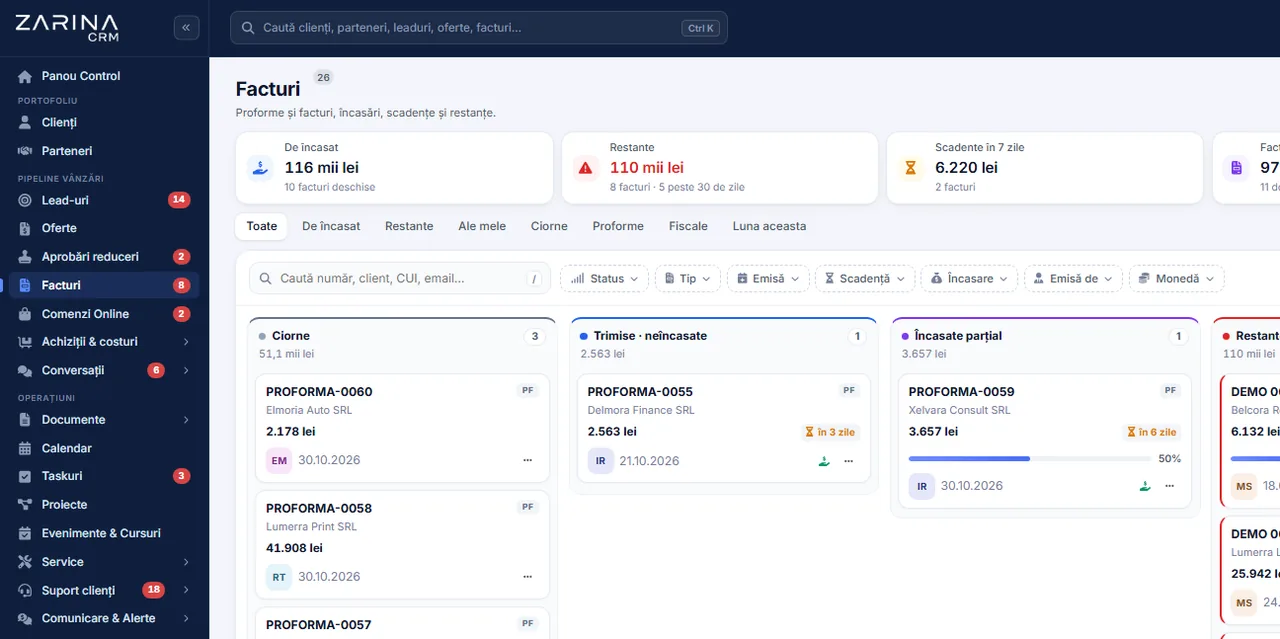
Invoices and payments in Zarina CRM: amounts receivable, overdue balances, due dates within 7 days and invoices grouped by payment status
Invoices from quotes
Correction through a credit note
E-invoicing through a connector
In short

Invoicing in a CRM, with credit notes and e-invoicing connected. Invoices and proformas are issued from the same data sales works on: the client, the accepted quote, the products in the catalogue. A separately licensed module. A permanent licence, installed on the company’s server, with unlimited users.

Works together with: UAE e-invoicing, Order automation, Multilingual CRM.

The problem

The situation today, when invoicing sits apart from sales

Every manual transfer of data between the quote and the invoice is a source of errors that surface at an audit or at the client.

  • The data is entered twice The quote is made in one place, the invoice in another. Differences appear in the lines, the quantities and the discounts.
  • Nobody knows what was collected out of what was invoiced Without the link between the invoice and the payment, the client balance is calculated by hand, with errors.
  • Corrections are made by deleting A tax document deleted locally stays valid in the official records. The problem surfaces late and costs money.
  • The stock does not match Invoicing with no link to the warehouse leaves the inventory behind, and the real cost of the sale stays unknown.
  • Transmission to the national system is manual Every document is uploaded separately, and the errors are discovered on rejection.
  • Overdue amounts are tracked from memory Missed due dates come to light when someone remembers to check the bank statement.
What the module does

What the invoicing module includes

The module covers the commercial and tax documents, linked to clients, quotes, stock and payments.

Proformas and invoices

The documents go out from the same data.

  • Issued from an accepted quote
  • Lines from the catalogue
  • Your own series and numbering
  • PDF generation

A credit note, not a deletion

The correction follows the tax rules.

  • Issued documents are not deleted
  • Correction through a credit note
  • The document and its credit note, visible as a pair
  • The stock is restored once only

Invoicing connectors

The link with the usual accounting software.

  • Connectors to the accounting services used locally
  • Test mode before going live
  • Keys entered by you
  • One active connector

e-invoicing

Transmission to the e-invoicing system.

  • The document prepared for transmission
  • A check on the mandatory fields
  • Status tracked
  • The errors shown explicitly

The link with the stock

The sale moves the warehouse.

  • Stock issued on invoicing
  • The cost taken from the warehouse
  • The margin on the document
  • Movements recorded

Due dates and balances

The money receivable is visible.

  • A due-date schedule by client
  • Days overdue
  • The balance by client
  • The link with the payments
What changes

What changes in the first month after the invoicing module is switched on

The direct effects of invoicing using the same data as sales.

01

Invoicing without double work

The document goes out from the quote.

  • The lines carried over in full
  • No retyping
  • No differences between the documents
  • Administrative time recovered
02

Corrections without risk

Mistakes are repaired properly.

  • A credit note instead of a deletion
  • A clear trace of the correction
  • Records that stand up to an audit
  • The stock restored once only
03

Overdue amounts visible

Collection becomes a tracked process.

  • Invoices past their due date
  • Days overdue
  • The balance by client
  • Prioritising the calls
04

The margin on every document

The sale is measured, not assumed.

  • The cost from the warehouse
  • The margin per line and per document
  • Unprofitable products identified
  • Price decisions backed by evidence
05

Fewer rejections on transmission

The mandatory data is checked beforehand.

  • Checks on the client details
  • Explicit error messages
  • Status tracked
  • Fewer manual retries
06

Consistent documents

The client always receives the same format.

  • Your own template
  • Continuous numbering
  • Sending from the application
  • A history on the client
In the application

The path of a document, step by step

The same flow for a simple invoice and for one with dozens of lines.

Invoices and payments in Zarina CRM: amounts receivable, overdue balances, due dates within 7 days and invoices grouped by payment status
  1. 1

    The document starts from the quote or from the client record

    The client details and the lines of the accepted quote are carried over in full, so they are not re-entered.

  2. 2

    The mandatory details are checked

    The tax number, the address and the other required details are checked before issue, to avoid rejection on transmission.

  3. 3

    Issuing moves the stock

    If the warehouse module is active, the issue is recorded and the cost of the sale enters the margin calculation.

  4. 4

    The document goes to the client

    The file is generated, sent by email from the application and stays in the client’s history, with the date and the author.

  5. 5

    Transmission to the e-invoicing system

    The document is sent through the configured connector, and the transmission status stays visible on the document.

  6. 6

    The payment closes the cycle

    The payment, including a partial one, is recorded on the invoice, and the client balance updates immediately.

Video tour

Invoicing, in short, inside the application

Coming soonThe video presentation of the module is being prepared.
Credit notes

Correcting documents, without tax risk

This is where the most expensive mistakes happen in a CRM that invoices.

Issued documents are not deleted

The rule is enforced by the application.

  • Deletion blocked on issued documents
  • Cancelling blocked for documents already transmitted
  • An explicit message to the user
  • No silent exceptions

Correction through a credit note

The correct method, applied consistently.

  • A credit note document generated
  • The pair visible in the list
  • A mirrored value
  • Full history

The stock is restored once only

Double errors are prevented.

  • A check on the credit note
  • No double stock re-entry
  • Movements recorded
  • A correct inventory

Re-invoicing stays possible

A cancelled proforma does not block the sale.

  • A new proforma allowed
  • No administrative deadlocks
  • The link with the quote kept
  • A clean record
Connectors

The invoicing connectors and transmission

We explain how the link with accounting software works, because this is where most questions come up.

  1. 01

    Connectors to the usual services

    The module connects to the accounting software commonly used in your market, with your company’s own credentials.

  2. 02

    One active connector

    Switching on one connector switches the others off, so there are never two sources of numbering in parallel.

  3. 03

    A test mode before real issuing

    We recommend testing in trial mode: the document is created as a draft or as a non-fiscal document, depending on the provider, and the proforma in the CRM stays unchanged.

  4. 04

    The keys stay with the company

    The credentials are entered once, kept encrypted and never shown again in the interface.

  5. 05

    Errors are shown explicitly

    The messages received from the provider are turned into usable explanations, instead of staying technical codes.

  6. 06

    Checks before transmission

    Differences between the document lines and its total, as well as incomplete client details, block the transmission before it produces a rejection.

Automations

What cuts administrative work in the invoicing module

Mechanisms that shorten the road from a sale to a payment.

Invoices from quotes

The conversion is one step, not a process.

  • The lines carried over in full
  • It respects the discount approvals
  • The link stays visible
  • No retyping

Recurring invoices

Subscriptions issue themselves.

  • Generated on the set date
  • Values and lines kept
  • A retry on failure
  • Visible before issue

Automatic sending

The document reaches the client with no manual steps.

  • An email with the document attached
  • A message template
  • Recorded in the history
  • A log of what was sent

Alerts on due dates

Overdue amounts are not discovered late.

  • Invoices past due flagged
  • Days overdue
  • A notification to the owner
  • A report on overdue amounts

The link with online payments

The payment confirms itself.

  • A payment link on the invoice
  • Automatic confirmation
  • Refunds recorded
  • The balance updated immediately

Scheduled reports

The figures reach the decision-makers.

  • Periodic report by email
  • Invoiced and collected
  • Overdue amounts by client
  • Export attached
Who sees what

Access to documents and amounts

Tax documents and balances are sensitive information, handled by role.

  • Separate financial roles Issuing, cancelling and crediting are granted explicitly, not to every user by default.
  • Cost and margin have their own rights Access to cost and margin is limited to the financial and management roles.
  • Operations on issued documents are controlled Cancelling and crediting follow rules and stay recorded, with the author and the date.
  • The documents are protected The generated files are served only to users with the right, through verified links.
  • The connector keys stay encrypted The credentials for the external services are never shown again in the interface after saving.
  • Data on the company’s server The documents, the series and the history stay in your own installation.
What you need

What needs preparing to switch the invoicing module on

We do the configuration at implementation, together with your accountant.

01

Series and numbering

The records have to continue.

  • The series in use
  • Starting numbers
  • Numbering rules
  • Checked on the first document
02

VAT rates and company details

The documents have to be correct.

  • The rates in use
  • Complete tax details
  • The VAT regime
  • Checked during implementation
03

The account with the invoicing service

For transmission and tax records.

  • Your own account with the provider
  • Keys generated by you
  • Series configured at the provider
  • Tested in trial mode
04

The item catalogue

The document lines come from it.

  • Items with a price and a unit
  • VAT rates per item
  • The link with the stock
  • Import from your existing records
05

The payment-terms policy

Due dates become a collection instrument.

  • A default payment term
  • By type of client
  • Behaviour when overdue
  • Agreed at implementation
06

The opening balances

The records start from reality.

  • Unpaid invoices
  • Existing advances
  • Opening stock with costs
  • Taken over at implementation
What it does not do

The limits of the invoicing module, stated explicitly

The module issues and tracks commercial documents. It does not replace the accounting software.

  • It is not accounting software The module issues documents and tracks payments. The accounting entries, the trial balance and the returns stay in your accounting software.
  • The tax record stays with the invoicing provider For fiscal numbering and official archiving, the connector to the invoicing service is used, with the company’s own account.
  • It does not pull in supplier invoices automatically The module covers issued invoices. Supplier invoices are recorded as costs, in the purchasing module.
  • Transmission depends on the e-invoicing system If the receiving system is unavailable, the transmission is retried. The status stays visible, but the timing does not depend on us.
  • Payment fees do not pass through us The payment processor invoices your company directly.
  • The quality depends on the client data An incomplete tax number or address produces rejections. Cleaning the data is part of the implementation.
Active connections

The invoicing software the platform connects to

Documents issued in the CRM can be transmitted to the accounting software you already use, with your own account credentials. For the UAE, the invoice data is produced in the structure required by PINT-AE, the UBL-based format, and is transmitted through the Accredited Service Provider you appoint. Zarina CRM is not an accredited provider and does not send directly to the FTA.

CRM implementations

Companies that have trusted Zarina CRM

Metod Sistem - Zarina CRM clientMetod Sistem
SICC Project Services - Zarina CRM clientSICC Project Services
Lapis Residence - Zarina CRM clientLapis Residence
Onyx Residence - Zarina CRM clientOnyx Residence
Iași Clinical Hospital of Pulmonology - Zarina CRM clientIași Clinical Hospital of Pulmonology
Regional Office for Cross-Border Cooperation Iași - Zarina CRM clientRegional Office for Cross-Border Cooperation
Arpa Imobiliare - Zarina CRM clientArpa Imobiliare
Rubin Capital - Zarina CRM clientRubin Capital
Hotel Palas Grand View - Zarina CRM clientHotel Palas Grand View
Grey Boutique Hotel Palas - Zarina CRM clientGrey Boutique Hotel Palas
Bucovina Resort and Spa - Zarina CRM clientBucovina Resort & Spa
HighLife Events - Zarina CRM clientHighLife Events
PavMar Beton - Zarina CRM clientPavMar Beton
Clinica Lauderma - Zarina CRM clientClinica Lauderma
Axa Traduceri Iași - Zarina CRM clientAxa Traduceri
AFQ Accounting - Zarina CRM clientAFQ Accounting
Moldo Garage - Zarina CRM clientMoldo Garage
Zuzu Land - Zarina CRM clientZuzu Land
Ziarul Unirea - Zarina CRM clientZiarul Unirea
Meat Me Up Belgium - Zarina CRM clientMeat Me Up Belgium
Joues et Croquettes Belgium - Zarina CRM clientJoues et Croquettes Belgium
Comparison

Invoicing in files, in a subscription or on your own platform

The same operation, three ways of doing it. The difference shows in volume, in control and in the long-term cost.

With spreadsheets

The option most companies start from.

  • The numbering is kept by hand, with the risk of duplicates
  • The client details are retyped on every document
  • The e-invoicing XML is produced in another program
  • The payment history sits in another file

With a monthly subscription

The platforms where you pay per user, every month.

  • A monthly cost, for every user who issues documents
  • The data sits on the supplier’s servers
  • Export limited to what the platform allows
  • The price grows with the team

With Zarina CRM

Installed on the company’s server, with a permanent licence.

  • The document starts from the existing quote or order
  • XML in the PINT-AE structure, checked before it is sent
  • Unlimited users, with no cost per person
  • The database stays on the company’s server
Who it is for

When this module makes sense and when it does not

We prefer to say from the start in which situations the module is not worth its cost, so the sales conversation does not begin with the wrong expectations.

It makes sense if

The situations in which the module pays for itself quickly.

  • You issue invoices from quotes or orders, on the same data
  • You have an e-invoicing obligation and rejections on transmission
  • Invoicing is done today in another program, with retyped data
  • You want the link between the invoice, the client and the payment in one place

It does not make sense if

The situations in which we recommend not buying it now.

  • Invoicing is done entirely by your accountant, from their own software
  • You issue a few invoices a month, with the same content
  • You do not want to change the invoicing software you use now
  • You have no catalogue of products or services in the CRM
How to buy

How the invoicing module is licensed

The module is activated by licence and works together with the core.

A separately licensed module

It contains the proformas, the invoices, the credit notes, the connectors and the due-date schedule.

What the core includes

Users and roles, clients and contacts, leads and the sales pipeline, custom fields and 15 interface languages.

Together with payments

For payments, payment links and balances, the payments module is used.

Pricing and configurations

Package composition and prices by edition are on the pricing page.

Price, warranties and implementation

Invoicing: what it costs and what you get

You pay once. Everything that follows is written here, not in hidden conditions.

The price

It is part of the Invoicing and payments package: $690 + VAT, on top of the core ($2,320). Bought separately, together with the core: $3,010.

Cheaper in a bundle. The tiers group several packages at a price lower than their sum:

  • Start2 packages + core
    $2,900$3,570
    −19%
  • Pro5 packages + core
    $3,480$5,280
    −34%
  • Business8 packages + core
    $4,640$7,460
    −38%
  • Enterprise13 packages + core
    $6,970$10,080
    −31%

List prices, excl. VAT, one-time payment, unlimited users. The struck-through price is the sum of the packages bought individually. Current offers apply on the pricing page.

Subscription or licence

What you pay over time for a subscription CRM

Subscription$10,480
Zarina Start$2,900

Over 3 years, the subscription costs $10,480; the Zarina Start licence costs $2,900, once.

An indicative comparison: enter the subscription price you pay now. The licence does not grow with the number of users.

After purchase

What you get

  • A lifetime licence, with no subscription and no per-user charge
  • Unlimited users, on the same licence
  • 6 months of warranty on correct operation: fixing errors and inconsistencies
  • Implementation, configuration and team training, included in the price
  • The licence is verified locally, on your own server: the application does not depend on our servers to work
Implementation and server

How long it takes and what is needed

  • 48 hours in the standard configuration; up to 14 working days with customisation around the company’s workflow
  • Your own server or web hosting with cPanel, with an SSL certificate
  • PHP 7.4 or newer (8.x recommended) and MySQL / MariaDB
  • The PHP extensions mysqli, json, mbstring; curl, gd and zip for integrations, PDF and exports
  • One cron task, for reminders and automations
Security and data protection

Where data lives

  • The data stays on your server and does not pass through ours
  • Roles and rights per user, two-factor authentication
  • An audit trail and limits on login attempts
  • Consents and data subject requests, managed in the application
  • Digitally signed updates and backups from the application

Do you have a question about invoicing?

We answer in writing, with the exact price for your configuration.

Frequently asked questions

Questions about the invoicing module

Does it replace accounting software?
No. The module issues the commercial documents and tracks the payments. The accounting entries and the returns stay in your accounting software, and the link is made through the invoicing connectors.
Can I delete an invoice issued by mistake?
No, and that is a deliberate decision. Issued documents are corrected through a credit note, so the records stay coherent and stand up to an audit.
How is the transmission to the e-invoicing system done?
Through the invoicing connector configured with your company’s own account. The mandatory details are checked beforehand, and the transmission status stays visible on the document.
Can I use the invoicing software I already have?
If it has a programming interface and is among the available connectors, yes. We check this before promising the integration.
Can it be tested before real issuing?
Yes, and we recommend it. In trial mode the document is created as a draft or as a non-fiscal document, depending on the provider, and the proforma in the CRM stays unchanged.
Does invoicing move the stock?
Yes, if the warehouse module is active. The issue is recorded, and the cost of the sale enters the margin calculation on the document.
Can I issue recurring invoices?
Yes. Subscriptions are generated on the set date, with the lines kept, and stay visible before issue.
How do I track unpaid invoices?
The due-date schedule shows the overdue invoices, with the days late and the balance by client. Alerts are sent to the owner, and the report can be scheduled by email.
Can I put a payment link on the invoice?
Yes, through the payments module, with a configured processor. The payment is confirmed automatically and the balance updates immediately.
Can I invoice in a foreign currency?
Yes. The document is issued in the chosen currency, and the conversion into the base currency uses the configured rate, so the reporting stays comparable.
Product sheet

Get the complete product sheet by email

A six-page document with everything you need to know before a sales conversation. No obligation and no sales call.

  • The platform core and the 13 module packages, with what each one contains
  • The features and modules of the edition you choose, plus available integrations
  • Full pricing and what it includes: installation, training, data import, warranty
  • The native integrations available and the situations where the platform is not a good fit

No monthly subscription

Take control of your operations, once

We install Zarina CRM on your hosting, configure it around your own workflow and train your team. From that moment on, the application is an asset of your company, not a recurring expense.
