A separately licensed module

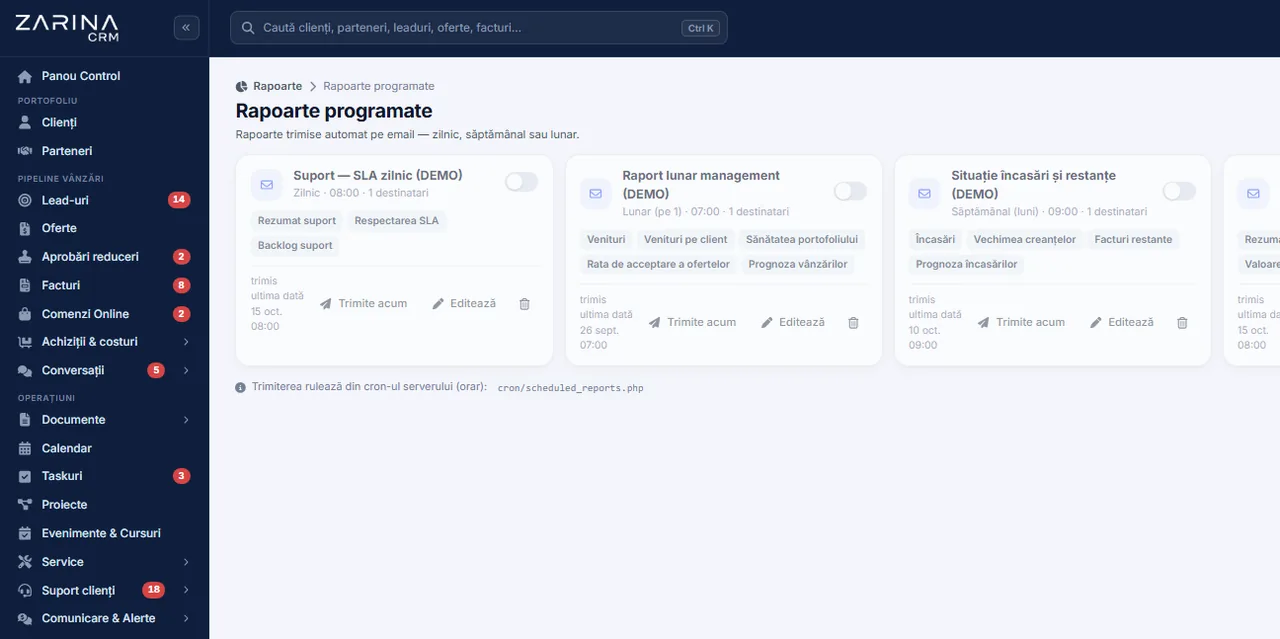
Scheduled reports, the figures reach the decision makers by themselves

The reports you ask for every week are sent automatically, at the intervals you set, to the people you choose, with the file attached. Every recipient receives only the information they have a right to, and the sendings stay recorded. Nobody loses a Monday morning compiling a file for the meeting.

From $2,900 excl. VATone-time payment, no monthly subscription
  • Sent at a fixed interval
  • Content according to rights
  • File attached
  • Relative periods
  • A log of what was sent
Scheduled · Zarina CRM
Screenshot from Zarina CRM: reports sent automatically by e-mail daily, weekly or monthly
Sent at a fixed interval
Content according to rights
File attached
In short

Scheduled reports sent automatically by e-mail. The reports you ask for every week are sent automatically, at the intervals you set, to the people you choose, with the file attached. A separately licensable module. Permanent licence, installed on the company server and unlimited users.

Works together with: Zarina SMART, Interactive dashboard, E-mail and templates.

The problem

The current situation, when reports are requested and sent by hand

The time spent monthly on manual reporting is usually greater than anyone in the company estimates.

  • The report is requested, not received Every figure means a request, a wait and a check.
  • The format differs from one date to the next Every person who puts the report together structures it differently, so comparing periods becomes difficult.
  • The information arrives late By the time it is compiled and sent, the data has changed.
  • The files circulate without control A report with margins lands in an e-mail and stays on devices, leaving no trace.
  • The same data is sent to everyone Every recipient receives everything, including the information that does not concern them.
  • Nobody checks whether it was sent When a report is missing, it is discovered at the meeting, not before.
What the module does

What the scheduled reports module contains

The module turns frequently used reports into automatic sendings, with clear rules.

Scheduling by interval

The report goes out by itself.

  • Daily, weekly, monthly
  • A set day and hour
  • On relative periods
  • Switched on and off at any time

Configured recipients

The information reaches the right people.

  • Recipient lists
  • Users of the application
  • External addresses, if that is accepted
  • Editable at any time

Content according to rights

Everyone receives what they are allowed.

  • The report generated in the recipient’s context
  • Margins restricted
  • Their own portfolio or the whole company
  • No bypassing the rules

File attached

The report can be used immediately.

  • Spreadsheet format
  • For the reported period
  • A consistent name
  • Opened directly

A log of what was sent

You know exactly what went out.

  • Date and recipients
  • The report sent
  • Delivery errors
  • Verifiable at any time

A configurable message

The report comes with context.

  • An introductory text
  • The period covered
  • The company’s signature
  • Per report type
What changes

What changes in the first month after the scheduled reports module is activated

Direct effects of the reporting running by itself.

01

Time recovered

Nobody compiles files any more.

  • No repeated requests
  • No manual processing
  • No formatting
  • Hours given back to the team
02

Information on time

The report arrives before the meeting.

  • A set interval
  • A fixed hour
  • Current data
  • No delays
03

A consistent format

Comparing periods becomes possible.

  • The same structure
  • The same definitions
  • A comparable history
  • Decisions on trends
04

Sensitive data protected

Unsuitable files no longer circulate.

  • Content according to rights
  • Configured recipients
  • A log of what was sent
  • No uncontrolled copies
05

Fewer questions

The decision makers already have the figures.

  • They receive it automatically
  • No requests to the team
  • Context in the message
  • File attached
06

Verifiability

You know what went out and when.

  • A complete log
  • Errors flagged
  • Resent when needed
  • Simple auditing
In the application

How a sending is configured, step by step

The configuration is done once, and the report then goes out with no intervention.

Screenshot from Zarina CRM: reports sent automatically by e-mail daily, weekly or monthly
  1. 1

    The report is chosen

    From the report centre, with the filters that produce exactly the information wanted.

  2. 2

    The filters are saved

    The filter set becomes the definition of the scheduled report, so the result stays comparable over time.

  3. 3

    The interval is set

    Daily, weekly or monthly, with a fixed day and hour, over a relative period: last week, last month.

  4. 4

    The recipients are chosen

    Users of the application or, if the policy allows it, external addresses. Everyone receives the content they have a right to.

  5. 5

    A test sending is checked

    Before activation, the report is sent once, for verification.

  6. 6

    The sendings stay recorded

    Every sending appears in the log, with date, recipients and any delivery errors.

Video tour

Scheduled reports, in short, inside the application

Coming soonThe video presentation of the module is being prepared.
Examples

The reports worth scheduling

Not all of them. Only the ones somebody asks for repeatedly.

A weekly commercial report

For the Monday meeting.

  • Sales for last week
  • Quotes issued and accepted
  • By owner
  • Compared with the week before

Overdue amounts, twice a month

For collection.

  • Invoices past due
  • Days overdue
  • By client
  • To the people responsible for collection

A monthly operational report

For management.

  • Activity per team
  • Completed tasks
  • Support and resolution time
  • Comparison across periods

Monthly budget execution

For cost control.

  • Budget against expenses
  • By department
  • Deviations
  • If the budgets module is active
Rights

How the rights are respected when sending

This is the point where an automatic reporting module can create a breach, if it is not designed correctly.

  1. 01

    The report is generated for the recipient

    The same file generated by an administrator is not sent to everyone; each person gets the content they have a right to.

  2. 02

    The margins stay restricted

    A recipient with no right to costs does not receive those columns.

  3. 03

    Their own portfolio, not the company’s

    A consultant receives their own figures, not the full picture, if that is how the access is configured.

  4. 04

    External addresses are a decision

    Sending to addresses outside the company is enabled explicitly, not implicitly.

  5. 05

    The sendings stay recorded

    The log shows which report went out, to whom and when.

  6. 06

    Stopping is immediate

    A schedule can be switched off at any time, without affecting the others.

Automations

What runs automatically in the scheduled reports module

The module is, in essence, an automation mechanism. These are the details that matter.

Run at the set hour

The report goes out by itself.

  • Based on the scheduled tasks on the server
  • Configurable interval
  • A relative period
  • No intervention

A retry on failure

A temporary error does not cancel the report.

  • Automatic retry
  • The error recorded
  • An alert to the administrator
  • A manual resend is possible

Relative periods

The dates do not have to be changed every month.

  • Last week
  • Last month
  • The previous quarter
  • No repeated configuration

The attachment generated automatically

The file is ready to use.

  • Spreadsheet format
  • A name carrying the period
  • Respects the rights
  • Opened directly

Switched off when a user leaves

The lists do not keep inactive recipients.

  • Checking the accounts
  • Inactive addresses flagged
  • Simple updating
  • No pointless sendings

A complete log

Everything is verifiable.

  • Successful sendings
  • Delivery errors
  • Recipients
  • The period covered
Who sees what

Protecting the data that is sent

A report sent automatically, periodically, is a flow of sensitive data leaving the application.

  • Content according to rights Every recipient receives only what they are allowed, generated in their own context.
  • External addresses, controlled Sending outside the company is approved explicitly, at configuration.
  • Protected files Spreadsheet files are protected against executable formulas.
  • A sending log Every sending stays recorded, useful for internal checks.
  • No broad configuration access Creating schedules is granted to administration roles, not to any user.
  • Data on the company server The reports are generated locally and go out through your own e-mail server.
What you need

What needs to be prepared to put the scheduled reports module into operation

We handle the configuration at implementation, on the reports you actually ask for.

01

The list of repetitive reports

The starting point.

  • What is asked for weekly
  • What is asked for monthly
  • For whom
  • Agreed together
02

The recipients

The information has to reach someone specific.

  • Users of the application
  • External addresses, if that is accepted
  • Lists per report type
  • Changeable later
03

The intervals

The moment matters.

  • Day and hour
  • Before the meetings
  • A relative period
  • Reviewable later
04

An email server configured

The sendings go out through it.

  • An active sending account
  • A domain with its reputation configured
  • A log of what was sent
  • Checked at implementation
05

Scheduled tasks on the server

Without them, nothing goes out.

  • Active scheduled task
  • A short checking interval
  • Diagnostics on failure
  • Checked during implementation
06

The recipients’ rights

They decide the content received.

  • Configured roles
  • Access to margins
  • Portfolio or company
  • Checked before activation
What it does not do

The limits of the scheduled reports module, stated explicitly

The module sends reports. It does not interpret them and it does not replace analysis.

  • It does not interpret the figures It sends data and comparisons. Explaining variations in plain language can be obtained through the AI analytics module.
  • It depends on the scheduled tasks on the server Without periodic execution on the server, no sending takes place. The configuration is part of the implementation.
  • It depends on the e-mail server If your e-mail server is unavailable, the sending is retried, and the error stays recorded.
  • It does not send reports you do not have Scheduling works on the reports that exist in the application, with their filters. New reports are built separately.
  • Too many sendings become noise A decision maker who receives seven reports a week reads none of them. We recommend being selective.
  • It does not guarantee reading The module confirms the sending, not the reading. The log shows what went out, not what was read.
Who it is for

When this module makes sense and when it does not

We prefer to say from the start in which situations the module is not worth its cost, so the sales conversation does not begin with the wrong expectations.

It makes sense if

The situations in which the module pays for itself quickly.

  • The same reports are asked for weekly or monthly, by the same people
  • Somebody loses time putting figures together and sending them
  • Management does not log into the platform, but wants the figures
  • You want the same report structure, at the same hour

It does not make sense if

The situations in which we recommend not buying it now.

  • The reports are asked for rarely and differently every time
  • The recipients log into the platform daily anyway
  • You have no scheduled tasks active on the server
  • The source modules are not licensed
How to buy

How the scheduled reports module is licensed

The module is activated through the licence and completes the report centre.

A separately licensed module

It contains the schedules, the recipients, the attachments and the sending log.

What the core includes

Users and roles, customers and contacts, lead and sales pipeline, custom fields, 15 interface languages and the central dashboard.

Pricing and configurations

Package composition and prices by edition are on the pricing page.

CRM implementations

Companies that have trusted Zarina CRM

Metod Sistem - Zarina CRM clientMetod Sistem
SICC Project Services - Zarina CRM clientSICC Project Services
Lapis Residence - Zarina CRM clientLapis Residence
Onyx Residence - Zarina CRM clientOnyx Residence
Iași Clinical Hospital of Pulmonology - Zarina CRM clientIași Clinical Hospital of Pulmonology
Regional Office for Cross-Border Cooperation Iași - Zarina CRM clientRegional Office for Cross-Border Cooperation
Arpa Imobiliare - Zarina CRM clientArpa Imobiliare
Rubin Capital - Zarina CRM clientRubin Capital
Hotel Palas Grand View - Zarina CRM clientHotel Palas Grand View
Grey Boutique Hotel Palas - Zarina CRM clientGrey Boutique Hotel Palas
Bucovina Resort and Spa - Zarina CRM clientBucovina Resort & Spa
HighLife Events - Zarina CRM clientHighLife Events
PavMar Beton - Zarina CRM clientPavMar Beton
Clinica Lauderma - Zarina CRM clientClinica Lauderma
Axa Traduceri Iași - Zarina CRM clientAxa Traduceri
AFQ Accounting - Zarina CRM clientAFQ Accounting
Moldo Garage - Zarina CRM clientMoldo Garage
Zuzu Land - Zarina CRM clientZuzu Land
Ziarul Unirea - Zarina CRM clientZiarul Unirea
Meat Me Up Belgium - Zarina CRM clientMeat Me Up Belgium
Joues et Croquettes Belgium - Zarina CRM clientJoues et Croquettes Belgium
Price, warranties and implementation

Scheduled reports: what it costs and what you get

You pay once. Everything that follows is written here, not in hidden conditions.

The price

It is part of the Advanced reporting package: $450 + VAT, on top of the core ($2,320). Bought separately, together with the core: $2,770.

Cheaper in a bundle. The tiers group several packages at a price lower than their sum:

  • Pro5 packages + core
    $3,480$5,280
    −34%
  • Business8 packages + core
    $4,640$7,460
    −38%
  • Enterprise13 packages + core
    $6,970$10,080
    −31%

List prices, excl. VAT, one-time payment, unlimited users. The struck-through price is the sum of the packages bought individually. Current offers apply on the pricing page.

Subscription or licence

What you pay over time for a subscription CRM

Subscription$10,480
Zarina Pro$3,480

Over 3 years, the subscription costs $10,480; the Zarina Pro licence costs $3,480, once.

An indicative comparison: enter the subscription price you pay now. The licence does not grow with the number of users.

After purchase

What you get

  • A lifetime licence, with no subscription and no per-user charge
  • Unlimited users, on the same licence
  • 6 months of warranty on correct operation: fixing errors and inconsistencies
  • Implementation, configuration and team training, included in the price
  • The licence is verified locally, on your own server: the application does not depend on our servers to work
Implementation and server

How long it takes and what is needed

  • 48 hours in the standard configuration; up to 14 working days with customisation around the company’s workflow
  • Your own server or web hosting with cPanel, with an SSL certificate
  • PHP 7.4 or newer (8.x recommended) and MySQL / MariaDB
  • The PHP extensions mysqli, json, mbstring; curl, gd and zip for integrations, PDF and exports
  • One cron task, for reminders and automations
Security and data protection

Where data lives

  • The data stays on your server and does not pass through ours
  • Roles and rights per user, two-factor authentication
  • An audit trail and limits on login attempts
  • Consents and data subject requests, managed in the application
  • Digitally signed updates and backups from the application

Have a question about Scheduled reports?

We answer in writing, with the exact price for your configuration.

Frequently asked questions

Questions about scheduled reports

Does every recipient receive the same data?
No. The report is generated in each recipient’s context, so everyone receives only the information they have a right to, margins included.
Can it be sent to addresses outside the company?
Yes, if your policy allows it. External sending is enabled explicitly at configuration, not implicitly.
What happens if a sending fails?
It is retried automatically, the error stays recorded, and the administrator is alerted. A manual resend is possible.
Do I have to change the period every month?
No. Relative periods are used: last week, last month, the previous quarter. The configuration is done once.
Does the report come as a file?
Yes, attached, in spreadsheet format, with a name that includes the period covered, so it can be used immediately.
Who can create schedules?
The administration roles. Not every user can configure automatic sendings to other people.
Can I stop a sending?
Yes, at any time, without affecting the other schedules. Stopping is immediate.
What does it depend on to work?
On the scheduled tasks on the server and on your e-mail server. Both are checked at implementation.
Can I check what was sent?
Yes. The log shows the report, the recipients, the date and any delivery errors.
Do the reports explain why the figures changed?
No. They contain data and comparisons. Plain-language interpretation can be obtained through the AI analytics module, with a human check.
Product sheet

Get the complete product sheet by email

A six-page document with everything you need to know before a sales conversation. No obligation and no sales call.

  • The platform core and the 13 module packages, with what each one contains
  • The features and modules of the edition you choose, plus available integrations
  • Full pricing and what it includes: installation, training, data import, warranty
  • The native integrations available and the situations where the platform is not a good fit

No monthly subscription

Take control of your operations, once

We install Zarina CRM on your hosting, configure it around your own workflow and train your team. From that moment on, the application is an asset of your company, not a recurring expense.
