Support and satisfaction package

Documentation and manuals, the company procedures in a single place

Internal procedures, product manuals, work instructions and answers to frequent questions sit in a structured library, with categories, search and role-based rights. Articles can also be published for customers, and new team members train from up-to-date material rather than from explanations repeated by colleagues.

From $2,900 excl. VATone-time payment, no monthly subscription
  • Procedures in a single place
  • Role-based rights
  • Public articles, optional
  • Links from tickets
  • Centralised updating
Documentation · Zarina CRM
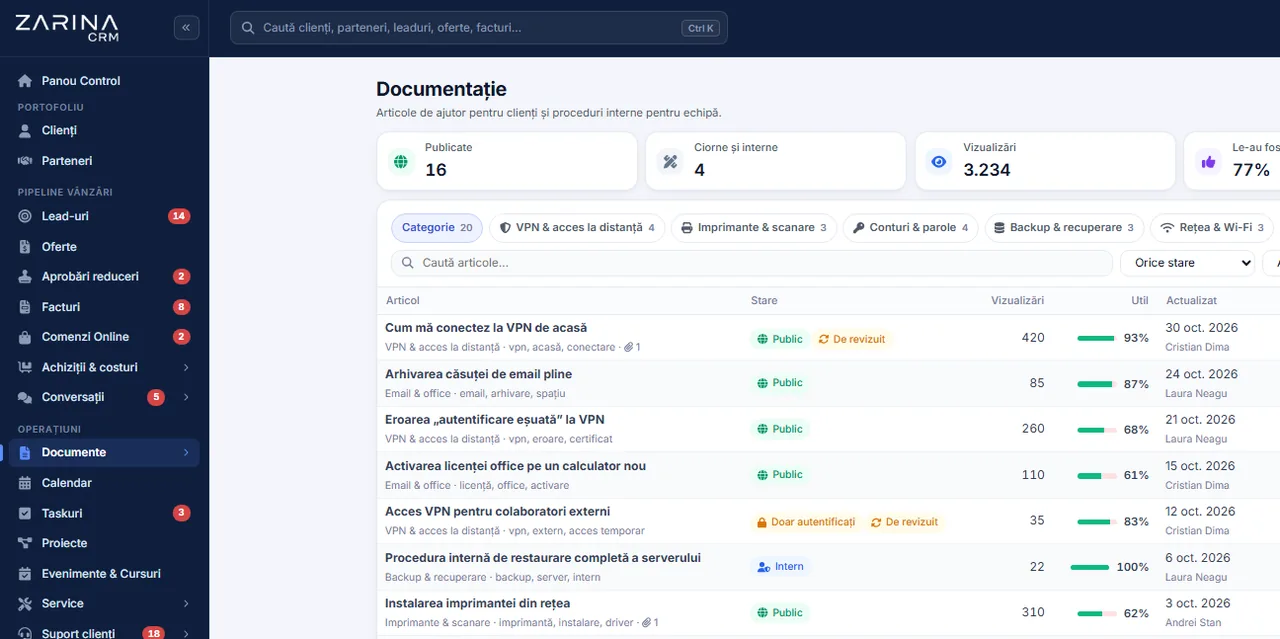
Screenshot from Zarina CRM: help articles for customers and internal procedures, by category, with views and usefulness
Procedures in a single place
Role-based rights
Public articles, optional
In short

Internal documentation and manuals, in a single place. Internal procedures, product manuals, work instructions and answers to frequent questions sit in a structured library, with categories, search and role-based rights. Part of the Support and satisfaction package. Permanent licence, installed on the company server and unlimited users.

Works together with: Multilingual CRM, Customer portal, HR and time tracking.

The problem

The current situation, when the procedures live in people’s heads

Unwritten knowledge looks free until the day the person who holds it leaves or is away.

  • Everyone works the way they were taught The same operation is carried out in three different ways, depending on who trained the employee.
  • Training eats the time of the good people A new employee takes up weeks of the most experienced colleague’s time.
  • The documents are scattered Procedures on a shared drive, instructions in an e-mail, the rest in conversations.
  • Nobody knows which version is valid The updated procedure travels in a file, while the team works from the old variant.
  • Customers ask the same thing Frequent questions occupy support, although the answer could be public.
  • The knowledge leaves with the employee When someone leaves, the company rediscovers how an operation used to be done.
What the module does

What the documentation module contains

The module adds a library of articles, with structure, search, rights and optional publishing.

01 / 06

Structured articles

The information has an order.

  • Categories and subcategories
  • Articles with a title and content
  • Your own ordering
  • Full-text search
02 / 06

Role-based rights

Not every procedure is for everyone.

  • Role-based access
  • Restricted categories
  • Internal articles
  • Public articles, optional
03 / 06

Publishing for customers

Frequent questions, answered by themselves.

  • Public pages on the company domain
  • Selected articles
  • Links sent from support
  • Reduces the volume of requests
04 / 06

Attachments

The documents accompany the explanation.

  • Files attached to the articles
  • Common formats
  • Controlled downloading
  • The current version visible
05 / 06

Centralised updating

One change, in a single place.

  • Article updated centrally
  • The team sees the current variant
  • History of changes
  • The author recorded
06 / 06

Links from the application

The documentation reaches where it is needed.

  • Links from tickets
  • Links from tasks
  • Sent to the customer
  • Context kept
What changes

What changes in the first months after the documentation module is activated

Direct effects of the procedures being written, updated and accessible.

Faster training

A new employee becomes productive sooner.

  • Material by role
  • An order to work through
  • Without taking up colleagues’ time
  • What they went through is verifiable

Consistent operations

The same procedure, for everyone.

  • Single instructions
  • The current variant, visible
  • Fewer errors
  • Predictable quality

Support less loaded

Frequent questions answer themselves.

  • Public articles
  • Links sent to customers
  • Falling volume
  • Consistent answers

Knowledge that stays

Departures no longer empty the company.

  • Documented procedures
  • Independent of individuals
  • Updated periodically
  • Context kept

Simpler compliance

The procedures can be shown.

  • Updated documents
  • History of changes
  • Controlled access
  • Useful in an audit

Time recovered

The explanations are no longer repeated.

  • An answer through a link
  • Material already written
  • Updated in one place
  • Fewer interruptions
In the application

How the library is built, step by step

You do not write everything from the start. You write what gets explained most often.

Screenshot from Zarina CRM: help articles for customers and internal procedures, by category, with views and usefulness
  1. 1

    What repeats gets identified

    The questions the team and the customers ask every week are the first articles. You do not start with the full manual.

  2. 2

    The categories are set

    A simple structure, by role and by type of operation, so that the articles can be found.

  3. 3

    The articles are written short

    One article solves one problem. Long procedures are split, so that they actually get read.

  4. 4

    The rights are set

    Internal articles stay internal. Those useful to customers can be published, selectively.

  5. 5

    They are linked from the application

    Articles are sent from tickets, attached to tasks and reach the customer as a link, not as a rewritten explanation.

  6. 6

    They are updated when things change

    When a procedure changes, the article is updated centrally, and the whole team sees the current variant.

Video tour

Documentation, in short, inside the application

Coming soonThe video presentation of the module is being prepared.
Organisation

What goes into the library and what does not

A library with a bit of everything does not get used. The selection is what gives it value.

Work procedures

How the operations are carried out.

  • Concrete steps
  • Owners
  • Exceptions
  • Updated when things change

Product or service manuals

What you sell, explained.

  • Features
  • Usage instructions
  • Frequently asked questions
  • Useful in sales too

Answers for customers

The material that reduces support.

  • Frequently asked questions
  • Configuration instructions
  • Publishable
  • Links from tickets

What does not go in here

Customer files have another place.

  • Contractual documents
  • Customer files
  • Personnel documents
  • They stay in their own modules
Access

Who reads what

Internal procedures and customer-facing material do not follow the same regime.

  • Internal articles Visible only to users of the application, by role and category.
  • Articles by role A support operator, a sales consultant and a technician each see the material that concerns them.
  • Public articles Selectively, on public pages of the company domain, for customers’ frequent questions.
  • Attachments follow the article Files are served under the same access conditions as the article that contains them.
  • Changes stay recorded You can see who updated an article and when, useful for procedures that have to be traceable.
  • Data on the company server The library stays in your own installation, not with an outside documentation provider.
Automations

What reduces the maintenance work

Mechanisms that keep the library useful without constant effort.

Articles out of support solutions

The documentation grows out of the work.

  • The solution from a ticket becomes an article
  • No rewriting
  • The link is kept
  • Useful for repeated cases

Links sent to customers

The answer no longer gets written from scratch.

  • Article attached to the reply
  • Public link
  • Recorded in the ticket
  • Consistent answers

Search in the library

The articles get found.

  • Full-text search
  • Filtering by category
  • Results according to rights
  • No long lists to work through

Material for new employees

The training has a path.

  • Articles grouped by role
  • An order to work through
  • Links from onboarding tasks
  • Verifiable

Centralised updating

One change reaches everyone.

  • An article updated once
  • The current variant, visible
  • History kept
  • No parallel versions

Usage reports

You can see what is being searched for.

  • Articles viewed
  • Searches with no result
  • Topics to be filled in
  • Export for analysis
Who sees what

Protecting the material

Internal procedures are, at times, confidential information.

  • Access by role and category Sensitive material is restricted explicitly, it does not stay visible to all users.
  • Publishing is a decision An article becomes public only through an explicit action, never implicitly.
  • Attachments are protected Files are served through the application, with rights checked, not through public addresses.
  • Changes stay traceable The author and the date of every update are recorded.
  • No indexing for internal articles Internal material does not appear in search engines.
  • Data on the company server The library and the attachments stay in your own installation.
What you need

What needs to be prepared to put the documentation module into operation

We handle the configuration at implementation. The content stays the company’s.

01

The list of repetitive topics

The starting point.

  • The team’s frequent questions
  • Customers’ frequent questions
  • Critical operations
  • Agreed together
02

The category structure

It decides whether the articles get found.

  • Simple categories
  • By role and operation
  • No deep hierarchies
  • Reviewable later
03

The existing material

Much of it is already written.

  • Procedures in files
  • Product manuals
  • Instructions from e-mails
  • Taken over at implementation
04

The access rights

It is decided what is internal.

  • Roles with access
  • Restricted categories
  • Publishable articles
  • Reviewable later
05

An owner for the content

A library with no owner goes stale.

  • A responsible person
  • A review rhythm
  • The update procedure
  • Agreed internally
06

The installation address, for the public pages

Needed only when publishing.

  • Configured address
  • Valid certificate
  • Accessible pages
  • Checked during implementation
What it does not do

The limits of the documentation module, stated explicitly

The module hosts and structures the documentation. It does not write it and it does not maintain it by itself.

  • We do not write your procedures The structure, the categories and the migration we do at implementation. The operational content stays the company’s.
  • It is not a quality management system Document approval flows, edition control and the signature circuits from quality standards are not part of this module.
  • It does not search inside attached files The search covers the text of the articles, not the content of attached documents.
  • It does not track mandatory completion We do not generate training evidence such as a test with a certificate. Completion can be tracked through tasks, not through certification.
  • A library with no owner goes stale If nobody updates the articles, the module becomes an archive of outdated procedures.
  • It does not replace hands-on training The material cuts training time, it does not eliminate it, especially in technical work.
Who it is for

When this module makes sense and when it does not

We prefer to say from the start in which situations the module is not worth its cost, so the sales conversation does not begin with the wrong expectations.

It makes sense if

The situations in which the module pays for itself quickly.

  • The same questions reach support, every day
  • New colleagues are trained verbally, every time
  • You want public articles to send customers to
  • The internal procedures exist, but nobody finds them

It does not make sense if

The situations in which we recommend not buying it now.

  • The product or service needs no explaining
  • You already have a knowledge base your customers use
  • You have nobody to write and maintain the articles
  • The volume of questions is small
How to buy

How the documentation module is licensed

The module is activated by licence and works together with the core.

Support and satisfaction package

It contains the article library, the categories, the rights and the public pages.

What the core includes

Users and roles, clients and contacts, leads and the sales pipeline, custom fields and 15 interface languages.

Pricing and configurations

Package composition and prices by edition are on the pricing page.

CRM implementations

Companies that have trusted Zarina CRM

Metod Sistem - Zarina CRM clientMetod Sistem
SICC Project Services - Zarina CRM clientSICC Project Services
Lapis Residence - Zarina CRM clientLapis Residence
Onyx Residence - Zarina CRM clientOnyx Residence
Iași Clinical Hospital of Pulmonology - Zarina CRM clientIași Clinical Hospital of Pulmonology
Regional Office for Cross-Border Cooperation Iași - Zarina CRM clientRegional Office for Cross-Border Cooperation
Arpa Imobiliare - Zarina CRM clientArpa Imobiliare
Rubin Capital - Zarina CRM clientRubin Capital
Hotel Palas Grand View - Zarina CRM clientHotel Palas Grand View
Grey Boutique Hotel Palas - Zarina CRM clientGrey Boutique Hotel Palas
Bucovina Resort and Spa - Zarina CRM clientBucovina Resort & Spa
HighLife Events - Zarina CRM clientHighLife Events
PavMar Beton - Zarina CRM clientPavMar Beton
Clinica Lauderma - Zarina CRM clientClinica Lauderma
Axa Traduceri Iași - Zarina CRM clientAxa Traduceri
AFQ Accounting - Zarina CRM clientAFQ Accounting
Moldo Garage - Zarina CRM clientMoldo Garage
Zuzu Land - Zarina CRM clientZuzu Land
Ziarul Unirea - Zarina CRM clientZiarul Unirea
Meat Me Up Belgium - Zarina CRM clientMeat Me Up Belgium
Joues et Croquettes Belgium - Zarina CRM clientJoues et Croquettes Belgium
Price, warranties and implementation

Documentation: what it costs and what you get

You pay once. Everything that follows is written here, not in hidden conditions.

The price

It is part of the Support and satisfaction package: $450 + VAT, on top of the core ($2,320). Bought separately, together with the core: $2,770.

Cheaper in a bundle. The tiers group several packages at a price lower than their sum:

  • Business8 packages + core
    $4,640$7,460
    −38%
  • Enterprise13 packages + core
    $6,970$10,080
    −31%

List prices, excl. VAT, one-time payment, unlimited users. The struck-through price is the sum of the packages bought individually. Current offers apply on the pricing page.

Subscription or licence

What you pay over time for a subscription CRM

Subscription$10,480
Zarina Business$4,640

Over 3 years, the subscription costs $10,480; the Zarina Business licence costs $4,640, once.

An indicative comparison: enter the subscription price you pay now. The licence does not grow with the number of users.

After purchase

What you get

  • A lifetime licence, with no subscription and no per-user charge
  • Unlimited users, on the same licence
  • 6 months of warranty on correct operation: fixing errors and inconsistencies
  • Implementation, configuration and team training, included in the price
  • The licence is verified locally, on your own server: the application does not depend on our servers to work
Implementation and server

How long it takes and what is needed

  • 48 hours in the standard configuration; up to 14 working days with customisation around the company’s workflow
  • Your own server or web hosting with cPanel, with an SSL certificate
  • PHP 7.4 or newer (8.x recommended) and MySQL / MariaDB
  • The PHP extensions mysqli, json, mbstring; curl, gd and zip for integrations, PDF and exports
  • One cron task, for reminders and automations
Security and data protection

Where data lives

  • The data stays on your server and does not pass through ours
  • Roles and rights per user, two-factor authentication
  • An audit trail and limits on login attempts
  • Consents and data subject requests, managed in the application
  • Digitally signed updates and backups from the application

Have a question about Documentation?

We answer in writing, with the exact price for your configuration.

Frequently asked questions

Questions about the documentation module

Can I publish some articles for customers?
Yes, selectively. Published articles appear on public pages, on the company domain, while internal ones stay visible only to users of the application.
Who can read the internal procedures?
The users granted access, by role and by category. Sensitive material is restricted explicitly.
Can I attach files to articles?
Yes, in the common formats. Attachments follow the same access rules as the article that contains them.
Can the attached documents be searched?
No. The search works on the text of the articles. Text recognition inside attached files is not part of the module.
How is the documentation linked to support?
Operators send articles as a reply to tickets, and frequent solutions can become new articles, without being rewritten.
Can I track whether an employee went through the material?
Completion can be tracked through onboarding tasks. The module does not generate tests and does not issue training certificates.
Who makes sure the information is current?
Someone responsible inside your company. With no owner for the content, any library goes stale within a few months.
Do internal articles show up in Google?
No. Only explicitly published articles appear publicly; the rest are not indexed.
Do you migrate the existing procedures?
Yes, at implementation we take over the material you already have, place it in categories and make it searchable.
Does it replace a quality management system?
No. Edition control, formal approvals and the signature circuits from quality standards are not part of this module.
Product sheet

Get the complete product sheet by email

A six-page document with everything you need to know before a sales conversation. No obligation and no sales call.

  • The platform core and the 13 module packages, with what each one contains
  • The features and modules of the edition you choose, plus available integrations
  • Full pricing and what it includes: installation, training, data import, warranty
  • The native integrations available and the situations where the platform is not a good fit

No monthly subscription

Take control of your operations, once

We install Zarina CRM on your hosting, configure it around your own workflow and train your team. From that moment on, the application is an asset of your company, not a recurring expense.