A separately licensed module

HR and employee administration, records, leave and attendance in one place

Personnel records, leave requests, day balances and attendance are administered in the application, with rights kept separate from the rest of the commercial activity. The employee sees their own position, the manager approves from the same interface, and the personnel documents stay in a controlled archive rather than in files sent by e-mail.

From $2,900 excl. VATone-time payment, no monthly subscription
  • Complete records
  • Leave with approval
  • Balances calculated automatically
  • Alerts on expiry dates
  • Strict role-based access
HR · Zarina CRM
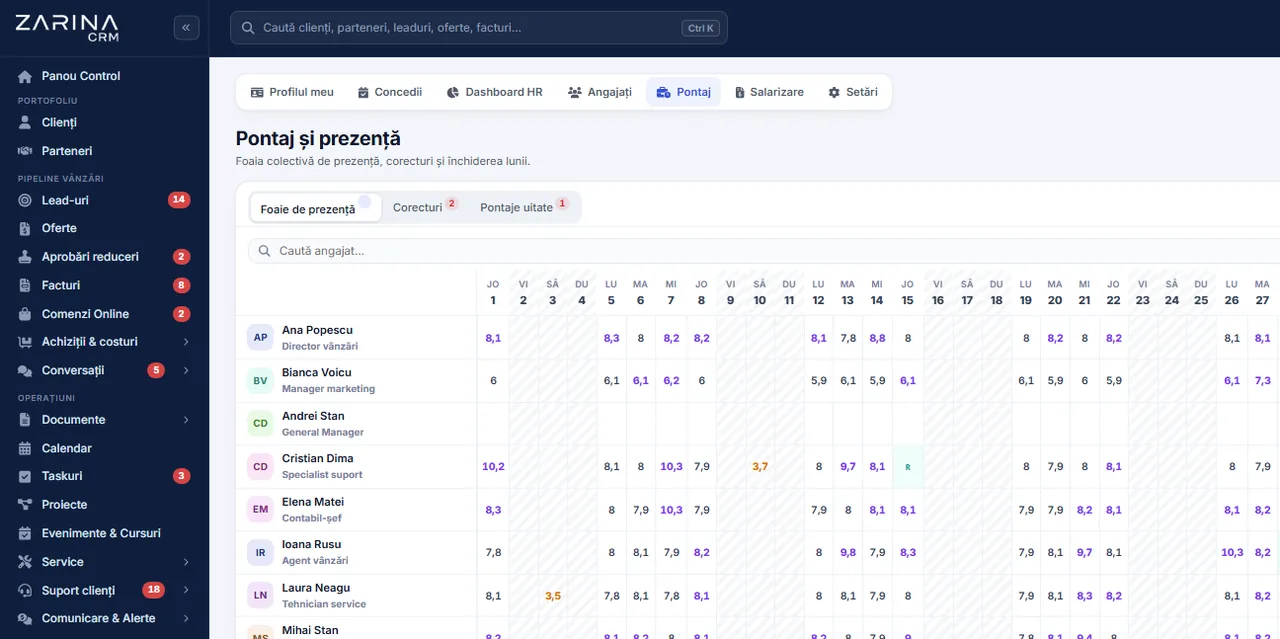
Screenshot from Zarina CRM: the collective attendance sheet with hours worked per day, corrections and the month close
Complete records
Leave with approval
Balances calculated automatically
In short

HR and attendance in the CRM: records, leave and presence. Personnel records, leave requests, day balances and attendance are administered in the application, with rights kept separate from the rest of the commercial activity. A separately licensable module. Permanent licence, installed on the company server and unlimited users.

Works together with: Recruitment and careers, Documentation, Notification centre.

The problem

The current situation, when personnel data is kept in files

Personnel records look simple until the first inspection or the first labour dispute.

  • The records are incomplete The papers sit partly with accounting, partly in a physical folder, partly in somebody’s mailbox.
  • Leave balances are calculated by hand A table maintained by one person, with mistakes discovered at year end.
  • The requests travel by e-mail The approval is given in a message, and when it is needed nobody finds the proof.
  • The attendance does not match reality The hours are filled in at month end, from memory, for the whole team.
  • Documents with an expiry date run out Permits, authorisations and certificates expire without anyone being warned.
  • Personnel data circulates without control Sensitive information ends up in files anyone in the company can open.
What the module does

What the human resources module contains

The module adds the employee record, the leave flow, attendance and the personnel documents.

01 / 06

Employee record

Personnel information, structured.

  • Identification details
  • Position and department
  • A history of positions
  • Attached documents
02 / 06

Leave with approval

The request becomes a flow, not a message.

  • A request from the application
  • Approval by the manager
  • The day balance calculated
  • Full history
03 / 06

Timesheet (attendance)

Presence becomes a record.

  • Recorded per day
  • Hours worked
  • Absences and their types
  • Export for payroll
04 / 06

Documents with an expiry date

The expiry dates are seen in advance.

  • Permits and authorisations
  • Certificates and training
  • An alert before expiry
  • Per employee and per position
05 / 06

Separate rights

Personnel data is not for everyone.

  • Access restricted to the HR roles
  • The employee sees their own position
  • The manager sees the team
  • No commercial access
06 / 06

Personnel reports

The decisions are made on data.

  • Presence by period
  • Leave by department
  • Expired documents
  • Export for analysis
What changes

What changes in the first months after the HR module is activated

Direct effects of the personnel records sitting in a system with rights and history.

Complete records

Inspections no longer cause panic.

  • Documents up to date
  • For every employee
  • Quick search
  • An export for an inspection

Correct balances

The arguments about remaining days disappear.

  • Automatic calculation
  • Visible to the employee
  • A history of requests
  • No parallel spreadsheets

Approvals with a trace

Who approved is visible.

  • A flow inside the application
  • Author and date
  • Full history
  • No lost proof

Realistic attendance

The hours are recorded in time.

  • Recorded as it happens
  • Fewer corrections
  • Export for payroll
  • Comparison across periods

Expiry dates caught in time

The risk of non-compliance drops.

  • Alerts before the deadline
  • By document type
  • The owner notified
  • A report on the position

Sensitive data protected

Compliance becomes possible.

  • Role-based access
  • No files by email
  • Operations recorded
  • Personal data procedures
In the application

How it works, across the three main flows

The record, the leave and the attendance cover most of the administrative personnel work.

Screenshot from Zarina CRM: the collective attendance sheet with hours worked per day, corrections and the month close
  1. 1

    The record is filled in at hiring

    The identification data, the position, the department and the documents are entered once, and the updates stay in the history.

  2. 2

    The employee files the leave request

    From the application, with the period they want. The available balance is visible before filing, so unsuitable requests drop.

  3. 3

    The manager approves or rejects

    The decision stays recorded, with date and author, and the balance is updated automatically on approval.

  4. 4

    The attendance is filled in as it happens

    The days worked, the absences and their types are recorded along the way, not reconstructed at month end.

  5. 5

    The documents with an expiry date are tracked

    Permits and authorisations generate alerts before expiry, to the person responsible for personnel.

  6. 6

    The data goes to payroll through an export

    The module does not calculate salaries. The export prepared for the payroll program is produced by period.

Video tour

HR and attendance, in short, inside the application

Coming soonThe video presentation of the module is being prepared.
Holidays

The leave flow, in detail

This is the part with the biggest immediate impact, because it replaces a manually maintained table.

01 / 04

Absence types

Not all days are the same.

  • Annual leave
  • Sick leave
  • Unpaid leave
  • Other configurable types
02 / 04

Balance and annual entitlement

The calculation is no longer done by hand.

  • Annual entitlement per employee
  • Days used
  • Remaining balance
  • Carry-over, where it applies
03 / 04

Approval along the hierarchy

The request reaches the right person.

  • The direct manager
  • A stand-in for certain periods
  • The decision recorded
  • Automatic notifications
04 / 04

Visibility in the calendar

Planning takes the absences into account.

  • Absences visible to the team
  • Clashes flagged
  • Useful when scheduling work
  • No medical details exposed
Timesheet (attendance)

Attendance, in detail

Presence is not reconstructed at month end, from memory. It is recorded as it happens, and approved absences enter the attendance sheet by themselves.

  • The working schedule is configured Full time, shifts or flexible hours, per employee or per department. Deviations are calculated against that schedule, not against an estimate.
  • Presence is recorded as it happens Logging into the platform marks the day as present, and manual entry stays available for those who do not work in the application.
  • Approved absences enter automatically An approved leave request appears in the attendance sheet as such, so the record no longer contradicts the approvals.
  • Corrections are made under control Any later change stays in the history, with author, moment and reason. The attendance sheet is not quietly rewritten.
  • The employee sees their own position Everyone can check the days recorded and flag an error before the month is closed, not after payday.
  • The month is closed and exported After closing, the position is exported for payroll, in the format agreed at implementation.
Rights

Who sees the personnel data

The rules here are stricter than anywhere else in the application, because the data is sensitive.

  1. 01

    The employee sees their own position

    Their own record, day balance, requests and attendance.

  2. 02

    The manager sees the team

    The requests to approve and the attendance position of the team they lead, with no access to each person’s sensitive documents.

  3. 03

    The HR roles have full access

    The records, the documents and the attendance are administered by the personnel roles, not by the commercial management.

  4. 04

    Nobody changes their own rights

    Balances, the annual entitlement and your own attendance are not adjusted by the user. The rule is enforced by the application.

  5. 05

    Medical data stays protected

    The absence type is visible where it is needed, with no medical details in the team calendar.

  6. 06

    Operations stay recorded

    Changes to records, balances and attendance are logged, with author and date.

Automations

What runs automatically in the HR module

Mechanisms that reduce the administrative personnel work.

Calculating the balances

The days are no longer counted by hand.

  • The annual entitlement applied
  • Consumption from approved requests
  • Updated balance
  • Visible to the employee

Notifications on requests

The flow does not stall.

  • Notification to the manager
  • An answer to the employee
  • A reminder on pending requests
  • Configurable

Alerts on expiry dates

The documents do not expire unnoticed.

  • Before the term
  • By document type
  • To the HR owner
  • A report on the position

Absences in the calendar

Planning becomes realistic.

  • Approved absences visible
  • Clashes flagged
  • Useful when scheduling the team
  • No sensitive details

Export for payroll

The data goes out structured.

  • Export by period
  • An agreed format
  • No recopying
  • Verifiable

Scheduled reports

The reports reach management.

  • Presence by period
  • Leave by department
  • Expired documents
  • Export attached
Who sees what

Protecting the personnel data

Personnel data is the most sensitive category in the application and is treated as such.

  • Strict role-based access The module opens only to the personnel roles and, in a limited way, to managers and employees.
  • The documents are protected Personnel files are served through the application, with rights checked, and access can require two-step authentication.
  • Separation from the commercial data A sales consultant has no access to records, balances or attendance.
  • Nobody adjusts their own record data Balances, the annual entitlement and your own attendance cannot be modified by the user.
  • Requests about personal data Employee data is included in the search, export and deletion procedures, respecting the legal retention periods.
  • Data on the company server The records and the documents stay in your own installation.
What you need

What needs to be prepared to put the HR module into operation

We handle the configuration at implementation, together with the person responsible for personnel.

01

The personnel structure

The basis of the whole module.

  • Employees and positions
  • Departments
  • Direct managers
  • Imported at implementation
02

The absence types

They decide the request flow.

  • The types used
  • Approval rules
  • The annual entitlement by category
  • Agreed together
03

The current balances

The records start out correct.

  • Days used in the current year
  • Carry-over from the previous year
  • Checked against the existing records
  • Taken over at implementation
04

The documents with an expiry date

For useful alerts.

  • Document types
  • Expiry dates
  • An owner for the tracking
  • Configured at implementation
05

The working hours

Needed for attendance.

  • Working intervals
  • Public holidays
  • Schedules per department
  • Configured at implementation
06

The format for payroll

The export has to be usable.

  • The payroll program used
  • The fields needed
  • The reporting periods
  • Agreed at implementation
What it does not do

The limits of the HR module, stated explicitly

The module administers the personnel records. It does not calculate salaries and it does not replace employment-law advice.

  • It does not calculate salaries The module produces the records and the export. The salary calculation, the contributions and the filings stay in the payroll program.
  • It does not generate official reporting documents Statutory registers and filings are produced in the dedicated programs.
  • It does not provide employment-law advice The rules on leave and entitlements are configured according to the legislation and your own policy, based on the company’s decisions.
  • Attendance is not an access control system It does not replace badge readers. If you have such a system, the integration is analysed separately.
  • It does not track employees’ location The records capture presence and activities, not where people are.
  • The quality depends on the discipline of filling it in An attendance sheet filled in at month end produces the same approximations as before.
Who it is for

When this module makes sense and when it does not

We prefer to say from the start in which situations the module is not worth its cost, so the sales conversation does not begin with the wrong expectations.

It makes sense if

The situations in which the module pays for itself quickly.

  • You have more than ten employees and records on paper
  • Leave is requested in messages and then forgotten
  • Attendance is filled in at month end, from memory
  • You want the personnel documents in a single place

It does not make sense if

The situations in which we recommend not buying it now.

  • You have fewer than five employees and everyone knows everything
  • You use a payroll program that also covers the records
  • You outsource human resources completely
  • Nobody will file the requests in the system
How to buy

How the human resources module is licensed

The module is activated through the licence, with rights kept separate from the rest of the application.

A separately licensed module

It contains the records, the leave, the attendance and the personnel documents.

What the core includes

Users and roles, clients and contacts, leads and the sales pipeline, custom fields and 15 interface languages.

Pricing and configurations

Package composition and prices by edition are on the pricing page.

CRM implementations

Companies that have trusted Zarina CRM

Metod Sistem - Zarina CRM clientMetod Sistem
SICC Project Services - Zarina CRM clientSICC Project Services
Lapis Residence - Zarina CRM clientLapis Residence
Onyx Residence - Zarina CRM clientOnyx Residence
Iași Clinical Hospital of Pulmonology - Zarina CRM clientIași Clinical Hospital of Pulmonology
Regional Office for Cross-Border Cooperation Iași - Zarina CRM clientRegional Office for Cross-Border Cooperation
Arpa Imobiliare - Zarina CRM clientArpa Imobiliare
Rubin Capital - Zarina CRM clientRubin Capital
Hotel Palas Grand View - Zarina CRM clientHotel Palas Grand View
Grey Boutique Hotel Palas - Zarina CRM clientGrey Boutique Hotel Palas
Bucovina Resort and Spa - Zarina CRM clientBucovina Resort & Spa
HighLife Events - Zarina CRM clientHighLife Events
PavMar Beton - Zarina CRM clientPavMar Beton
Clinica Lauderma - Zarina CRM clientClinica Lauderma
Axa Traduceri Iași - Zarina CRM clientAxa Traduceri
AFQ Accounting - Zarina CRM clientAFQ Accounting
Moldo Garage - Zarina CRM clientMoldo Garage
Zuzu Land - Zarina CRM clientZuzu Land
Ziarul Unirea - Zarina CRM clientZiarul Unirea
Meat Me Up Belgium - Zarina CRM clientMeat Me Up Belgium
Joues et Croquettes Belgium - Zarina CRM clientJoues et Croquettes Belgium
Price, warranties and implementation

HR and attendance: what it costs and what you get

You pay once. Everything that follows is written here, not in hidden conditions.

The price

It is part of the HR and recruitment package: $450 + VAT, on top of the core ($2,320). Bought separately, together with the core: $2,770.

Cheaper in a bundle. The tiers group several packages at a price lower than their sum:

  • Enterprise13 packages + core
    $6,970$10,080
    −31%

List prices, excl. VAT, one-time payment, unlimited users. The struck-through price is the sum of the packages bought individually. Current offers apply on the pricing page.

Subscription or licence

What you pay over time for a subscription CRM

Subscription$10,480
Zarina Enterprise$6,970

Over 3 years, the subscription costs $10,480; the Zarina Enterprise licence costs $6,970, once.

An indicative comparison: enter the subscription price you pay now. The licence does not grow with the number of users.

After purchase

What you get

  • A lifetime licence, with no subscription and no per-user charge
  • Unlimited users, on the same licence
  • 6 months of warranty on correct operation: fixing errors and inconsistencies
  • Implementation, configuration and team training, included in the price
  • The licence is verified locally, on your own server: the application does not depend on our servers to work
Implementation and server

How long it takes and what is needed

  • 48 hours in the standard configuration; up to 14 working days with customisation around the company’s workflow
  • Your own server or web hosting with cPanel, with an SSL certificate
  • PHP 7.4 or newer (8.x recommended) and MySQL / MariaDB
  • The PHP extensions mysqli, json, mbstring; curl, gd and zip for integrations, PDF and exports
  • One cron task, for reminders and automations
Security and data protection

Where data lives

  • The data stays on your server and does not pass through ours
  • Roles and rights per user, two-factor authentication
  • An audit trail and limits on login attempts
  • Consents and data subject requests, managed in the application
  • Digitally signed updates and backups from the application

Have a question about HR and attendance?

We answer in writing, with the exact price for your configuration.

Frequently asked questions

Questions about the human resources module

Does it calculate salaries?
No. The module keeps the personnel records: files, leave, attendance and documents. The salary calculation and the filings stay in the payroll program, and the data is transferred through an export.
Can the employee file their own leave request?
Yes, from the application, with the day balance visible before filing. The manager approves or rejects, and the decision stays recorded.
Who sees the personnel records?
The human resources roles. The manager sees what they need for their own team, and the employee sees their own position. The commercial roles have no access.
Are leave balances calculated automatically?
Yes, from the configured annual entitlement and the approved requests. Nobody can adjust their own balance or their own annual entitlement.
Can the expiry of authorisations be tracked?
Yes. Documents with an expiry date generate alerts before they run out, to the person responsible for personnel, by document type.
Do the absences appear in the team calendar?
Yes, as an unavailability period, with no sensitive details. Planning takes them into account, including when flagging overlaps.
Does the module replace badge readers?
No. The attendance is a record inside the application. Integration with an existing access control system is analysed separately.
How is the data exported for payroll?
By period, in the format agreed with your payroll program, set at implementation.
Is the personnel data protected?
Yes: strict role-based access, documents served through the application with rights checked, additional authentication where it is enabled, and operations logged.
Do you provide employment-law advice?
No. We configure the rules according to your company’s decisions and the applicable legislation, but we do not replace legal advice.
Product sheet

Get the complete product sheet by email

A six-page document with everything you need to know before a sales conversation. No obligation and no sales call.

  • The platform core and the 13 module packages, with what each one contains
  • The features and modules of the edition you choose, plus available integrations
  • Full pricing and what it includes: installation, training, data import, warranty
  • The native integrations available and the situations where the platform is not a good fit

No monthly subscription

Take control of your operations, once

We install Zarina CRM on your hosting, configure it around your own workflow and train your team. From that moment on, the application is an asset of your company, not a recurring expense.
