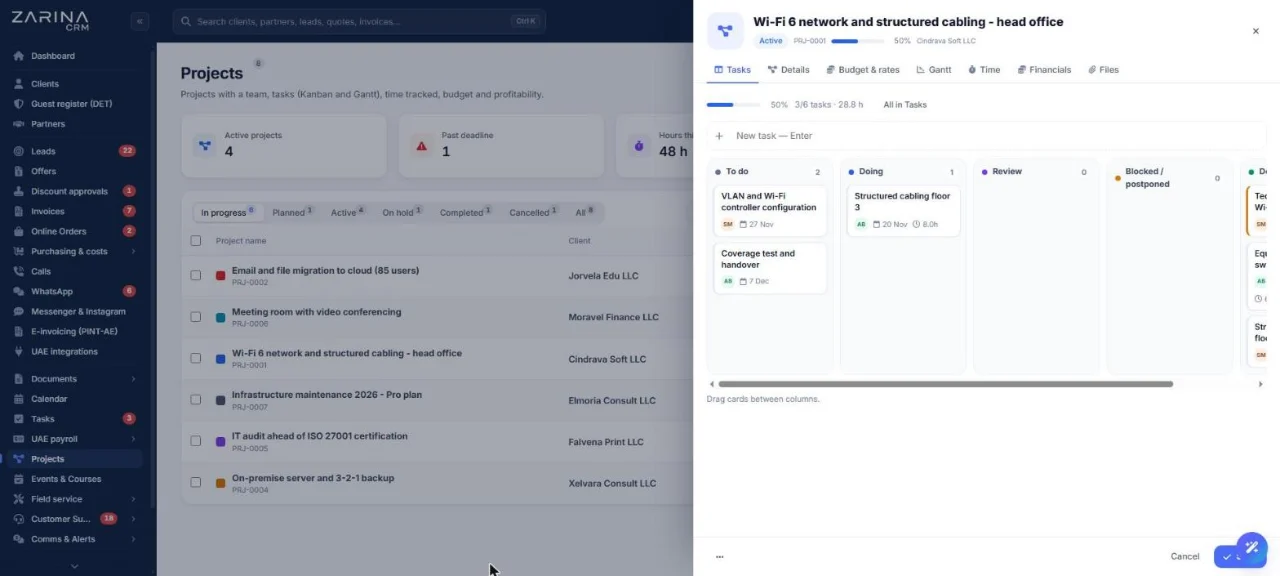
One board for the whole team
Everyone sees the tasks of the project and moves them as the work advances.
- Five columns, drag and drop
- Assignee and due date on every card
- Blocked tasks visible at a glance
- New task added with Enter


Every project has its client, team, deadline and budget. Tasks move on a Kanban board and on a Gantt timeline, hours are logged per task with a timer or by hand, and the financials tab shows what was invoiced, what was collected and what the project really earned. Installed on your own server, with a one-time licence.
From $2,900one-time payment, no monthly subscription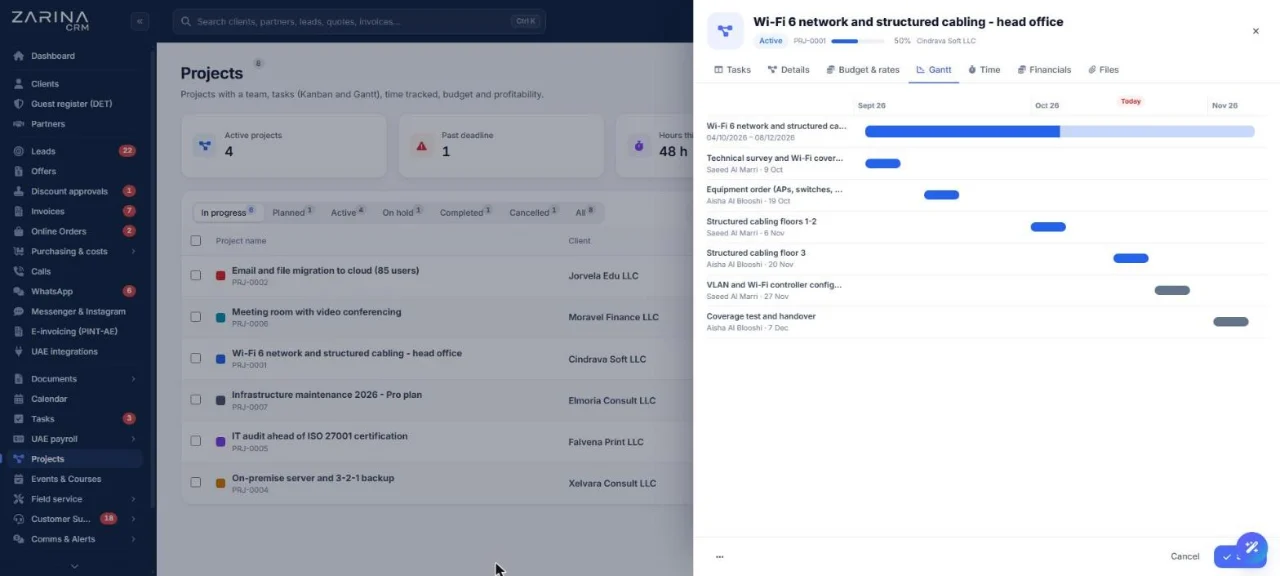
Project management in Zarina CRM connects the work to the money: tasks with an owner and an estimate, hours logged against them, a budget in AED or another currency, and the invoices linked to the project. You see at any moment how far the project is, how many hours were spent and whether it still makes a profit.
Works together with: Task management, Invoicing, Client files and Reports.
The tasks sit in one tool, the hours in a spreadsheet and the invoices in the accounting software. Nobody sees the whole project until it is already late or over budget.
Each project opens in a side panel with seven tabs: Tasks, Details, Budget & rates, Gantt, Time, Financials and Files.
A project linked to a client and a team.
Columns that follow the real work.
The tasks of the project on a calendar.
Hours logged against tasks.
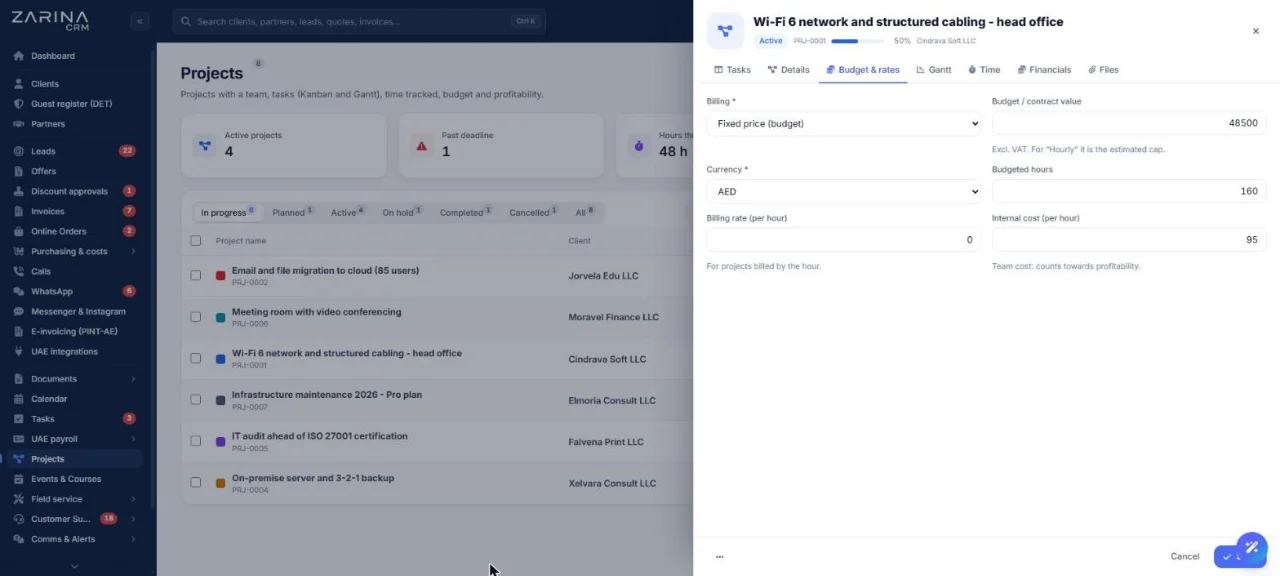
The commercial terms of the project.
What the project earns, in real numbers.
The team works on tasks, the hours are logged as they happen, and the numbers of the project are always up to date.
Everyone sees the tasks of the project and moves them as the work advances.
The Gantt timeline shows the tasks against today.
Time is attached to the task, not to a separate timesheet.
Labour cost and expenses are deducted as they appear.
The logged hours become a proforma invoice.
The project list starts with the figures that matter.
From the moment the client accepts the offer to the final invoice.
Choose the client, the project manager, the team, the start date and the deadline.
Fixed price, hourly or internal, with budgeted hours, billing rate and internal cost per hour.
Each task gets an assignee, a due date, a priority and an estimate in hours.
The team moves the cards on the board and logs time with the timer or by hand.
The Gantt shows what is late; the financials tab shows labour cost, expenses and margin.
Link the invoices, turn billable hours into a proforma and mark the project completed.
Written here so that you can decide before the demo, not after the purchase.
Service companies that sell work by project and want to know what each project earns.
A team of 3 to 200 people delivering projects for clients in the UAE.
Planning features that belong to specialised scheduling software.
The module is part of the package that includes it and works with the rest of the platform.
Projects, Kanban and Gantt, time tracking, budget and rates, financials and project files.
Users and roles, clients and contacts, leads and the sales pipeline, custom fields and 15 interface languages.
To bill the project and see the collected amount, the project uses the invoicing of the platform.
Package composition and prices by edition are on the pricing page.


You pay once. Everything that follows is written here, not in hidden conditions.
The Projects module is included from the PRO package: $3,480, paid once, for the whole company.
The same CRM, in 3 packages. Each package includes everything in the one before it:
One-time payment, unlimited users. What each package contains is on the pricing page.
Over 3 years, the subscription costs $9,000; the Zarina PRO licence costs $3,480, once.
An indicative comparison: enter the subscription price you pay now. The licence does not grow with the number of users.
We answer in writing, with the exact price for your configuration.
Yes. Every project has a Gantt tab with the project bar from start to deadline and each task on its due date, with the assignee and a marker for today. It is a timeline for following the work, not a scheduling engine with a critical path.
Yes. A timer can be started from the task, or the hours can be added by hand with the date and a note. The Time tab shows the totals per person and for the whole project, compared with the budgeted hours.
Yes. Set the billing to hourly and the billing rate per hour. The logged hours can be turned into a proforma invoice, and the invoices are linked to the project.
From the amount invoiced, excluding VAT, minus the labour cost and the project expenses. The labour cost comes from the logged hours multiplied by the internal cost per hour.
For service companies, agencies, IT and maintenance teams it usually is, because it connects tasks, hours and invoices. For large construction programmes with critical path and resource levelling, a specialised scheduling tool is still needed.
Each project has its own currency, AED by default. The budget, the rates and the financials are shown in that currency.
No. The licence is paid once, with unlimited users and unlimited projects, and the CRM runs on your own server.
The project is managed by your team inside the CRM. For customer requests and their history, the customer portal can be used together with the support module.
A six-page document with everything you need to know before a sales conversation. No obligation and no sales call.
We install Zarina CRM on your hosting, configure it around your own workflow and train your team. From that moment on, the application is an asset of your company, not a recurring expense.
We have sent the access link to the e-mail address you entered. It usually arrives within a minute.