Zarina CRM Medical · neurology profile

Software for neurology clinics, with the neurological examination, clinical scales and investigations

Neurology follows patients through scales and examinations that must be repeated the same way: MMSE, EDSS, headache days, muscle power. When they are written as prose, the change between visits is guesswork. Zarina CRM records the neurological examination, the clinical scales and the EEG, EMG and imaging results in fields, visit after visit. It is installed on the clinic’s own server, with a lifetime licence.
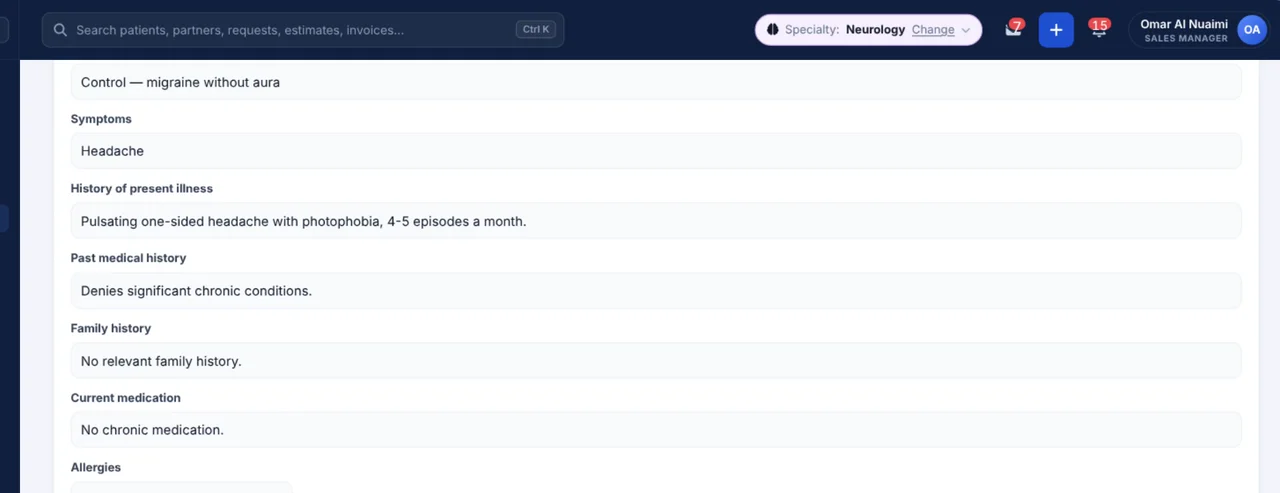
Screenshot from Zarina CRM Medical: the neurology visit with symptoms, history of present illness and medical history
Clinic workflow

From symptoms to the follow-up scale, in 6 steps

Every step exists as such in the application, in the order in which the data is entered.

1

History

Symptoms, history of present illness, past and family history, medication and allergies.

2

Vital signs

Blood pressure and heart rate.

3

Examination

GCS, cranial nerves, MRC power, reflexes, Babinski, sensation, coordination, Romberg and gait.

4

Scales

MMSE, headache days per month, EDSS and VAS pain.

5

Investigations

EEG, EMG / nerve conduction and brain or spine CT / MRI.

6

Diagnosis and recall

ICD-10 diagnosis, treatment and the next check-up date.

The neurological examination

What the neurology chart records

The examination follows the order you perform it, system by system.

Consciousness and nerves

The first part of the examination.

  • Glasgow Coma Scale
  • Cranial nerves
  • Blood pressure and heart rate
  • Recorded per visit

Motor and reflexes

Power and reflexes in fields, comparable between visits.

  • MRC muscle power
  • Reflexes
  • Babinski sign
  • Sensation

Coordination and gait

The functional part of the examination.

  • Coordination
  • Romberg test
  • Gait
  • Findings
Scales and investigations

MMSE, EDSS and the investigations, in the same visit

The scales show the course of the disease; the investigations explain it.

Clinical scales

Repeated the same way, so change is measurable.

  • MMSE
  • Headache days per month
  • EDSS
  • VAS pain

Investigations

Results attached to the visit that requested them.

  • EEG
  • EMG / nerve conduction
  • Brain CT / MRI
  • Spine CT / MRI

Treatment and follow-up

What was decided and when to look again.

  • ICD-10 diagnosis
  • Treatment
  • Recommendations
  • Next check-up date
Follow-up

Chronic neurological patients are followed by their scales

  • Each scale stays in its visit. MMSE, EDSS or headache days are a series, visible in the patient history.
  • Investigations stay with the visit. EEG, EMG and imaging results are attached where they were requested.
  • Referrals come out of the record. Internal referrals and medical letters are issued from the signed visit.
  • A signed visit is locked. Visits are saved as drafts and locked once signed. Corrections are added as addenda, with author and date.
The rest of the clinic

What else is included, from the Medical edition

The neurology profile is not a separate product. It is a configuration of the Medical edition, so you also get the rest of its modules.

Appointments and front desk

The calendar per doctor and per room, with check-in, the waiting room and walk-ins handled at reception.

  • Schedule per doctor and per room
  • Check-in and waiting room
  • Walk-ins and rescheduling
  • Reminders before the appointment

Treatment plans and estimates

Plans in phases, an estimate the patient accepts online, and service packages sold as a whole.

  • Plans split into phases
  • Estimate with online acceptance
  • Service packages
  • Linked to the patient record

Payments, VAT and insurance

Clinic payments by doctor and method, invoices with 5% VAT and the insurance claims log.

  • Invoices in AED with 5% VAT
  • Payments by doctor and method
  • Insurance claims log, CSV / XLSX export
  • Outstanding amounts per patient

Built for the UAE

Payroll and accounting needs of a clinic operating in the Emirates, not adapted from another country later.

  • WPS payroll with the SIF file
  • End-of-service gratuity
  • Connectors for accredited e-invoicing providers
  • Zoho Books, Tally and Wafeq

Patient communication

WhatsApp, requests, reviews and NPS surveys, all linked to the patient record instead of someone’s phone.

  • WhatsApp conversations on the record
  • Online requests and follow-ups
  • Reviews and NPS surveys
  • Feedback tickets with deadlines

Reports and automation

Ten ready-made medical reports, plus workflows and tasks that run without someone remembering them.

  • Appointments, utilisation, waiting time
  • New and returning patients, revenue
  • Top services, recalls and stock
  • Workflows, follow-ups and tasks
What the application does not do

It records and calculates, it does not decide

We state them explicitly, because the application is used in clinical practice.

  • It records, it does not decide. The application holds what the clinician observed and decided. The clinical judgement belongs entirely to them.
  • It does not read EEG, EMG or imaging. Results and reports are attached. There is no device integration or image viewer by default.
  • It does not score the scales for you. MMSE, EDSS and the others are recorded as assessed by the neurologist.
  • It does not calculate drug doses. Treatments are written by the doctor; we do not take on a function where an error could reach the patient.
Transparency

What to know beforehand

We prefer to be precise from the start, including about the things the application does not do.

  • It does not submit data to NABIDH, Malaffi or Riayati on its own. The application is not a connector to the emirate health information exchanges by default. If your licence requires a connection, it is built as a separate integration project.
  • Insurance claims are logged, not submitted. The claims log is exported as CSV / XLSX. Direct submission to eClaimLink, Shafafiya or a TPA portal is not part of the standard delivery.
  • Integrations run through your own accounts. WhatsApp, payments, e-invoicing: each works with your company’s subscription and keys, not ours.
  • Installation requires a server. The application runs on your side. If you have no hosting, we set it up together, but it remains yours.
Video tour · 7 minutes

See Zarina CRM Medical in a neurology clinic

Appointments, the neurological history and examination, MMSE, EDSS and headache days, EEG and MRI, treatment and payments – on real screens of the Medical demo, with English subtitles.

Neurology clinic software – Zarina CRM video tour
7:08 running time14 chaptersSubtitles in EnglishPublished on 11 November 2026
Where you are today

If the examination is written as prose

The problems below are not hypothetical. They are the reasons clinics look for software.

The MMSE without a series

The score is known for today; last year’s is in another letter.

Each scale is a field in every visit.

The MRI report nobody finds

The imaging was done elsewhere and emailed once.

Results are attached to the visit that requested them.

The headache diary

Headache days per month are estimated from memory at each visit.

Headache days are recorded per visit, as a series.

Licensing model

A lifetime licence, not a monthly subscription

The neurology profile is part of the Medical edition. It is paid once, installed on your side and remains the clinic’s.

  • Unlimited users. You do not pay per doctor, nurse or receptionist. The number of accounts does not change the price.
  • The platform is activated by module. Choose the package that covers what you use, with unlimited users.
  • Prices and packages are published. You will find them on the pricing page, with what each option includes.
  • Updates do not lock you in. An existing installation receives new versions without needing a new licence.
Implementation

What you get when you sign the contract

Installation on your server

We install the application on the clinic’s hosting and configure it around the real workflow, not a generic one.

Your scales and investigations

We adjust the scales and investigation fields to how your neurologists work.

Team training

Reception, assistants and clinicians are trained on their own roles, not on every screen of the application.

Fit

Who it is for and who it is not for

It is for

Neurology clinics and practices that want a structured examination, scales and investigations, on their own server.

It is for

Polyclinics where neurology works with psychiatry, physiotherapy and orthopaedics on the same record.

It is not for

Anyone looking for EEG acquisition software or a PACS. Those are not part of the application.

Security

Where the data lives and who is responsible for it

A clinic’s records are health data. Their place is on the clinic’s server, not with us.

  • Installation is on your side. The application runs on the clinic’s server, so patient data does not pass through our infrastructure — and stays in the UAE if your server is there.
  • Health data is handled as health data. Sensitive fields are encrypted, and every opening of a chart is written to the access log.
  • Access is by role, with a log. Doctors, nurses and reception see only what their role allows, and you can see who opened what.
  • Patient data requests are handled in the application. Consents, and requests to access or correct personal data under the UAE PDPL, are recorded on the patient record.
Frequently asked questions

Answers about the neurology profile

Is the neurology profile a separate product?

No. It is a configuration of the Medical edition, with the neurology chart activated. You also get the rest of the Medical edition’s modules.

Which examination items are recorded?

GCS, cranial nerves, MRC power, reflexes, Babinski sign, sensation, coordination, Romberg test and gait.

Which scales are included?

MMSE, headache days per month, EDSS and VAS pain.

Can investigations be attached?

Yes: EEG, EMG / nerve conduction and brain or spine CT / MRI results, in the visit.

Can the chart be changed?

Yes. The form builder lets you add sections, fields, scales, lists and calculations yourself, per specialty.

Where is the patient data stored?

On the clinic’s server. The application is self-hosted, so data does not pass through our infrastructure.

How many users can we have?

Unlimited. The licence is not paid per user, so adding clinicians or front-desk staff does not change the price.

How do I see the application before ordering?

Ask for demo access. You receive a personal link to the Medical edition test installation, set to neurology.

Other medical profiles

The same solution, configured for another practice

The Medical CRM is configured by speciality. If neurology is one of several departments, see the polyclinic setup.

Psychiatry CRM

Mental state examination, risk assessment, PHQ-9, GAD-7, CGI-S and medication monitoring.

Physiotherapy CRM

VAS, range of motion, the rehabilitation plan and progress at every session.

Polyclinic CRM

Every specialty with its own chart, on one shared patient record.

Cardiology CRM

ECG and echocardiography in structured fields, SCORE2 risk and the LDL target.

Medical CRM

The complete solution: patient file, appointments, invoicing and portal, for a practice or clinic.

All specialities

The 23 configured specialities, each with its own form, demo and video tour.

No monthly subscription

Examination, scales and investigations, on the clinic’s server

We install Zarina CRM on your side, adjust the neurology chart and train the team. From that moment on, the application is an asset of the clinic, not a monthly expense.