

File centralisation, every document on its own customer
The contracts, the paperwork, the specifications and the documents received from customers sit on the customer record, not on the team’s computers. Every file has a category, an author and a date, access is granted by role, and downloading happens through checked links, not through public addresses circulating by email.
From $2,900one-time payment, no monthly subscription- Included from the START package
- A folder on every customer
- Role-based access
- Authenticated download
- The files on your own server
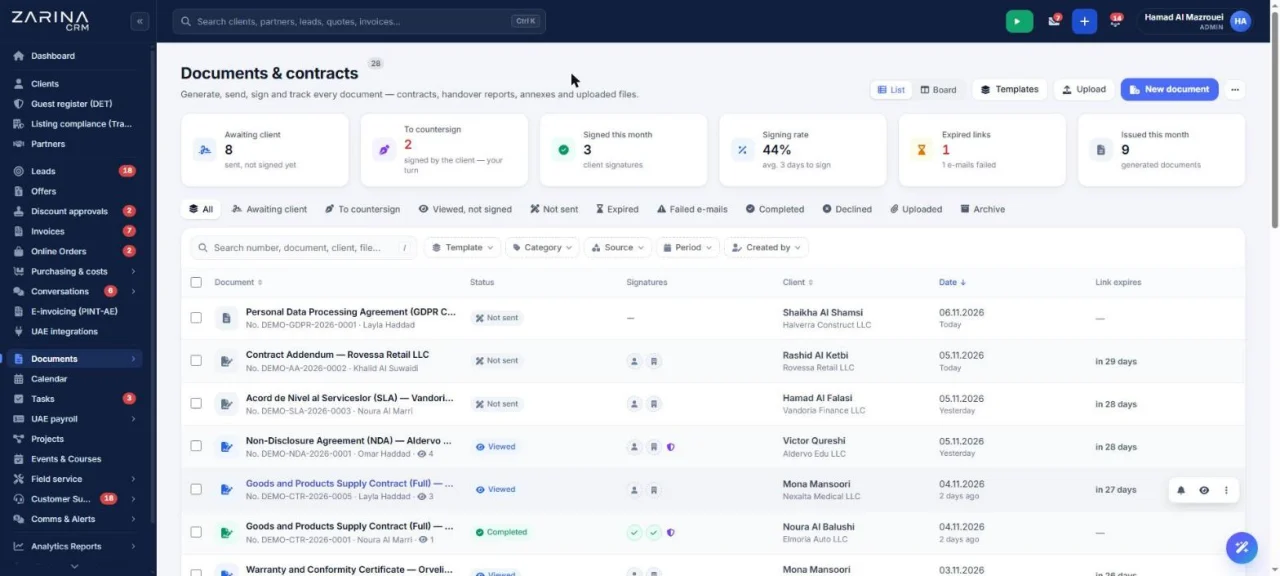
File and document centralisation on the customer record. The contracts, the paperwork, the specifications and the documents received from customers sit on the customer record, not on the team’s computers. The Complete Sales package. A lifetime licence, installation on the company server and unlimited users.
Works together with: The customer portal, Document generation, UAE e-invoicing.
The situation today, when the documents sit on computers
A complete customer file is usually reassembled by asking three colleagues.
- The documents are scattered One file in each person’s mailbox, a few on a shared drive, the rest on the computer of somebody who is on leave.
- Nobody knows which is the final version Three files with similar names and no information about which one was signed.
- When a colleague leaves, files are lost The documents stay on an account that gets closed, and the company finds out what was missing only when it needs it.
- Searching consumes real time A document asked for by a customer or an auditor is found in tens of minutes, not in a few seconds.
- Access is not controlled A file shared through a link stays reachable by anyone who receives it, including after the collaboration ends.
- Requests about personal data become impossible Without a record, you cannot say which documents the company holds about a person.
What the file centralisation module contains
It is part of the Complete Sales package: every commercial record has its own document folder.
A folder on every customer
The documents sit where everyone looks for them.
- Files attached to the customer
- Visible on the record
- The author and the date on record
- Available again at any time
Documents on other records too
Not only on the customer.
- On the lead and on the quotation
- On the order and on the invoice
- On the job or on the ticket
- On the supplier and on the partner
Categories and names
The folder stays in order.
- Configurable categories
- Clear names
- Filtering by category
- Search by criteria
Role-based access
Not every document is for everyone.
- Role-based rights
- Visibility tied to the customer
- Download through checked links
- Authentication required
Documents received from customers
The paperwork arrives with no exchange of emails.
- Upload from the customer portal
- File types checked
- It enters the customer folder
- Notification to the consultant
A record for audits
Files are prepared quickly.
- A list by period and category
- Export
- A history of the operations
- Useful at an audit and in a dispute
What changes in the first month after the file centralisation module is enabled
The direct effects of the documents sitting next to the commercial data.
A complete file, in a few seconds
The documents are found where they should be.
- All the files on the customer record
- Filtering by category
- Search by name
- No questions to colleagues
Nothing is lost when people leave
The archive belongs to the company.
- Files in your own installation
- Independent of personal accounts
- A handover with no archive transfer
- Full context for the replacement
Controlled access
The documents no longer circulate uncontrolled.
- Role-based rights
- No public links
- Authenticated download
- Operations recorded
Documents received in order
The customer’s paperwork lands in the folder.
- Upload from the portal
- A category assigned
- A notification to the owner
- No emails with attachments
Audits handled quickly
An audit no longer blocks the team.
- Export by period
- Documents grouped
- A history of the accesses
- Complete records
Compliance made possible
Requests about personal data can be answered.
- Search by person
- An export of the documents attached
- Deletion on request
- A record of the operations
How a document comes in and how it is found again
The same flow for a signed contract and for a specification received by email.
- 1
The document is attached to the right record
It is uploaded straight onto the customer, the quotation, the order or the job, so the context is clear from the start.
- 2
It receives a category and a name
The categories are set by the company, not invented at every upload, so that filtering works.
- 3
It stays recorded who added it
The author and the date are registered automatically, which is useful when a question about provenance comes up.
- 4
The documents generated enter on their own
The quotations, invoices and contracts produced in the application are attached automatically, with no manual upload.
- 5
The customer can send documents
Through the portal, if it is active, the customer uploads the paperwork asked for, and it enters their folder directly.
- 6
Finding it again is done through filters and search
By customer, by category, by period or by name, with the download through a checked link.
File centralisation, in short, inside the application
How a useful folder is organised
A folder with no rules becomes, within six months, a tidy chronological heap that nobody can use.
Few, clear categories
The short list gets used, the long one does not.
- Contracts
- Company paperwork
- Technical documents
- Relevant correspondence
Naming rules
The document is recognised from the list.
- The type and the date in the name
- No generic names
- A convention agreed internally
- Checked in the first few weeks
What is not kept
The folder is not an unlimited archive.
- No intermediate versions
- No duplicates
- No unrelated files
- A clean-up policy
The retention period
Compliance calls for a decision.
- A retention period per category
- Clean-up at expiry
- Exceptions for contractual documents
- Agreed at implementation
Who has access to the documents
A customer file frequently contains sensitive data. Access is handled explicitly.
- Access tied to the customer A user reaches the documents of the customers they have the right to see, according to the structure of roles and teams.
- Permissions per category Certain categories can be restricted to specific roles, for example personnel or financial documents.
- Authenticated download The files are not reachable through public addresses. The links are checked and require a valid session.
- Extra authentication, where it is enabled Access to files can require two-step authentication, where the company has turned that measure on.
- The operations stay on record Uploads and deletions are registered, with the author and the date.
- Data on the company server The documents stay in your own installation, with no copy at an external storage provider.
What runs automatically in the file centralisation module
Mechanisms that keep the folder complete with no extra work.
The documents generated are attached
They are not uploaded by hand.
- Quotations and invoices
- Contracts and minutes
- On the source record
- With the date and the author
Documents from the portal
The paperwork asked for arrives on its own.
- Upload by the customer
- Types checked
- A category assigned
- Notification to the consultant
Attachments from correspondence
The documents in email do not get lost.
- Attachments kept on the conversation
- Linked to the customer
- Available in the folder
- Through the inbox module
Notifications on new documents
The team finds out immediately.
- A notification to the owner
- Visible in the customer history
- Configurable per user
- No manual checks
Clean-up at expiry
The retention policy applies itself.
- A retention period per category
- Automatic deletion at expiry
- Configurable exceptions
- A log of the operations
Export for audits
The files are prepared in minutes.
- Export by period
- Filters by category
- Documents included
- Useful in an audit
The protection of the files
A document module is an obvious target, so it has mechanisms of its own.
- The files are not served directly Access goes through the application, which checks the session and the permissions, not through file addresses.
- The file types are checked On upload, the real type is checked, not only the extension, so that disguised executable files are not allowed.
- Limits on uploads from outside The uploads from the customer portal have limits per customer and per address, against abusive use.
- Deletion is controlled The operation is granted by role and stays on record, with the author and the date.
- Requests about personal data The documents attached to a person are included in the search, the export and the deletion on request.
- Backups are the company’s responsibility The files are part of the installation, so they fall under your own backup policy. We settle that together at implementation.
What needs to be prepared to put the file centralisation module into service
We do the configuration ourselves at implementation, on the real structure of your documents.
The document categories
They decide how useful the archive is.
- A short list, actually used
- By type of activity
- Restrictions by role, where they are needed
- Agreed together
The documents you already have
The archive starts from reality.
- The important documents to take over
- On customers and contracts
- Imported at implementation
- No duplicates
Space on the server
The files take up real space.
- An estimate at implementation
- Monitoring
- A retention policy
- Archiving, if it is needed
The retention policy
Compliance calls for deadlines.
- A duration per category
- Contractual exceptions
- Automatic clean-up
- Agreed at implementation
Rights on documents
You decide who sees what.
- Roles with access
- Restricted categories
- The right to delete
- Reviewable later
Backups
The documents have to be protected.
- A backup policy
- Frequency
- Periodic checks
- Responsibility assigned
The limits of the file centralisation module, stated explicitly
The module organises the documents linked to the commercial activity. It is not a full document management system.
- It is not an advanced document management system Approval flows on documents, complex versioning and multi-signature circuits are not part of this module.
- It does not edit the documents The files are stored and downloaded. Editing happens in your own software, and the new version is uploaded.
- It does not search inside the files The search works on the name, the category, the customer and the period, not in the content of scanned documents.
- The space is yours The files take up space on your own server. We do not offer unlimited storage, and the estimate is made at implementation.
- The backups stay the company’s responsibility The documents are part of the installation. The backup policy is settled together, but running it belongs to your infrastructure.
- The quality depends on discipline Without categories and naming rules, the archive becomes a chronological list that is hard to use.
When this module makes sense and when it does not
We prefer to say from the start in which situations the module is not worth its cost, so the sales conversation does not begin with the wrong expectations.
It makes sense if
The situations in which the module pays for itself quickly.
- The customers’ files are scattered across email and desktops
- Several people are looking for the same documents
- You need access control by role
- The documents have to be found quickly at an inspection or an audit
It does not make sense if
The situations in which we recommend not buying it now.
- You already work with a document system the team uses
- You have fewer than a handful of files per customer
- The documents are not attached to customers but to external projects
- Nobody uploads anything unless they are made to
How the files module is licensed
It is included from the START package.
The complete Sales package
It is included from the START package.
What every package includes
Users and roles, clients and contacts, leads and the sales pipeline, custom fields and 15 interface languages.
Together with document generation
The contracts and the minutes are produced in the document generation module.
Pricing and configurations
Package composition and prices by edition are on the pricing page.
Companies that have trusted Zarina CRM


File centralisation: what it costs and what you get
You pay once. Everything that follows is written here, not in hidden conditions.
The File centralisation module is included from the START package: $2,900, paid once, for the whole company.
The same CRM, in 3 packages. Each package includes everything in the one before it:
- STARTIncluded$2,900
- PROIncluded$3,480
- BUSINESSIncluded$4,640
One-time payment, unlimited users. What each package contains is on the pricing page.
What you pay over time for a subscription CRM
Over 3 years, the subscription costs $9,000; the Zarina START licence costs $2,900, once.
An indicative comparison: enter the subscription price you pay now. The licence does not grow with the number of users.
What you get
- A lifetime licence, with no subscription and no per-user charge
- Unlimited users, on the same licence
- 6 months of warranty on correct operation: fixing errors and inconsistencies
- Implementation, configuration and team training, included in the price
- The licence is verified locally, on your own server: the application does not depend on our servers to work
How long it takes and what is needed
- 48 hours in the standard configuration; up to 14 working days with customisation around the company’s workflow
- Your own server or web hosting with cPanel, with an SSL certificate
- PHP 7.4 or newer (8.x recommended) and MySQL / MariaDB
- The PHP extensions mysqli, json, mbstring; curl, gd and zip for integrations, PDF and exports
- One cron task, for reminders and automations
Where data lives
- The data stays on your server and does not pass through ours
- Roles and rights per user, two-factor authentication
- An audit trail and limits on login attempts
- Consents and data subject requests, managed in the application
- Digitally signed updates and backups from the application
Do you have a question about File centralisation?
We answer in writing, with the exact price for your configuration.
Questions about file centralisation
Where are the files physically kept?
Can I restrict access to certain documents?
Can the customer upload documents?
Can you search inside scanned documents?
What happens to the documents when an employee leaves?
Is there a space limit?
Can the documents be exported for an audit?
Who can delete a document?
How do we answer a request about personal data?
Is it included in the price or bought separately?
Get the complete product sheet by email
A six-page document with everything you need to know before a sales conversation. No obligation and no sales call.
- All the modules of the platform and the package that includes each one
- The features and modules of the edition you choose, plus available integrations
- Full pricing and what it includes: installation, training, data import, warranty
- The native integrations available and the situations where the platform is not a good fit
Take control of your operations, once
We install Zarina CRM on your hosting, configure it around your own workflow and train your team. From that moment on, the application is an asset of your company, not a recurring expense.