


Telephony connected to the CRM, with every call on the customer record
The company calls are tied to customers and leads: on an incoming call, the operator sees on screen who is calling, and outgoing calls start with one click from the customer record. Every phone conversation stays in the history, with its duration, outcome and owner, so that commercial activity on the phone becomes measurable rather than estimated.
From $2,900 excl. VATone-time payment, no monthly subscription- You see who is calling
- One-click dialling
- Duration and outcome saved
- Missed calls recovered
- History on the customer record
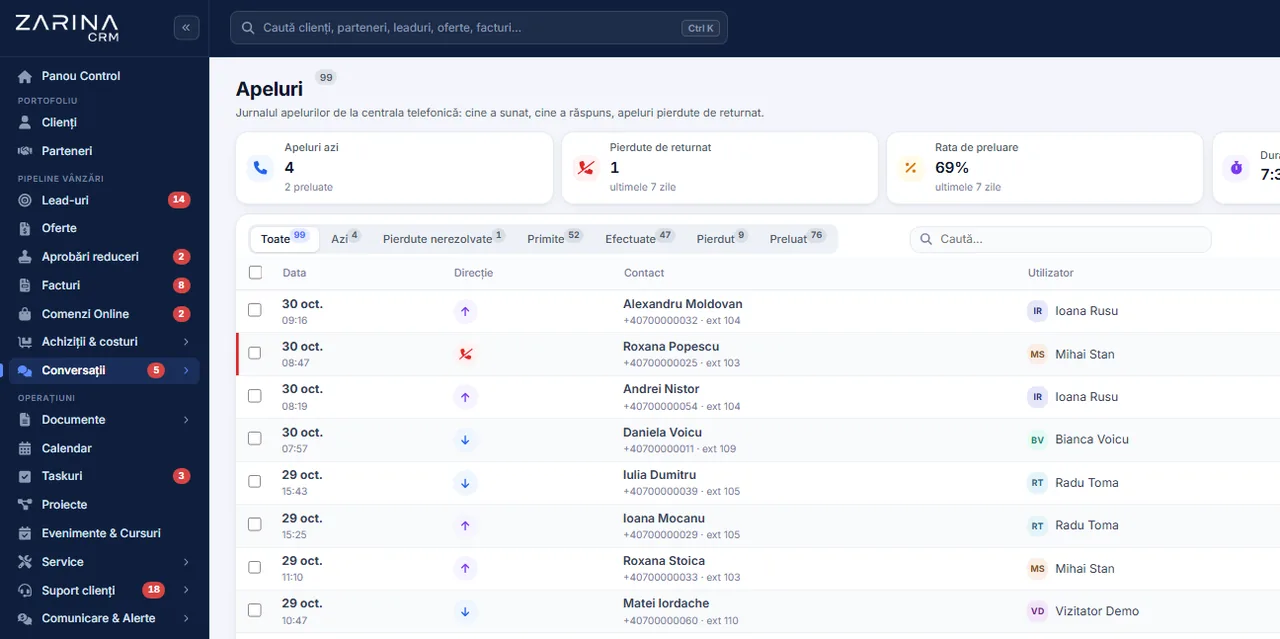
Telephony integrated into the CRM, with every call on the customer record. The company calls are tied to customers and leads: on an incoming call, the operator sees on screen who is calling, and outgoing calls start with one click from the customer record. A module from the Omnichannel communication package. A lifetime licence, installation on the company server and unlimited users.
Works together with: WhatsApp Business, Messenger and Instagram, Smart reminders.
The situation today, when the phone does not talk to the system
The phone is still the main channel in sales and in services. Without a link to the CRM, nothing that is discussed reaches the record.
- The operator does not know who is calling The call arrives as a number on a screen. The history, the quotation sent last week and the unpaid invoice are looked up during the conversation, if at all.
- The calls do not show up in the activity A consultant who spent two hours a day talking to customers appears in the reports as inactive, because nothing was recorded.
- Missed calls leave no trace A customer who called and was not answered generates no task. The follow-up depends on the memory of whoever saw the notification on their phone.
- Dialling the number takes time and produces errors The numbers are copied by hand from the system into the phone. At dozens of calls a day, the time lost and the mistakes become significant.
- There is no picture of the team’s workload How many calls come in, how many are missed, how long a conversation lasts: without data, the team is sized on impressions.
- The call history belongs to the devices The call log sits on personal phones. When an employee leaves, the company keeps nothing of the telephone relationship.
The phone system, tied to the commercial data
The module connects to the phone system and turns every call into a record tied to the customer or the lead.
An incoming call, identified on the spot
The call screen appears before the conversation is picked up.
- A window with the caller’s details
- A customer, a lead or an unknown number
- The latest quotation and the open invoices
- Direct opening of the record
An outgoing call with one click
The number is dialled from the application, on the operator’s extension.
- Dialling from the customer record
- No copying the number by hand
- The system rings the extension first
- Then connects the recipient
A complete call log
Every call stays on record, with its outcome.
- Incoming, outgoing, internal
- Answered, unanswered, busy
- The duration of the conversation
- The owner attached
Automatic linking to the records
The call attaches itself to the right person.
- Matching by phone number
- The call history on the customer record
- The call attached to the lead in progress
- Manual linking, when the number differs
Extensions per user
Every operator has their own extension configured.
- The user-to-extension mapping
- The call screen only at the recipient
- Internal calls recorded
- Call groups supported
A diagnostic of the connection
The state of the integration is checked from the application.
- A connection test to the phone system
- The reason for a refusal, shown to the administrator
- The events received, verifiable
- Error messages translated
What changes after the telephony is connected to the CRM
The direct effects of the phone conversation becoming a commercial record.
Prepared conversations
The operator enters the conversation with the information on screen.
- The context visible before picking up
- No more “could you tell me that again”
- A documented answer to objections
- A professional impression on every call
Missed calls recovered
An unanswered call becomes a task, not a memory.
- A record of the missed calls
- A scheduled follow-up
- An owner is named
- Verifiable at team level
Measurable commercial activity
The work on the phone shows up in the reports.
- The number of calls per user
- Total and average duration
- A report on answered and missed calls
- Comparison between periods
Time gained on every call
One-click dialling adds up over a day.
- No dialling the number by hand
- No typing mistakes
- Quick movement between records
- Useful in calling campaigns
Sizing the team correctly
Staffing decisions are taken on data.
- The load across time slots
- Identifiable peaks
- Missed calls per slot
- An argument for hiring
A history that stays with the company
The telephone relationship does not depend on a device.
- A log in your own database
- Context when a customer is handed over
- Proof of the contacts made
- Independent of personal phones
How a call runs, step by step
The route is identical for incoming and for outgoing calls, differing only in the starting point.
- 1
The customer calls the company number
The call enters the phone system and is distributed to the extensions configured, according to the rules set by the company.
- 2
The application receives the event from the phone system
The system notifies your own installation. Every notification is verified, so that only authentic events are accepted.
- 3
The operator sees who is calling
On the screen of the user whose extension is ringing, the call window appears, with the caller’s details and a link to their record.
- 4
The conversation happens as normal
The call is taken on the desk phone, on the phone system’s app or on a mobile, depending on the configuration. The application does not come between you and the conversation.
- 5
The outcome is recorded automatically
When the call ends, the duration and the outcome are saved: answered, unanswered or busy. The operator can add a note and a follow-up task.
- 6
The call appears in the customer history
The conversation is found on the record, alongside the quotations, invoices, emails and messages, so the context stays complete for whoever takes over the relationship.
Integrated telephony, in short, inside the application
Dialling from the application, for the teams that call every day
In calling work, the time lost between two calls is the main cost.
Dialling in one click
Every number in the application becomes a call button.
- From the customer or lead record
- From lists and from search results
- From the contact people
- On the current user’s extension
Working through a calling list
The calling campaigns run in an orderly way.
- A list filtered by commercial criteria
- The outcome of the call recorded immediately
- A scheduled follow-up where needed
- A record of those already contacted
Notes and tasks during the call
What was discussed stays written down, not remembered.
- A note attached to the call
- A follow-up task with a deadline
- Changing the stage in the pipeline
- Sending a quotation straight after the call
Internal calls recorded
The communication between colleagues is visible too.
- Calls between extensions
- Duration and participants
- Useful in escalations
- No extra configuration
The phone systems supported and how the connection works
The integration is done through the phone system’s official interface, with the company’s own access details.
- Connection through the phone system’s interface The module uses the phone system’s programming interface for dialling and for receiving the events. No software is installed on the team’s phones.
- An adaptor for cloud phone systems The current implementation includes the adaptor for a widely used cloud phone system, with full dialling and call notifications.
- Other systems, on request For other phone systems, including on-premise ones, we check the interface available and assess the adaptor at implementation, before any commitment.
- Access keys kept encrypted The access details for the phone system are saved encrypted and are not displayed in the interface after saving.
- A notification address of your own The phone system sends the events to a unique address, protected by a secret key, on the company server.
- A check before going live The connection is tested from the application, and the result shows explicitly what caused a refusal by the phone system.
What happens automatically around a call
Mechanisms that turn the call into commercial activity, with no extra work.
Automatic recording
No call depends on the operator’s discipline.
- Duration and outcome saved
- Linked to the customer or the lead
- The owner attached
- Visible in the reports
An alert on a missed call
Unanswered calls produce an action.
- A notification in the application
- A separate record
- A follow-up that can be scheduled
- Verifiable across the team
A lead from an unknown number
A call from a new number does not get lost.
- Creating a lead from the call window
- The source marked as phone
- Assignment by rules
- Direct entry into the pipeline
Follow-up tasks
The promises made on the call reach the schedule.
- A task with a deadline
- It appears in the calendar
- A link to the source call
- Tracked to completion
Audible notifications
The team reacts even when nobody is watching the screen.
- A ring on an incoming call
- A sound for new messages
- A switch per user
- It works with the tab in the background too
Integration with the other channels
The phone does not stay an isolated channel.
- The same history as email and WhatsApp
- Full context on the record
- Comparative reporting
- A simple handover between colleagues
Access to the call log follows the role structure
The telephony data follows the same visibility rules as the rest of the commercial information.
- Visibility by portfolio and team An operator sees the calls attached to the customers in their charge. Managers see the team level, according to their role.
- Access keys invisible in the interface The connection details for the phone system are kept encrypted and are not displayed after saving, not even in the page source.
- Events verified on arrival The notifications from the phone system are accepted only with a valid signature and the correct key. A public address cannot be fed false data.
- Extensions allocated explicitly The call window appears only to the user of the extension being called. Nobody receives notifications for colleagues’ calls.
- Data on the company server The call log stays in your own database, on the company infrastructure.
- Handling requests about personal data The calls are included in the search, the export and the anonymisation of a person’s data, like every other record.
What needs to be prepared to put the telephony module into service
We do the configuration ourselves at implementation. The phone system, the numbers and the server stay the company’s.
A phone system of your own
The integration requires a phone system with a programming interface.
- A company account on the phone system
- Access to the developer section
- Extensions created for the team
- Numbers allocated to the company
Access details for the interface
The dialling is done in the company’s name.
- A key and a secret generated from the account
- Entered once
- Kept encrypted
- Regenerable at any time
Call notifications enabled
Without them, the calls do not reach the CRM.
- The notification address configured in the phone system
- The event types ticked
- A secret key on the address
- A check from the application
Extensions mapped to users
The call screen depends on that mapping.
- An extension filled in for every user
- Call groups, where they exist
- Distribution rules in the phone system
- Reviewable later
Installation reachable over HTTPS
The phone system sends the events to your own server.
- Valid certificate on the domain
- A publicly accessible address
- No restrictions on that address
- Checked during implementation
Numbers in international format
Correct dialling depends on the data on the records.
- A country prefix on the numbers
- A clean-up at import
- Validation on entry
- Checked during implementation
The limits of the telephony module, stated explicitly
The module connects the telephony to the commercial data. It does not replace the phone system and it is not a full contact centre.
- It does not replace the phone system The conversations, the queues, the voice menus and the distribution rules stay in your own phone system. The module connects to it.
- The recordings stay in the phone system’s panel The module records that the call happened and its outcome. Access to the recording files is still through the phone system’s panel.
- The cost of the calls does not pass through us The telephony rates are paid directly to the phone system provider, from the company account. The CRM licence does not include call costs.
- It depends on the phone system being available If the phone system’s interface is unavailable, one-click dialling and the notifications wait. The calls themselves are not affected.
- Not every phone system has a usable interface Some systems, especially older on-premise ones, expose no programming interface. In that case we check the alternatives before the contract.
- We do not transcribe the conversations The module does not produce automatic transcripts of the discussions. The notes are filled in by the operator, on the call record.
The telephony and online meeting services connected
The calls can be started from the customer record, and online meetings can be booked from the calendar, with the link generated automatically.


The subscription to the telephony or conferencing service stays your own company’s.
When this module makes sense and when it does not
We prefer to say from the start in which situations the module is not worth its cost, so the sales conversation does not begin with the wrong expectations.
It makes sense if
The situations in which the module pays for itself quickly.
- Calls are your main sales channel
- Nobody knows who called whom and when
- You want the call history on the customer record
- You often book online meetings with customers
It does not make sense if
The situations in which we recommend not buying it now.
- You use personal phones and will carry on that way
- The call volume is small
- You have no phone system or configurable telephony service
- You do not want calls recorded or logged
Which package the telephony module belongs to
The module is licensed together with the other communication channels.
The Omnichannel communication package
It contains the phone system, WhatsApp Business, Messenger and Instagram, plus the email inbox. All the channels arrive on the same customer record.
What the core includes
The mandatory core brings users and roles, clients and contacts, a lead and sales pipeline, custom fields and 15 interface languages.
How it is enabled
The module is enabled through the licence, on your own installation. It involves no data migration and does not affect the modules already in use.
Pricing and configurations
Package composition and prices by edition are on the pricing page.
Companies that have trusted Zarina CRM


Integrated telephony: what it costs and what you get
You pay once. Everything that follows is written here, not in hidden conditions.
It is part of the Omnichannel communication package: $1,040 + VAT, on top of the core ($2,320). Bought separately, together with the core: $3,360.
Cheaper in a bundle. The tiers group several packages at a price lower than their sum:
- Business8 packages + core$4,640−38%
$7,460 - Enterprise13 packages + core$6,970−31%
$10,080
List prices, excl. VAT, one-time payment, unlimited users. The struck-through price is the sum of the packages bought individually. Current offers apply on the pricing page.
What you pay over time for a subscription CRM
Over 3 years, the subscription costs $10,480; the Zarina Business licence costs $4,640, once.
An indicative comparison: enter the subscription price you pay now. The licence does not grow with the number of users.
What you get
- A lifetime licence, with no subscription and no per-user charge
- Unlimited users, on the same licence
- 6 months of warranty on correct operation: fixing errors and inconsistencies
- Implementation, configuration and team training, included in the price
- The licence is verified locally, on your own server: the application does not depend on our servers to work
How long it takes and what is needed
- 48 hours in the standard configuration; up to 14 working days with customisation around the company’s workflow
- Your own server or web hosting with cPanel, with an SSL certificate
- PHP 7.4 or newer (8.x recommended) and MySQL / MariaDB
- The PHP extensions mysqli, json, mbstring; curl, gd and zip for integrations, PDF and exports
- One cron task, for reminders and automations
Where data lives
- The data stays on your server and does not pass through ours
- Roles and rights per user, two-factor authentication
- An audit trail and limits on login attempts
- Consents and data subject requests, managed in the application
- Digitally signed updates and backups from the application
Questions about the telephony integration in the CRM
Do I have to change my phone system?
Are the calls taken in the browser?
What does the operator see on an incoming call?
Are calls on mobiles recorded too?
Can I listen to the recordings from the CRM?
Who has access to the call log?
What happens to the missed calls?
Are the access details for the phone system safe?
Can I use several numbers or several extensions?
How long does it take to go live?
Get the complete product sheet by email
A six-page document with everything you need to know before a sales conversation. No obligation and no sales call.
- The platform core and the 13 module packages, with what each one contains
- The features and modules of the edition you choose, plus available integrations
- Full pricing and what it includes: installation, training, data import, warranty
- The native integrations available and the situations where the platform is not a good fit
Take control of your operations, once
We install Zarina CRM on your hosting, configure it around your own workflow and train your team. From that moment on, the application is an asset of your company, not a recurring expense.