


Satisfaction surveys, with the answer tied to the customer
The questionnaires are built in the application and published on a page of their own, on the company domain. The invitations are sent to customers, and every answer stays tied to the person and the company that gave it. Dissatisfaction becomes visible in the answer register and on the customer record, not when the contract is lost.
From $2,900one-time payment, no monthly subscription- Questionnaires on your own domain
- The answer tied to the customer
- A recommendation indicator
- Low scores filtered in one step
- The data stays with the company
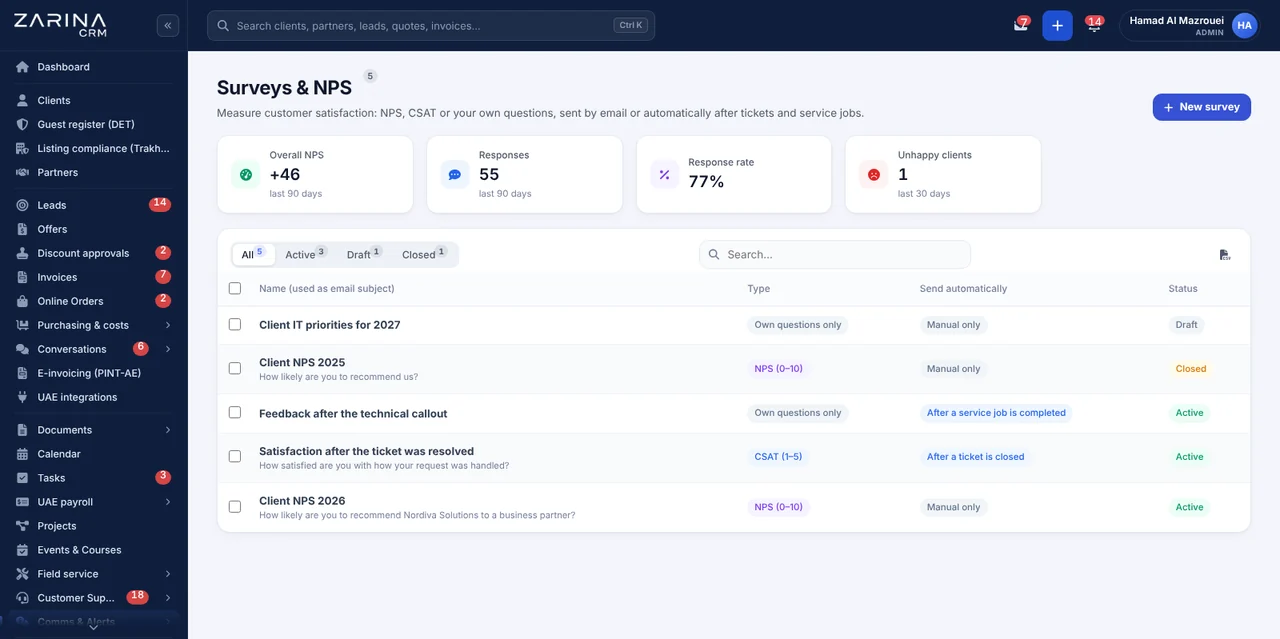
Satisfaction surveys in the CRM, tied to the customer record. The questionnaires are built in the application and published on a page of their own, on the company domain. A separately licensable module: Surveys and NPS. A lifetime licence, installation on the company server and unlimited users.
Works together with: Events and registrations, Review automation, WhatsApp Business.
The situation today, when satisfaction is assumed
A dissatisfied customer usually does not complain. They simply stop buying, and the reason stays unknown.
- Dissatisfaction surfaces too late The problems come out when an invoice goes unpaid or a renewal is refused, by which time the commercial conversation is already lost.
- External questionnaires do not connect to the data A form in another application produces a file of answers, with no link to the customer or to the consultant responsible.
- The results do not reach the right people The answers pile up in a monthly report that is not read by the person who could have put the situation right the same day.
- Nobody knows what exactly is causing the dissatisfaction Without questions on the real stages of the process, the result is an average that points to no concrete action.
- Satisfied customers are not made use of The moment when a customer is most willing to leave a public review passes unnoticed.
- The respondents’ data stays outside the company The answers sit in an external service, with no link to your own personal-data procedures.
What the surveys module contains
The module adds three things: the questionnaire builder, the public answer page and the register of answers tied to customers.
A questionnaire builder
The questions are defined with no technical knowledge.
- Varied question types
- Rating scales
- Required and optional questions
- Different questionnaires for different situations
A public answer page
The questionnaire runs on the company domain.
- An address of its own, on your installation
- Works on a phone
- Available in the languages configured
- No registration for the respondent
Invitations to customers
Every invitation is personal.
- Sent to customers and contacts
- A link of its own on each invitation
- A record of the invitations sent
- Status: sent, answer received
The answer tied to the customer
Every answer has a commercial context.
- Tied to the customer or the lead
- The consultant responsible attached
- Visible on the customer record
- Date and time recorded
A register of answers
The results can be consulted at any time.
- A list with filters and search
- The low scores, identifiable at once
- The free comments, readable
- Export for analysis
A recommendation indicator
A benchmark comparable over time.
- An NPS-type question
- A standard calculation
- Comparable between periods
- Comparable between teams
What changes in the first few months after the surveys module is enabled
The direct effects of the feedback arriving in the system the team works in.
Problems seen in time
The gap between dissatisfaction and response drops to hours.
- The answers appear in the register immediately
- Visible on the customer record
- The consultant responsible, identified
- A conversation on the same day
Customers kept
Retention rises with no extra campaigns.
- Risk signals identified
- A conversation at the right moment
- Renewals prepared in good time
- An argument at renegotiation
Quality comparable between teams
The assessment is no longer based on impressions.
- Scores per consultant
- Comparison across periods
- Differences in the process identified
- Targeted training
Evidence for decisions
Investment in quality can be justified.
- The movement across periods
- The correlation with complaints
- Reporting to management
- Export for analysis
Comments that say something
The most valuable part of a questionnaire.
- An optional free-text field
- Visible on the customer record
- Useful for root-cause analysis
- Read by the person responsible
The data stays with the company
No dependence on an external service.
- Questionnaires on your own installation
- Answers in your own database
- They fall under your data-protection procedures
- Controlled export
The route of a questionnaire, step by step
The same flow for satisfaction after a delivery and for the assessment of a job carried out.
- 1
The questionnaire is built once
The questions are defined in the application, for each situation where you want feedback. A short questionnaire gets completed, a long one does not.
- 2
The invitations are sent
The invitation goes out by email, to the customers or contacts chosen, with a personal link that identifies the answer without asking for any further details.
- 3
The customer answers on your own page
The public page runs on the company domain and works on a phone. They are not asked for an account and not asked for a password.
- 4
The answer reaches the system immediately
It is saved in the answer register and on the customer record, with the date, the time and the consultant responsible for the relationship.
- 5
The person responsible sees the low scores
The register allows the unfavourable answers to be filtered quickly, and from the customer record a remedial task can be opened, with a deadline.
- 6
Satisfied customers can be pointed onward
For public reviews the reviews module is used, which manages the invitations to the public platforms.
Satisfaction surveys, in short, inside the application
Which questions produce useful answers
A twenty-question questionnaire does not get completed. One with three well-chosen questions changes processes.
A recommendation question
The headline indicator, comparable over time.
- A simple numeric scale
- A standard NPS-type calculation
- Comparable between periods
- Comparable between teams
One question on the critical stage
Where your process most often breaks.
- Promptness, quality or communication
- Wording specific to the business
- A result that points to an action
- A separate questionnaire per situation
One short free-text field
The most valuable information is unstructured.
- Optional, not required
- Visible on the customer record
- Useful for root-cause analysis
- Read by the person responsible, not filed away
Different questionnaires for different situations
Not the same form for every case.
- After delivery
- After a job has been carried out
- After a request is closed
- Each with its own questions
What happens after an unfavourable answer
The value of a survey lies not in collecting it but in the response that follows. The response stays a company decision, not an automatism.
- 01
The answer is visible immediately
There is no waiting for an end-of-month report. The answer appears in the register and on the customer record the moment it is received.
- 02
The person responsible for the relationship is identified
The customer record shows the consultant assigned, so it is known who should take up the conversation.
- 03
A remedial task is opened
From the customer record a task is created with a deadline and an owner, so that the follow-up does not depend on goodwill.
- 04
The customer is contacted the same day
The short gap between the dissatisfaction and the call changes the perception, even when the problem cannot be solved straight away.
- 05
The outcome is recorded
The way the situation was closed stays in the customer history, useful when analysing recurring causes.
- 06
Recurring causes become visible
The unfavourable answers, filtered by period and by consultant, point to the problems in the process, not only to isolated incidents.
What cuts the administrative work in the surveys module
Mechanisms available in the module, with no promise of automation that does not exist.
Invitations in batches
The questionnaire reaches several customers in one operation.
- A selection from the customer list
- Invitations generated automatically
- A record of the ones sent
- No lists in files
A personal link on every invitation
The answer is attributed correctly.
- An identifier of its own
- No request for further details
- One answer per invitation
- A clear record
A register with filters
The analysis does not require an export.
- Filtering by score and period
- Search in the comments
- Grouping by consultant
- CSV export when needed
The link with the customer record
The feedback enters the commercial context.
- The answer visible on the record
- Tasks created from the record
- History kept
- Useful at renewals
Scheduled reports
The information reaches management on its own.
- Periodic report by email
- Configurable recipients
- Export attached
- Configurable interval
Invitations to public reviews
Reputation is built separately, under control.
- Through the reviews module
- The public platforms the company chooses
- No artificial incentives
- The decision to send stays the company’s
The answers and the respondents’ data
Questionnaires collect opinions, sometimes critical ones. How they are handled is set out explicitly.
- Personal links that cannot be guessed Every invitation has an identifier of its own, so that an answer cannot be attributed wrongly or filled in by somebody else.
- Access by role The answers are consulted by the users granted access to the module, through the access matrix.
- Protection on the public page The answer page has measures against automated submissions, so the results cannot be distorted from outside.
- The answers fall under the data-protection procedures The search, the export and the anonymisation of a person’s data include the survey answers too.
- Data on the company server The questionnaires and the answers stay in your own installation. We do not use an external survey service.
- Controlled export The exports are performed by users with the right, and the operations stay recorded in the application.
What needs to be prepared to put the surveys module into service
We do the configuration ourselves at implementation, on the processes where you want feedback.
The moments where you ask for feedback
Not all of them, only the ones that influence decisions.
- After delivery
- After a job
- After a request has been resolved
- Agreed together
The questions for each situation
Few, specific, geared to action.
- Three to five questions
- Worded in the customers’ language
- With one question comparable over time
- Reviewable later
An email server configured
The invitations go out through your own server.
- An active sending account
- A domain with its reputation configured
- A log of what was sent
- Checked at implementation
The installation address configured
The public page needs the correct address.
- The installation address set
- Valid certificate
- A page reachable publicly
- Checked during implementation
People responsible for the response
A survey with no response damages the relationship.
- Who reads the answers
- Who contacts the customer
- A committed deadline
- Agreed before go-live
The policy on public reviews
Pointing customers onward is done properly or not at all.
- The public platforms you use
- No incentives
- Through the reviews module
- Agreed at implementation
The limits of the surveys module, stated explicitly
The module collects and organises feedback. It does not manage the public review platforms and does not respond in the team’s place.
- It does not react automatically to low scores The module makes the answer visible immediately, but it does not send alerts configured on thresholds and does not create tasks by itself. The response stays a company decision.
- It does not publish reviews in the customer’s place The invitations to the public platforms are managed through the reviews module. Publishing stays the customer’s action, and the text is theirs.
- It is not a market research tool The questionnaires address the relationship with existing customers. Studies on representative samples call for different methodology and tools.
- It does not guarantee a response rate The rate depends on the relationship with the customers and on the moment of sending. We can optimise the moment, not promise percentages.
- It does not analyse the free text automatically The comments are read by the person responsible. Automatic text analysis can be configured through the artificial intelligence modules, if they are active.
- A survey with no response is counterproductive If nobody deals with the unfavourable answers, the questionnaire lowers satisfaction instead of raising it. We say this before the implementation.
When this module makes sense and when it does not
We prefer to say from the start in which situations the module is not worth its cost, so the sales conversation does not begin with the wrong expectations.
It makes sense if
The situations in which the module pays for itself quickly.
- You do not know why customers leave, only that they do
- You have a process with several stages and want to find out where it breaks
- You want evidence for improvement decisions, not impressions
- Satisfied customers never get round to leaving a review
It does not make sense if
The situations in which we recommend not buying it now.
- You talk to every customer daily and know what they think
- You have fewer than a few dozen customers a year
- Nobody will read or act on the results
- You have already sent questionnaires and nobody answered
How the surveys module is licensed
The module is part of the package that includes it and works with the rest of the installation from day one.
A separately licensed module
It contains the questionnaire builder, the public answer page, the invitations and the answer register.
What every package includes
Every package includes users and roles, clients and contacts, a lead and sales pipeline, custom fields and 15 interface languages.
Together with the reviews
For the invitations to the public platforms, the review automation module is used.
Pricing and configurations
Package composition and prices by edition are on the pricing page.
Companies that have trusted Zarina CRM


Satisfaction surveys: what it costs and what you get
You pay once. Everything that follows is written here, not in hidden conditions.
The Satisfaction surveys module is included from the PRO package: $3,480, paid once, for the whole company.
The same CRM, in 3 packages. Each package includes everything in the one before it:
- STARTDoes not include this module$2,900
- PROIncluded$3,480
- BUSINESSIncluded$4,640
One-time payment, unlimited users. What each package contains is on the pricing page.
What you pay over time for a subscription CRM
Over 3 years, the subscription costs $9,000; the Zarina PRO licence costs $3,480, once.
An indicative comparison: enter the subscription price you pay now. The licence does not grow with the number of users.
What you get
- A lifetime licence, with no subscription and no per-user charge
- Unlimited users, on the same licence
- 6 months of warranty on correct operation: fixing errors and inconsistencies
- Implementation, configuration and team training, included in the price
- The licence is verified locally, on your own server: the application does not depend on our servers to work
How long it takes and what is needed
- 48 hours in the standard configuration; up to 14 working days with customisation around the company’s workflow
- Your own server or web hosting with cPanel, with an SSL certificate
- PHP 7.4 or newer (8.x recommended) and MySQL / MariaDB
- The PHP extensions mysqli, json, mbstring; curl, gd and zip for integrations, PDF and exports
- One cron task, for reminders and automations
Where data lives
- The data stays on your server and does not pass through ours
- Roles and rights per user, two-factor authentication
- An audit trail and limits on login attempts
- Consents and data subject requests, managed in the application
- Digitally signed updates and backups from the application
Questions about the satisfaction surveys module
Are the questionnaires hosted at your end?
How long should a questionnaire be?
How is the answer tied to the customer?
Do we get an automatic alert on a low score?
Can I ask satisfied customers for public reviews?
Can the invitations be sent on WhatsApp?
Can the answers be compared between consultants?
What happens to the respondents’ data?
Is the free text analysed automatically?
How long does implementation take?
Get the complete product sheet by email
A six-page document with everything you need to know before a sales conversation. No obligation and no sales call.
- All the modules of the platform and the package that includes each one
- The features and modules of the edition you choose, plus available integrations
- Full pricing and what it includes: installation, training, data import, warranty
- The native integrations available and the situations where the platform is not a good fit
Take control of your operations, once
We install Zarina CRM on your hosting, configure it around your own workflow and train your team. From that moment on, the application is an asset of your company, not a recurring expense.