


Messenger, Instagram and Lead Ads, on the same customer record
The messages received on the Facebook page and on the Instagram account enter the CRM, become conversations with an owner and generate leads automatically. The Lead Ads forms arrive straight into the pipeline, with no manual file downloads. The reply is sent from the application, and the history stays with the company, not in an employee’s Business Suite.
From $2,900 excl. VATone-time payment, no monthly subscription- Messenger and Instagram
- Lead Ads straight into the pipeline
- An official Meta connection
- A reply from the application
- The history stays with the company
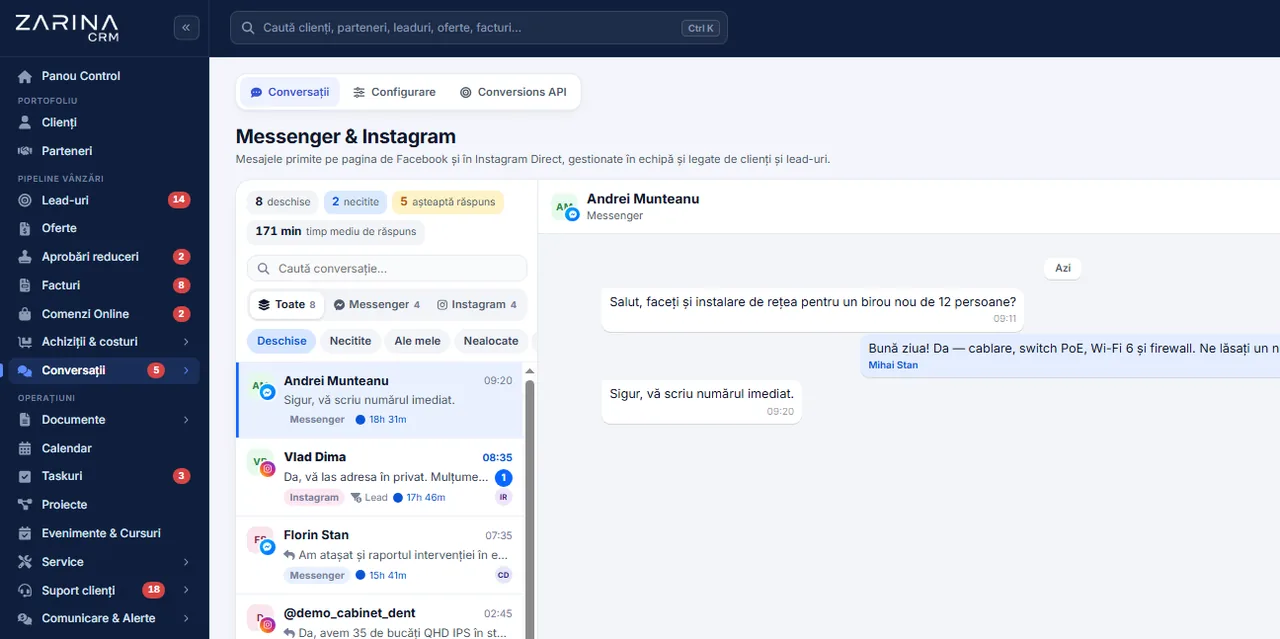
Messenger and Instagram in the CRM, with Lead Ads on the customer record. The messages received on the Facebook page and on the Instagram account enter the CRM, become conversations with an owner and generate leads automatically. A module from the Omnichannel communication package. A lifetime licence, installation on the company server and unlimited users.
Works together with: WhatsApp Business, Integrated telephony, Lead automation.
The situation today, when social media is handled separately
The messages from Messenger and Instagram reach one person who has access to the page. From there, the commercial process breaks off.
- The requests enter an application with no link to sales The conversations stay in Business Suite. Whoever opens the CRM has no information at all about the interest the customer showed on social media.
- The reply depends on who has access to the page If the person who administers the page is unavailable, the messages stay unread. There is no designated owner and no response deadline.
- The leads from campaigns are downloaded by hand The Lead Ads forms are exported into files periodically, re-copied into the system, and between two exports the prospects wait for days.
- The return on the campaigns cannot be measured Without the link between a lead and the commercial outcome, the advertising budget is judged on estimates, not on signed contracts.
- The history leaves with the employee Access to the page is personal. When the person leaves, the conversations stay in an account the company does not control.
- The customer repeats the same information A prospect who writes on Instagram, then calls and finally sends an email is treated as a stranger three times over.
An official connection to the Meta platform, on the company page
The module uses the official Meta interfaces for Messenger, Instagram and Lead Ads. The connection is made once, with the account that administers the page.
A connection in a single step
The authorisation is done from the application, with the company Facebook account.
- A connect button in the configuration screen
- Choosing the page, where there are several
- The Instagram account picked up automatically
- The page subscription, done automatically
A permanent token, kept encrypted
The page authorisation does not expire and does not travel through the interface.
- A page token with no expiry date
- Kept encrypted in your own database
- It is not displayed in pages or in sources
- Disconnection available at any time
Messenger messages in real time
Every message received becomes a conversation in the CRM.
- Picked up through real-time notifications
- Linked to an existing customer or lead
- A lead created automatically on the first conversation
- A read receipt on the messages sent
Instagram direct messages
The same flow, on the company Instagram account.
- Conversations kept separate by channel
- The reply sent from the application
- The reactions to messages are picked up
- Filtering by channel in the list
Lead Ads forms
The prospects from campaigns enter the pipeline directly.
- Picked up within seconds of being filled in
- The form fields saved on the lead
- The source and the campaign kept on the record
- Idempotent handling, with no duplicates
A diagnostic of the connection
The state of the integration can be checked without outside help.
- A connection check, on demand
- The latest events received, displayed
- A warning on missing permissions
- The Meta error messages, translated
What changes after the pages are connected to the CRM
Effects that follow from the interest shown on social media becoming a commercial record.
A measurable response time
The messages have an owner and a deadline, not just a notification on a phone.
- Conversations assigned to users
- Visible in the same work list
- A notification in the application
- A report on response time
Prospects handled the same day
The leads from campaigns no longer wait for an export.
- Automatic pick-up from the forms
- They appear in the pipeline, at an initial stage
- Assignment according to the company rules
- Follow-up sequences available
The return on the campaigns, verifiable
The budget is judged by the commercial outcome.
- The source kept on every lead
- Tracking through to the quotation and the contract
- A comparison between channels
- An export for financial analysis
A single history per customer
The different channels gather on the same record.
- Messenger, Instagram, email and phone
- Full context at every reply
- No repeated questions to the customer
- A simple handover between colleagues
Control over the access
The company decides who sees and who replies.
- Permissions by role and team
- Assignment between active users
- No personal access to the page
- Immediate disconnection when needed
Compliance on request
The messages fall under the same personal-data procedures.
- Search by the person concerned
- An export of the conversations attached
- Anonymisation on request
- A record of the operations
How a message from social media travels into the pipeline
The route is the same for Messenger and for Instagram, differing only in the source shown.
- 1
The customer writes on the page or on the Instagram account
The message goes out from the app the customer already uses. They are not asked to install anything and do not get another contact channel.
- 2
Meta sends the event to your own installation
The platform notifies the address configured on the company server. The transmission is verified, so that only authentic events are accepted.
- 3
The application identifies the person
If the sender already has a conversation or a record, the message is added to the existing history. Otherwise a new conversation is created and, optionally, a lead.
- 4
The conversation gets an owner
The message appears in the work list of the users with the right, with the option to assign it. Nobody takes over somebody else’s conversation without it being visible in the system.
- 5
The reply goes out from the application
The text is sent through the Meta platform, and the delivery and read receipt appears on the message. There is no need for another application open alongside.
- 6
The requests in Business Suite are not lost
The messages that stay under the control of the Meta Business Suite Inbox are picked up into the CRM as well, so that the work list is complete.
Messenger and Instagram, in short, inside the application
The Lead Ads forms, straight into the pipeline
The campaigns with a form generate commercial records, not files to download.
Automatic pull-in
The lead appears in the system within seconds of being submitted.
- No manual export and import
- The form fields saved in full
- Marked with the campaign source
- Visible immediately in the pipeline
No duplicates
A repeated event does not create a second record.
- A unique identifier checked
- Immediate confirmation to the platform
- The retries are handled correctly
- A log of the events received
The test leads, kept separate
Testing the campaign does not trigger real communications.
- The test submissions recognised
- No automated sequences on them
- No conversion reporting
- They can be removed from the record
The link with the commercial outcome
Every lead stays tracked through to the decision.
- A stage and an owner on creation
- The quotation and the contract on the same record
- A report by source and campaign
- The value won, attributed correctly
The conditions imposed by the Meta platform, explained up front
The integration depends on a few platform requirements that no implementation can get around.
- The Meta app has to be published In development mode, the platform does not deliver real data even to administrators. Publishing the app is a condition, not an option.
- The page has to be subscribed to the app Without the page subscription, the platform sends only test events. The operation is performed automatically when the connection is checked.
- The notification address is configured on the right object Messenger and Instagram use different objects in the Meta configuration. An address verified once is not enough.
- The messaging permissions have limits Replying to people who do not administer the page requires an extended permission to be granted, which Meta assesses for each app.
- The Lead Ads forms require a permission of their own Picking up the data from the forms only works if the page authorisation includes the right to access leads.
- The Instagram account has to be linked to the page Direct messages are available for business accounts connected to the company page, with access to messages allowed.
What can be automated on the social channels
The automations follow the platform rules and are configured by trigger and condition.
Automatic lead creation
The first conversation becomes an opportunity, with no intervention.
- A lead created on the first message
- The channel source marked
- Assignment by rules
- A configurable initial stage
A confirmation of receipt
The customer knows the request arrived.
- An automatic reply on the first conversation
- Text configurable per channel
- It can be switched off
- No generic text imposed
Follow-up sequences
The prospects from campaigns are not left without a follow-up.
- Scheduled follow-ups
- They stop at the first reply
- An exclusion for the test leads
- A log of what was sent
Internal notifications
The team finds out about a new request immediately.
- A notification in the application
- A sound for new messages
- A counter per channel
- An alert on conversations with no reply
Conversion synchronisation
The commercial outcome can be reported back to the platform.
- Conversion events available
- The test submissions excluded
- Control over what is reported
- Useful for optimising the campaigns
Filtering and organisation
The volume becomes manageable.
- A filter by channel
- Search across the conversations
- Bulk marking and assignment
- Controlled archiving
Access to the conversations follows the role structure
Connecting the page to the CRM means more control over access, not less.
- No personal access to the page The employee replies from the application, with their own permissions. They need no direct access to the Facebook page or the Instagram account.
- The authorisation kept encrypted The page token is saved encrypted and does not appear in the interface, in sources or in logs.
- The events received are verified The notifications from the platform are accepted only if the signature is valid. A public address cannot be fed false data.
- Visibility by team The conversations follow the visibility rules of the customers and leads. An operator does not see a colleague’s portfolio without the right.
- Data on the company server The conversations and the leads stay in your own database. There is no copy at an intermediary provider.
- Controlled disconnection When the relationship with a page ends, the app unsubscribes and the authorisation is deleted. The conversations already picked up stay in the history.
What needs to be prepared to put the Messenger and Instagram module into service
We do the configuration ourselves at implementation. The pages, the accounts and the server stay the company’s.
A company Facebook page
The integration is done on the official page, not on a personal profile.
- A page administered by the company
- An administrator role for connecting
- A business category filled in
- Public contact details
A Meta Business account
The pages and the app are administered from the business portfolio.
- An existing business portfolio
- The page added to the portfolio
- Business verification, where it is required
- Access for the person doing the connecting
An Instagram business account
Direct messages require a connected business account.
- A business or creator account
- Connected to the company page
- Access to messages allowed
- Administered from the same portfolio
A published Meta app
Real data only flows with the app published.
- A published privacy policy
- A data deletion address
- An icon and a category filled in
- The installation domain declared
Installation reachable over HTTPS
The platform sends notifications to your own server.
- Valid certificate on the domain
- A notification address reachable publicly
- A verification key configured
- No access restrictions on that address
Permissions defined in advance
It is settled who answers on each channel.
- Roles and teams configured
- Assignment rules
- A default owner per channel
- Reviewable later
The limits of the integration, stated explicitly
Some of the restrictions belong to the Meta platform and apply to any software provider.
- We do not publish content in your place The module handles messages and forms. Managing posts and ads stays in the Meta tools.
- We do not bypass the permission review Replying to any person requires an extended permission, granted by Meta after review. No implementation shortens that process.
- Comments on posts are not messages The module picks up direct messages and forms. Moderating public comments is still done from the platform.
- Availability depends on the Meta platform If the Meta interfaces are unavailable, receiving and sending wait. The messages are not lost, but they do not move in that period.
- One Instagram account links to one page Structures with dozens of pages and accounts call for a configuration analysed separately, at implementation.
- The advertising cost does not pass through us The campaign budgets are paid directly to the platform, from the company account. The CRM licence does not include advertising costs.
The Meta channels connected to the CRM
The messages from your own pages and accounts arrive in the platform, on the customer record, and the replies go out from the same place.




The connection is made with your own company accounts, through the official interfaces. What is possible depends on the platform policy.
When this module makes sense and when it does not
We prefer to say from the start in which situations the module is not worth its cost, so the sales conversation does not begin with the wrong expectations.
It makes sense if
The situations in which the module pays for itself quickly.
- You receive messages on the company pages and whoever gets there first replies
- The conversations never reach the customer records
- You advertise on these channels and the requests arrive there
- You want response times measured on messaging too
It does not make sense if
The situations in which we recommend not buying it now.
- You have no active pages on these platforms
- The messages received are rare and unrelated to selling
- Your social communication is handled by an agency
- You do not want these channels entering the CRM
Which package the Meta module belongs to
The module is licensed together with the other communication channels.
The Omnichannel communication package
It contains Messenger and Instagram, WhatsApp Business, the email inbox and the phone system. All the channels arrive on the same customer record.
What the core includes
The mandatory core brings users and roles, clients and contacts, a lead and sales pipeline, custom fields and 15 interface languages.
How it is enabled
The module is enabled through the licence, on your own installation. It involves no data migration and does not affect the modules already in use.
Pricing and configurations
Package composition and prices by edition are on the pricing page.
Companies that have trusted Zarina CRM


Messenger and Instagram: what it costs and what you get
You pay once. Everything that follows is written here, not in hidden conditions.
It is part of the Omnichannel communication package: $1,040 + VAT, on top of the core ($2,320). Bought separately, together with the core: $3,360.
Cheaper in a bundle. The tiers group several packages at a price lower than their sum:
- Business8 packages + core$4,640−38%
$7,460 - Enterprise13 packages + core$6,970−31%
$10,080
List prices, excl. VAT, one-time payment, unlimited users. The struck-through price is the sum of the packages bought individually. Current offers apply on the pricing page.
What you pay over time for a subscription CRM
Over 3 years, the subscription costs $10,480; the Zarina Business licence costs $4,640, once.
An indicative comparison: enter the subscription price you pay now. The licence does not grow with the number of users.
What you get
- A lifetime licence, with no subscription and no per-user charge
- Unlimited users, on the same licence
- 6 months of warranty on correct operation: fixing errors and inconsistencies
- Implementation, configuration and team training, included in the price
- The licence is verified locally, on your own server: the application does not depend on our servers to work
How long it takes and what is needed
- 48 hours in the standard configuration; up to 14 working days with customisation around the company’s workflow
- Your own server or web hosting with cPanel, with an SSL certificate
- PHP 7.4 or newer (8.x recommended) and MySQL / MariaDB
- The PHP extensions mysqli, json, mbstring; curl, gd and zip for integrations, PDF and exports
- One cron task, for reminders and automations
Where data lives
- The data stays on your server and does not pass through ours
- Roles and rights per user, two-factor authentication
- An audit trail and limits on login attempts
- Consents and data subject requests, managed in the application
- Digitally signed updates and backups from the application
Questions about the Messenger, Instagram and Lead Ads integration
Do I have to give the Facebook account password?
Can I still reply from Business Suite?
Do the leads from campaigns appear immediately?
What happens to the messages received before connecting?
Can I connect several pages?
Who sees the Instagram conversations?
What happens if an employee leaves the company?
Do the messages reach an external provider?
Can I send bulk messages on Messenger?
How long does it take to go live?
Get the complete product sheet by email
A six-page document with everything you need to know before a sales conversation. No obligation and no sales call.
- The platform core and the 13 module packages, with what each one contains
- The features and modules of the edition you choose, plus available integrations
- Full pricing and what it includes: installation, training, data import, warranty
- The native integrations available and the situations where the platform is not a good fit
Take control of your operations, once
We install Zarina CRM on your hosting, configure it around your own workflow and train your team. From that moment on, the application is an asset of your company, not a recurring expense.