


WhatsApp Business in the CRM, with the history on the customer record
The messages from WhatsApp arrive straight into the CRM, are linked automatically to the matching customer or lead by phone number and stay in their history. You reply from the same window where you see that person’s quotations, invoices and activities. There is no longer a company phone held by one colleague and a history that leaves with them.
From $2,900 excl. VATone-time payment, no monthly subscription- Automatic linking by phone number
- Templates approved by Meta
- A read receipt
- History on the customer record
- On the company number
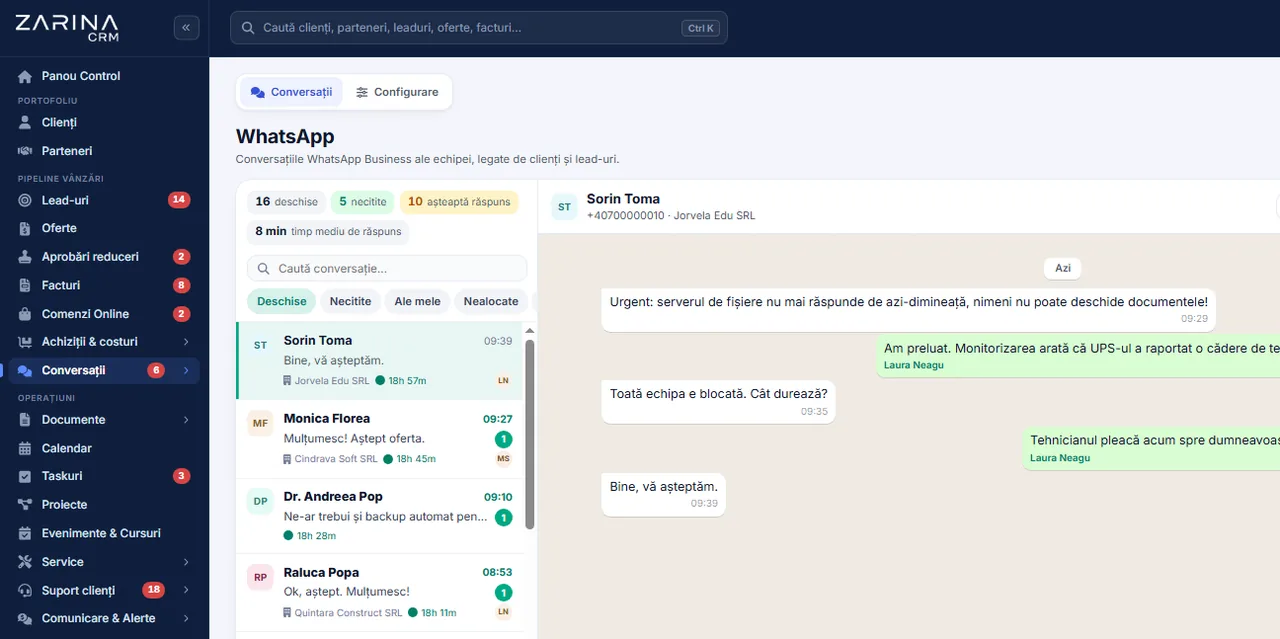
WhatsApp Business in the CRM, with the history on the customer record. The messages from WhatsApp arrive straight into the CRM, are linked automatically to the matching customer or lead by phone number and stay in their history. A module from the Omnichannel communication package. A lifetime licence, installation on the company server and unlimited users.
Works together with: Messenger and Instagram, Integrated telephony, Web quotation with tracking.
What happens now, when the WhatsApp sits on a colleague’s phone
Customers write on WhatsApp because it is the channel they use anyway. The problem is not the channel, but the fact that the conversation never reaches the system where the decision is taken.
- The history belongs to a person, not to the company When the colleague who held the phone leaves or goes on leave, the conversations leave with them. Nobody knows what the customer was promised, at what price and until when.
- Nobody sees the conversation on the customer record The coordinator opens the record, sees the quotation and the invoice, but does not see that three days ago the customer asked for a change on WhatsApp. The answer misses the point.
- What was promised cannot be checked A discount granted in a message appears nowhere in the system. At invoicing a difference appears that nobody can support with a document.
- The messages get lost between colleagues Two people answer the same customer, or neither does, because each assumes the other has. The customer sees a company that does not coordinate.
- There is no trail for data protection If a customer asks what data you hold about them, the conversations on a personal phone can neither be extracted nor deleted in a controlled way.
- Nothing can be automated An order confirmation or a callout notification has to be written by hand, every time, by somebody who remembers to do it.
The WhatsApp Business Platform, connected to the customer record
The module uses the official WhatsApp Business platform from Meta, on your own company number. It is not a solution that reads a phone screen and it does not depend on a device being switched on.
The messages enter the CRM within seconds
A message received creates or adds to a conversation in the application. Nobody has to open the company phone to see that a question has come in.
Automatic matching to the customer record
The conversation attaches itself to the customer or lead who has that number on their record. If the number exists nowhere, a new lead is created, with WhatsApp as the source.
A reply from the same screen as the commercial history
When you reply, you have the customer’s quotations, invoices, activities and notes on the same screen. The answer no longer relies on memory.
Confirmation of sending, delivery and reading
Every message shows whether it went out, whether it arrived and whether it was read. The “I never received anything” conversation is over.
The history stays with the company
The conversations sit in the company database, on your own server. An employee leaving takes no conversation with them.
It works with users who have no public number as well
Since 2026, WhatsApp allows usernames, and some messages arrive with no phone number. The module picks them up by the user identifier, and when the number does appear, it merges the two conversations.
What looks different after the first week of use
Measurable effects, obtained from the simple fact that the conversation reaches the system.
A shorter response time
The request appears in the same list the team works in anyway, with a notification. It no longer depends on somebody glancing at a phone now and then.
Requests handled all the way through
Every conversation has an owner assigned. A conversation with no answer is visible, not assumed.
The promises are verifiable
Everything that was discussed sits on the customer record, next to the quotation and the invoice. In a disagreement, the conversation is read, not reconstructed from memory.
A handover between colleagues with no loss of context
A colleague taking over a customer reads the conversation from the beginning in three seconds. There is no longer information that travels only by being told.
Reporting by channel
You see how many requests come in on WhatsApp compared with the phone, email or a form, and how many turn into a sale. Budget decisions are taken on figures.
Compliance on request
On a request about personal data, the conversations are extracted and anonymised from the application, including the WhatsApp user identifiers.
What a WhatsApp conversation looks like in the CRM
The conversation is a tab on the customer record, alongside the quotations, invoices and activities.
- 01
The conversation list, with an owner
Every conversation has a user assigned, a status and a counter of unread messages. No conversation sits without an owner.
- 02
The assignment cannot be stolen
A colleague cannot take over a conversation assigned to somebody else, and the assignment is only made to active users. The rule exists so that answers are not duplicated.
- 03
The linking respects the access rights
A conversation can only be linked to customers or leads the user has the right to see. Nobody learns data about somebody else’s customer by trying to link.
- 04
Messages with photos and documents
The pictures, documents and files received are saved in the customer’s document register, not in a phone’s gallery.
- 05
Quick replies
The wordings used often are saved and inserted with one click, with the customer’s details filled in automatically.
- 06
A notification and a sound on a new message
A new message announces itself to the owner in the application, with a distinct sound, including when the tab is in the background.
Templates approved by Meta, created and filled in from the CRM
For the messages the company initiates, Meta requires templates approved in advance. The module makes the process transparent: you write them, send them for approval and use them without leaving the application.
An editor with named variables
Variables named explicitly, not numeric positions.
- Variables such as {customer}, {invoice_no}, {amount}
- They are compiled automatically into the format Meta requires
- Validation against the Meta rules before sending
- A preview with real data
Submission for approval from the application
The whole approval cycle is managed from the application.
- Creation, editing and deletion through the API
- The approval status is visible in the list
- A full synchronisation of all the templates
- Templates deleted at Meta disappear locally too
Automatic filling from the record
The template takes the data from the current record.
- From the customer or lead record
- From the latest quotation, invoice or order
- The values are visible before sending
- They can be corrected by hand in the window
An initial set of templates in English
The implementation starts from a validated set.
- Eight sales templates ready
- Seven of the Utility type, one Marketing
- A header with an image, a video or a document
- Buttons with a link and coupon codes
The rule Meta imposes, explained before you buy
It is the most frequent surprise in WhatsApp Business implementations. We say it from the start, because it decides what can be automated and what cannot.
- 01
The customer writes to you: 24 hours of free text
From the moment the customer sends a message, you have 24 hours in which you reply with anything, in text you write yourself, with no approval at all. Most commercial conversations fall inside that.
- 02
The company starts the conversation: an approved template only
Outside that window, you cannot send free text. Meta requires a template approved in advance, with the variables filled in. There is no way around it, with any provider.
- 03
That is why the templates are in the application
Precisely because the rule cannot be circumvented, the template editor, the submission for approval and the automatic filling are in the CRM. Approval usually takes a few hours.
- 04
A message from the customer reopens the window
Any reply from the customer starts a new 24-hour window. In practice, an active conversation needs no templates.
- 05
What that means in practice for automation
The confirmations sent immediately after an action by the customer usually fall inside the window. Reminders sent days later require a template — which you prepare once.
- 06
Resuming the conversation after the window expires
If more than 24 hours have passed since the customer’s last message, the conversation is resumed through an approved Utility template. The customer replies, and the free-text window reopens immediately.
What can go out automatically on WhatsApp, with no intervention
The automations are defined in the interface, by trigger and condition. Each one respects the rule above: free text inside the 24-hour window, an approved template outside it.
An order or request confirmation
The customer sends a request or places an order and receives the confirmation immediately, with the number and the next steps.
Sending the link to the customer portal
The portal with the quotations, invoices and documents to sign is sent on WhatsApp with the message already written, and the sending is noted in the customer history.
Callout notifications
For service companies: the booking confirmation, the reminder, the “the technician is on the way” message with the estimated time, and the thank-you with the job sheet.
A reminder on a quotation not opened
If a quotation has not been opened within the period set, a short reminder goes out, with the link to the quotation.
A due-date alert
The invoices close to their due date or overdue can generate a message with the amount, the date and the payment link.
A review request after delivery
Once a job is finished or an order delivered, a review request goes out with a direct link.
The conversations follow the same permissions as the rest of the data
A communication channel added badly becomes a back door through which anyone sees data about somebody else’s customers. The rules below are in the code, not in a procedure.
- Linking only to visible customers A conversation can only be attached to a customer or lead the user has the right to see. Without that rule, an operator could learn the email or the city of any customer by trying to link the conversation to them.
- Assignment only to active users A conversation cannot be assigned to a disabled account, so it cannot be left in a corner with no owner.
- A colleague’s conversation cannot be taken over The new conversation button does not allow a discussion already assigned to somebody else to be hijacked.
- A signed webhook Every event received from Meta is verified against the application signature. An unsigned call does not enter the system.
- Data on your own server The conversations, the files and the identifiers are saved in the company database. We hold no copy — see the page about CRM on your own server.
- Token expiry, detected automatically The application checks the state of the authorisation at Meta and flags the expiry or revocation of the token in the interface, before the messages start being rejected.
The conditions for the module to work, stated up front
The conditions are communicated in full before the contract. We do the configuration at implementation, but the accounts are yours.
A Meta Business account
The application and the WhatsApp Business account are created in your company’s name. They stay yours, including if you change CRM provider.
A dedicated phone number
The number used on the WhatsApp Business platform cannot be used at the same time in the ordinary WhatsApp app on a phone. Usually a new company number is allocated.
Business verification at Meta
Meta requires company verification to go into production and for higher sending limits. We prepare the documentation; the approval belongs to Meta.
A permanent token
Production needs a System User token, not the temporary 24-hour one. If it expires or is revoked, the application detects it and tells the administrator.
Approved templates for the messages you initiate
We prepare the starter set in English. Approval usually takes a few hours and again belongs to Meta.
A server reachable for the webhook
The messages arrive through a webhook, so the installation has to be reachable from the internet, over HTTPS. We check that before installing.
The limits of the module and the cost that does not come from us
We prefer to state them up front, because they are imposed by Meta and do not depend on us.
- Meta charges for the conversations, separately from the licence The WhatsApp Business platform is charged by Meta, per conversation, directly to your own account. The CRM licence does not include that cost and we do not collect it. The rates are public at Meta and differ by conversation type and by country.
- It does not send bulk messages to bought lists The platform is not a tool for undifferentiated sending. The recipients have to be people you have a relationship with and a basis for communicating with. Breaching that leads to Meta blocking the number.
- It does not bypass template approval No provider can. The module makes the process fast and transparent, it does not remove it.
- The number cannot be used in the ordinary app at the same time A number moved to the Business platform leaves the WhatsApp app on the phone. That is why a dedicated company number is used.
- It does not replace a full contact centre For phone calls there is the telephony module, for email the inbox one. Together they form the omnichannel communication package, but they are distinct modules.
- Availability depends on the Meta platform Message delivery goes through Meta’s infrastructure. In the periods when the platform is unavailable, the messages wait, independently of your own server.
The Meta platforms involved in the WhatsApp conversations
The communication happens through the official business interface, with your own number and account. Conversion events can be reported back to the advertising platforms.


The cost of the messages is paid directly to the platform, at its own rates. Our platform does not handle the payment.
Companies that have trusted Zarina CRM


When this module makes sense and when it does not
We prefer to say from the start in which situations the module is not worth its cost, so the sales conversation does not begin with the wrong expectations.
It makes sense if
The situations in which the module pays for itself quickly.
- Your customers already write to you on WhatsApp, from personal phones
- The conversations are lost when somebody leaves the team
- You want the message history on the customer record
- You send repetitive confirmations or operational notifications
It does not make sense if
The situations in which we recommend not buying it now.
- Your customers prefer the phone or email
- You are not willing to use a number dedicated to the platform
- The message volume is a handful a week
- You do not want variable per-message costs
Which package the WhatsApp Business module belongs to
The module is not sold separately: it is part of the communication package, together with the other channels. The full structure and the prices are on the pricing and packages page.
The Omnichannel communication package
It contains WhatsApp Business, the email inbox, Facebook and Instagram, plus the phone system. All the channels arrive on the same customer record.
It is enabled on top of the core
Like any package, it is added to the existing installation through a licence key, with no reinstallation and no loss of data.
Included in the Business and Enterprise tiers
If you choose one of those two tiers, the communication package is already included. The comparison is visible in the package configurator.
The configuration is part of the implementation
Connecting to Meta, the webhook, the starter templates and the test on real messages are part of the implementation included in the price.
WhatsApp Business, in short, inside the application
WhatsApp Business: what it costs and what you get
You pay once. Everything that follows is written here, not in hidden conditions.
It is part of the Omnichannel communication package: $1,040 + VAT, on top of the core ($2,320). Bought separately, together with the core: $3,360.
Cheaper in a bundle. The tiers group several packages at a price lower than their sum:
- Business8 packages + core$4,640−38%
$7,460 - Enterprise13 packages + core$6,970−31%
$10,080
List prices, excl. VAT, one-time payment, unlimited users. The struck-through price is the sum of the packages bought individually. Current offers apply on the pricing page.
What you pay over time for a subscription CRM
Over 3 years, the subscription costs $10,480; the Zarina Business licence costs $4,640, once.
An indicative comparison: enter the subscription price you pay now. The licence does not grow with the number of users.
What you get
- A lifetime licence, with no subscription and no per-user charge
- Unlimited users, on the same licence
- 6 months of warranty on correct operation: fixing errors and inconsistencies
- Implementation, configuration and team training, included in the price
- The licence is verified locally, on your own server: the application does not depend on our servers to work
How long it takes and what is needed
- 48 hours in the standard configuration; up to 14 working days with customisation around the company’s workflow
- Your own server or web hosting with cPanel, with an SSL certificate
- PHP 7.4 or newer (8.x recommended) and MySQL / MariaDB
- The PHP extensions mysqli, json, mbstring; curl, gd and zip for integrations, PDF and exports
- One cron task, for reminders and automations
Where data lives
- The data stays on your server and does not pass through ours
- Roles and rights per user, two-factor authentication
- An audit trail and limits on login attempts
- Consents and data subject requests, managed in the application
- Digitally signed updates and backups from the application
Questions about the WhatsApp Business integration in the CRM
What is the WhatsApp Business module in Zarina CRM, in fact?
It is the official connection of the company number to the WhatsApp Business platform from Meta, so that the messages received and sent sit in the CRM, on the customer record. It is not an app that reads a phone screen and it does not depend on a device being switched on in the office.
Can I use the number the company already has on WhatsApp?
Only if you accept that the number leaves the ordinary WhatsApp app on the phone — one number cannot be in both places at once. In practice a new number is allocated, dedicated to the company, and the old one stays as it is.
Why do the messages have to be approved at Meta?
The rule belongs to Meta, not to us, and applies to every provider. When the company starts the conversation outside the 24-hour window since the customer’s last message, the text has to be a template approved in advance. Inside the window you write freely, with no approval at all.
How long does approving a template take?
Usually a few hours. The template is written in the CRM, with named variables, submitted for approval from the application, and its status is visible in the list. The starter set in English, eight sales templates, is prepared by us at implementation.
How much does sending the messages cost?
Meta charges for the conversations directly to your own account, by conversation type and by country. The cost is not included in the CRM licence and does not pass through us. The rates are public at Meta and can be checked before you decide.
What happens to the messages if an employee leaves?
They stay in the company database, on your own server, tied to the customer record. The employee’s account is disabled, and the conversations are reassigned to a colleague. No history leaves with the person.
Can an operator see the conversations of another colleague’s customers?
No. A conversation can only be linked to customers or leads the user has the right to see, it cannot be taken over if it is assigned to somebody else, and the assignment is only made to active accounts.
What happens if the access token expires?
The application detects the situation from the response received from Meta, marks the integration as not connected and tells the administrator, at most once every twelve hours. The module page shows the steps for generating a permanent token.
Can a campaign be sent to the whole database?
Not in the sense of undifferentiated sending to bought lists — the platform is not built for that, and Meta blocks the numbers that do it. For mass campaigns there is the marketing module, with email and SMS.
Does it work if the CRM is installed on our own server?
Yes, and that is the usual way of installing it. The server has to be reachable from the internet over HTTPS, because Meta sends the messages through a webhook. We check that requirement before installing.
Get the complete product sheet by email
A six-page document with everything you need to know before a sales conversation. No obligation and no sales call.
- The platform core and the 13 module packages, with what each one contains
- The features and modules of the edition you choose, plus available integrations
- Full pricing and what it includes: installation, training, data import, warranty
- The native integrations available and the situations where the platform is not a good fit
Take control of your operations, once
We install Zarina CRM on your hosting, configure it around your own workflow and train your team. From that moment on, the application is an asset of your company, not a recurring expense.