


A web quotation with tracking, sent as a link, accepted online
The quotation reaches the customer as a web page, not as an attachment lost in a mailbox. The customer opens it on their phone, reads it, asks questions and accepts it with an online signature. You see whether it was opened, when and how many times, so the follow-up happens at the right moment rather than at random.
From $2,900 excl. VATone-time payment, no monthly subscription- A quotation as a web page
- The openings, visible
- Acceptance with a signature
- Automatic expiry
- On the company domain
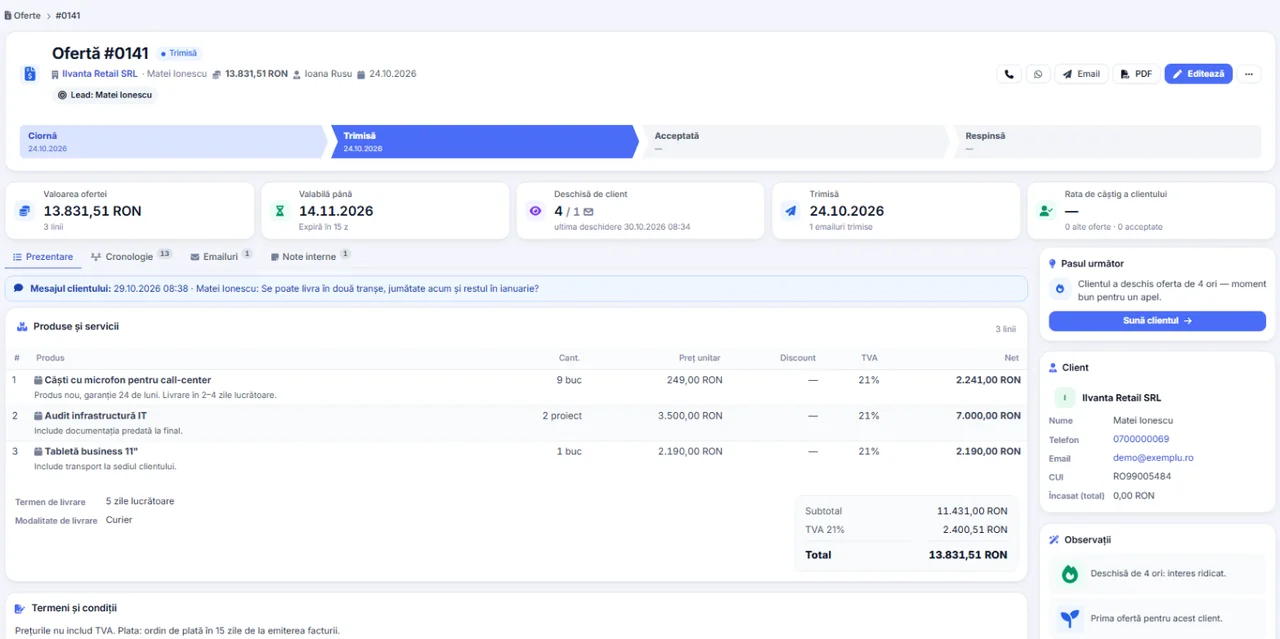
A web quotation with tracking: you see when the customer opens it. The quotation reaches the customer as a web page, not as an attachment lost in a mailbox. A separately licensable module. A lifetime licence, installation on the company server and unlimited users.
Works together with: WhatsApp Business, Multilingual CRM, Follow-up automation.
The situation today, when the quotation goes out by email and silence follows
After an attachment is sent, the company is left with no information at all until the next phone call.
- Nobody knows whether the quotation arrived The document may be in spam, it may be unread, it may be opened by somebody else. None of that is visible.
- The follow-up is guesswork A call after two days is intrusive, one after two weeks comes too late. Without data, the moment is a guess.
- Signing requires printing The customer has to print, sign, scan and send it back. Every step adds a day and another chance to drop out.
- The document circulates uncontrolled An attached file is forwarded anywhere, including to the competition, without the company finding out.
- The customer’s questions get lost The remarks arrive by email, by phone or through somebody else and do not stay attached to the quotation.
- The versions get mixed up After two revisions, nobody knows which variant is the valid one, neither at your end nor at the customer’s.
What the web quotation module contains
A quotation drawn up in the CRM gets an address of its own, on the company domain, with tracking and online acceptance.
A quotation page on your own domain
The customer downloads nothing.
- A unique address on every quotation
- Hosted on your own installation
- It works on a phone
- The company visual identity
Tracking of the openings
The period of not knowing disappears.
- The first opening, with date and time
- The number of visits
- Visible on the quotation record
- Useful for the timing of the follow-up
Acceptance with an online signature
The decision can be taken straight away.
- Acceptance directly from the page
- A signature on the screen
- Confirmation by a code sent by e-mail
- Signed document, archived automatically
The validity shown
The deadline becomes an argument.
- The days remaining, visible to the customer
- Automatic expiry
- A clear message after expiry
- Reactivation at your decision
The document stays downloadable
For those who prefer the file.
- A PDF download from the page
- The same content
- Identical numbering
- No parallel versions
A notification on any action
You find out at the same moment.
- A notification when it is opened
- A notification when it is accepted
- Recorded in the client’s history
- No manual checks
What changes after the first month of use
The direct effects of the quotation becoming a trackable page rather than a file sent into the unknown.
Follow-ups at the right moment
The call is made while the customer still has it in mind.
- An alert when it is opened
- A history of the visits
- Prioritising the quotations that were read
- Fewer pointless calls
A shorter sales cycle
Acceptance no longer means printing.
- Signing from the page
- No scanning and sending back
- A decision on the same day
- Fewer people dropping out along the way
A single valid version
The confusion disappears.
- The link always shows the current version
- No parallel files
- A history of the changes
- The customer no longer asks which one is correct
A professional image
It stands apart from an attachment.
- A page on the company domain
- A consistent design
- Works on a phone
- The impression of an organised company
The acceptance rate, measurable
Quoting becomes a process that can be assessed.
- Quotations opened against quotations sent
- Quotations accepted against quotations opened
- Comparison across periods
- Decisions on form and on price
Control over the access
The link can be closed.
- Expiry at the deadline
- Deactivation on request
- Access on record
- No uncontrolled circulation of the file
The route of a quotation sent as a link
The same flow for a simple quotation and for one with dozens of lines.
- 1
The quotation is drawn up in the CRM
The lines come from the catalogue, with prices and discounts, exactly as on any quotation. There is no separate work for the web version.
- 2
The link of its own is generated
The quotation gets a unique address that cannot be guessed, on the company domain. Nobody reaches it by chance.
- 3
The customer opens the page
They are not asked for an account and not asked for a password. The page opens on any device, and the opening is recorded.
- 4
You receive the notification
On the first opening, the person responsible is told. From that moment it is known that the quotation is under review.
- 5
The customer accepts online
The acceptance is confirmed through a code received by email, and the signature stays recorded with date and time.
- 6
The acceptance enters the CRM
The quotation moves to the accepted state, the signed document is archived, and the conversion into an invoice can be done in one step.
The web quotation with tracking, in short, inside the application
What you see after sending
The minimum information that completely changes the quality of commercial follow-up.
The first opening
The moment the quotation came to their attention.
- Date and time
- A notification to the owner
- Recorded on the quotation
- A starting point for the follow-up
The number of visits
The interest shows through repetition.
- Repeated visits flagged
- Useful for negotiation decisions
- Comparable between quotations
- History kept
The status of the quotation
A single place for the real position.
- Sent, opened, accepted, expired
- Visible in the list
- Filterable
- Reportable by period
The history per customer
All the quotations, in one place.
- Earlier quotations
- The outcome of each one
- Context for the next conversation
- Useful when a portfolio is handed over
Online acceptance and what it is worth
We explain exactly what the signature on the quotation page is and is not, so that nothing stays unclear.
- 01
The acceptance is confirmed with a code
The customer receives a code at the email address on their record and enters it to confirm. The acceptance becomes attributable to a person.
- 02
The signature stays recorded
The date, the time and the email address used for the confirmation are kept, together with the document in the form accepted.
- 03
The accepted document is archived
The accepted version is saved separately, so a later change to the quotation does not affect the evidence.
- 04
It is not a qualified electronic signature
It has the value of evidence of commercial agreement. For documents that require a qualified signature, dedicated tools are used.
- 05
The customer receives the confirmation
After acceptance, the customer receives the document and the confirmation by email, so the relationship stays clear on both sides.
- 06
The acceptance triggers the next step
An accepted quotation can become an invoice or a proforma, respecting the rules for approving discounts.
What runs automatically in the web quotation module
Mechanisms that move the follow-up off the consultant and into the application flow.
Notifications on events
Nothing depends on manual checks.
- A notification on the first opening
- A notification when it is accepted
- To the person responsible for the quotation
- Configurable per user
Scheduled follow-ups
Quotations that were opened and not accepted get followed up.
- Follow-up sequences
- It stops on acceptance
- Configurable interval
- A log of what was sent
Automatic expiry
Quotations do not stay valid for ever.
- Automatic move to expired
- A clear message on the page
- The reserved stock is released
- A report on expired quotes
Archiving on acceptance
The evidence keeps itself.
- The signed document saved
- Attached to the customer
- Reviewable at any time
- No manual steps
The link with invoicing
The acceptance leads to a tax document.
- Conversion in one step
- The lines carried over in full
- It respects the approvals
- The link stays visible
Reports on quoting
The results become management information.
- Openings and acceptances
- The conversion rate
- Comparison across periods
- Export for analysis
How the quotation page is protected
A public page with your prices on it calls for explicit protection mechanisms.
- An address that cannot be guessed The link contains a secret element. There is no public list of quotations and you cannot reach another one by editing the address.
- The page is not indexed The headers sent prevent it appearing in search engines.
- Access controlled over time The link stops working at expiry, and the quotation can be deactivated at any time.
- The visits stay on record It is known when and how many times the page was opened, information that is useful both commercially and for security.
- The confirmation requires the email on the record The acceptance code goes to the known address, not to one typed into the page.
- Data on the company server The quotation, the document and the history of visits stay in your own installation.
What needs to be prepared to put the web quotation module into service
We do the configuration ourselves at implementation. The domain and the server stay the company’s.
The installation address, configured
The public links depend on it.
- The address set correctly in the application
- Valid certificate
- Pages reachable publicly
- Checked during implementation
A working e-mail server
The link and the codes go out through it.
- An active sending account
- A domain with its reputation configured
- A log of what was sent
- Checked at implementation
The template of the quotation page
The customer’s first impression.
- Visual identity
- The commercial terms
- A closing text
- Versions by language, if needed
Correct email addresses on the records
The confirmation depends on them.
- Updated addresses
- Contact people
- Cleaned up at implementation
- Checked before sending in volume
The validity policy
The deadline is a commercial instrument.
- A default validity
- Behaviour on expiry
- Reactivation, if you want it
- Agreed at implementation
Rules for following up
The follow-up has to exist.
- Who reacts to an opening
- Within what time
- Configured sequences
- Agreed internally
The limits of the web quotation module, stated explicitly
The module makes the quotation trackable and acceptable online. It does not replace the negotiation and does not guarantee that it is opened.
- It does not guarantee the quotation is read The module shows whether the page was opened. If the customer does not open the link, there is no further information.
- It does not identify the person who opened it The visit to the page is recorded, not the identity of whoever opened it. Identification appears only when the acceptance is confirmed.
- The signature is not a qualified one Acceptance with a code has the value of commercial evidence. For a qualified electronic signature, dedicated tools are used.
- Comparative variants are not part of the standard module Quotations with several variants presented for the customer to choose from exist in the edition for service companies.
- It depends on the mail server If your mail server is unavailable, the link and the confirmation codes do not go out.
- It does not replace the commercial conversation The tracking shows the right moment. The outcome remains the consequence of the quotation and the relationship, not of the tool.
Payment straight from the quotation sent to the customer
A payment link can be added to the quotation web page, so that the acceptance and the deposit happen in the same step.


The processor fees are paid directly by your own company.
When this module makes sense and when it does not
We prefer to say from the start in which situations the module is not worth its cost, so the sales conversation does not begin with the wrong expectations.
It makes sense if
The situations in which the module pays for itself quickly.
- You want electronic acceptance, with no travel and no scanning
- The quotations have variants for the customer to choose from
- You care about the moment it is opened, for the follow-up call
- You send quotations to customers in other cities or countries
It does not make sense if
The situations in which we recommend not buying it now.
- Customers usually sign on the spot, at your premises
- The quotation is a single price, with no variants
- The internal procedure requires a paper document
- The volume of quotations is very small
How the web quotation module is licensed
The module adds to the quoting in the core and is enabled through the licence.
A separately licensed module
It contains the public quotation page, the tracking of openings and acceptance with an online signature.
What the core includes
Users and roles, clients and contacts, leads and the sales pipeline, custom fields and 15 interface languages.
Together with quoting
The quotations are drawn up in the quotation builder module, which is part of the core.
Pricing and configurations
Package composition and prices by edition are on the pricing page.
Companies that have trusted Zarina CRM


The web quotation with tracking: what it costs and what you get
You pay once. Everything that follows is written here, not in hidden conditions.
It is part of the complete Sales package: $570 + VAT, on top of the core ($2,320). Bought separately, together with the core: $2,890.
Cheaper in a bundle. The tiers group several packages at a price lower than their sum:
- Start2 packages + core$2,900−19%
$3,570 - Pro5 packages + core$3,480−34%
$5,280 - Business8 packages + core$4,640−38%
$7,460 - Enterprise13 packages + core$6,970−31%
$10,080
List prices, excl. VAT, one-time payment, unlimited users. The struck-through price is the sum of the packages bought individually. Current offers apply on the pricing page.
What you pay over time for a subscription CRM
Over 3 years, the subscription costs $10,480; the Zarina Start licence costs $2,900, once.
An indicative comparison: enter the subscription price you pay now. The licence does not grow with the number of users.
What you get
- A lifetime licence, with no subscription and no per-user charge
- Unlimited users, on the same licence
- 6 months of warranty on correct operation: fixing errors and inconsistencies
- Implementation, configuration and team training, included in the price
- The licence is verified locally, on your own server: the application does not depend on our servers to work
How long it takes and what is needed
- 48 hours in the standard configuration; up to 14 working days with customisation around the company’s workflow
- Your own server or web hosting with cPanel, with an SSL certificate
- PHP 7.4 or newer (8.x recommended) and MySQL / MariaDB
- The PHP extensions mysqli, json, mbstring; curl, gd and zip for integrations, PDF and exports
- One cron task, for reminders and automations
Where data lives
- The data stays on your server and does not pass through ours
- Roles and rights per user, two-factor authentication
- An audit trail and limits on login attempts
- Consents and data subject requests, managed in the application
- Digitally signed updates and backups from the application
Questions about the web quotation with tracking
Does the customer have to create an account?
Do I find out whether the quotation was opened?
Can I see who opened the quotation?
Can the customer also receive the PDF?
What is the online signature worth?
Can I close access to a quotation already sent?
Does the quotation page appear in Google?
Does it work on a phone?
What happens after acceptance?
Can I send the web quotation in another language?
Get the complete product sheet by email
A six-page document with everything you need to know before a sales conversation. No obligation and no sales call.
- The platform core and the 13 module packages, with what each one contains
- The features and modules of the edition you choose, plus available integrations
- Full pricing and what it includes: installation, training, data import, warranty
- The native integrations available and the situations where the platform is not a good fit
Take control of your operations, once
We install Zarina CRM on your hosting, configure it around your own workflow and train your team. From that moment on, the application is an asset of your company, not a recurring expense.